AlgoWay Blog
Guides, manuals and platform references.
Core
- All articles
- FAQ
- PineConnector alternative
- TradersPost alternative
- Automate TradingView alerts
- Automate Telegram signals
- AlgoWay CopyTrader
- cTrader Copier
- TrendSpider with AlgoWay
- How to Automate a TradingView Indicator with Dynamic SL/TP and 1% Risk on MT5
JSON & Alerts
- JSON schema
- Manual alerts
- TradingView without paid subscription
- AlgoWay Strategy Integration in Pine Script
- Python Trading Bot Webhook Integration
- TRALADAL - TradingView Alert Adapter
- TradingView Order Action Alert
- How to use Clone Mode
MT5 / Expert Advisors
Errors
Integrations
- MetaTrader 5
- Tradovate
- TradeLocker
- cTrader
- Match-Trader
- DXtrade
- Capital.Com
- Binance
- Bybit
- MEXC
- OKX
- Bitget
- Hyperliquid
- BingX
- Alpaca
- Interactive Brokers
- Gate.io
- Coinbase
- TooBit
- WEEX
- KuCoin
- Kraken
- ProjectX
- Rithmic
Other Publications
- MT5 EA Webhook JSON Reference
- OANDA MT5 with AlgoWay
- Buy Webhook via Buy Me a Coffee
- AlgoWay vs PineConnector
- Compare AlgoWay with other trading automation tools
- AlgoWay Red News Filter
- Why Paid Trading Indicators Avoid Verifiable Backtests
- How Trade Automation Tools Mislead You
- utomating a Prop-Firm Eval End to End:
- ATP Premium Indicator Testing Bot
- Why TradingView Backtests Win but Live Trades Lose
- Best Prop Firms for Trading Automation and Telegram Signal Copy in 2026
- Four AIs, One Trader, and the Strange Case of TradingView to Alpaca
- TradingView Automation
AlgoWay Strategy Lab
Donchian Channel Breakouts: Use the Previous Bar High
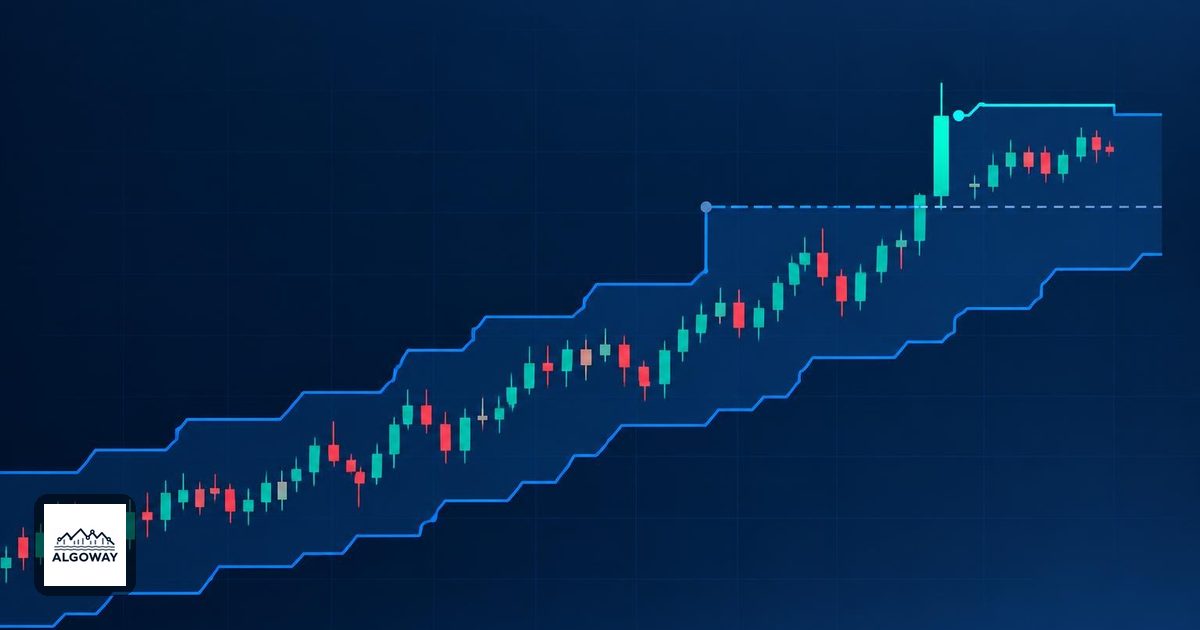
A Donchian breakout rule can look perfectly reasonable and never fire. The usual culprit is a moving finish line: the rule asks the current high to exceed a channel that already includes that same high. For a breakout beyond an established range, compare the current bar with the channel calculated through the previous completed bar.
This choice belongs at the signal end of TradingView automation. If you are preparing a Donchian alert for an AlgoWay workflow, settle the comparison window before configuring execution. The AlgoWay TradingView alert automation guide covers the surrounding workflow; a connector cannot make an impossible chart condition become true.
The current high cannot exceed itself
A Donchian channel uses the highest high and lowest low over a chosen number of bars. Its middle line is halfway between those boundaries. On a daily chart, a 20-bar window covers 20 daily bars; on a 15-minute chart, it covers 20 of those bars. These are range extremes, unlike the volatility-scaled bands described in our Supertrend settings guide. See TradingView's Donchian Channels definition.
Consider an unshifted upper channel that includes the current candle. That boundary is at least as high as the current high. Therefore a strict test of current high > current upper channel is false. The candle can raise the boundary or equal it, but it cannot outrun the maximum that contains it. A close above that boundary is also impossible on an ordinary OHLC bar, because the close cannot exceed the bar's high.
Instead, freeze the comparison range at the end of the previous candle. For a 20-bar rule, use the highest high of the 20 completed bars immediately before the current bar. For a downside breakout, use the lowest low of those completed bars. TradingView's Channel BreakOut Strategy likewise describes current-bar extremes crossing the previous bar's channel boundaries.
A five-bar example separates two valid rules
Suppose the previous five completed bars have highs of 98, 100, 99, 101 and 100. The prior upper boundary is 101. The next bar reaches 102 but closes at 100.5. The following comparisons are illustrative arithmetic, not trading results.
| Rule | Comparison | Result |
|---|---|---|
| High breaks the prior range | 102 > 101 | True |
| Close finishes above the prior range | 100.5 > 101 | False |
| High exceeds the updated channel | 102 > 102 | False |
The first two rules ask different questions. One records an excursion beyond the old range. The other requires the closing price to remain beyond it. Neither is a correction of the other. A high-based rule evaluated at bar close still detects the earlier excursion, even though the candle closed back inside.
A touch rule is different again. If the high is exactly 101, an inclusive comparison passes while a strict breakout comparison does not. Write that choice down. A one-character change should not be allowed to quietly redesign a strategy.
Separate the range, the event and the order
The Channel BreakOut example in TradingView's documentation places stop-entry orders one minimum tick beyond its calculated boundaries. That is an order-based implementation. It is not the same as waiting for a candle to close beyond a prior boundary and then sending a market-entry instruction. Do not copy the appearance of one chart and assume the execution rules match.
For your own rule specification, record the lookback length, the chart timeframe, the prior-window boundary, whether you compare a high/low or a close, and whether equality counts. Also decide what happens when another qualifying bar appears while a position is already open. A breakout condition alone does not specify position size, protective exits or permission to add another entry.
Changing a plotted line's visual offset is not enough evidence that the alert uses the intended historical value. Inspect the alert condition itself. If multiple timeframes are involved, the higher-timeframe confirmation guide explains the additional timing question.
Check one signal before enabling the stream
Choose a completed bar and manually list the preceding range's extremes. Compare the expected event with the script's result. Include a touch, an excursion that closes back inside, a close outside, and a bar with no breakout. These cases expose more logic mistakes than admiring a long history of colored markers.
Then create the running alert with the intended timing. TradingView distinguishes script alert events from strategy order-fill events, and its alerts operate on realtime bars. It also saves a snapshot of the script and settings when an alert is created, so later edits require a replacement alert. These behaviors are documented in the Pine alerts manual.
The useful question is precise: “Did this bar cross the range that existed before it?” Once the answer is reproducible, you can test whether trading that event is worthwhile. A correctly drawn channel establishes a reference price, not an edge.
