AlgoWay Blog
Guides, manuals and platform references.
Core
- All articles
- FAQ
- PineConnector alternative
- TradersPost alternative
- Automate TradingView alerts
- Automate Telegram signals
- AlgoWay CopyTrader
- cTrader Copier
- TrendSpider with AlgoWay
- How to Automate a TradingView Indicator with Dynamic SL/TP and 1% Risk on MT5
JSON & Alerts
- JSON schema
- Manual alerts
- TradingView without paid subscription
- AlgoWay Strategy Integration in Pine Script
- Python Trading Bot Webhook Integration
- TRALADAL - TradingView Alert Adapter
- TradingView Order Action Alert
MT5 / Expert Advisors
Errors
Integrations
- MetaTrader 5
- Tradovate
- TradeLocker
- Match-Trader
- DXtrade
- Capital.Com
- Binance
- Bybit
- MEXC
- OKX
- Bitget
- Hyperliquid
- BingX
- Alpaca
- Interactive Brokers
- Gate.io
- Coinbase
- TooBit
- WEEX
- ProjectX
- Rithmic
- cTrader logic
Other Publications
- MT5 EA Webhook JSON Reference
- OANDA MT5 with AlgoWay
- Buy Webhook via Buy Me a Coffee
- AlgoWay vs PineConnector
- Compare AlgoWay with other trading automation tools
- AlgoWay Red News Filter
- Why Paid Trading Indicators Avoid Verifiable Backtests
- How Trade Automation Tools Mislead You
- utomating a Prop-Firm Eval End to End:
- ATP Premium Indicator Testing Bot
- Why TradingView Backtests Win but Live Trades Lose
- Best Prop Firms for Trading Automation and Telegram Signal Copy in 2026
- Four AIs, One Trader, and the Strange Case of TradingView to Alpaca
- TradingView Automation
AlgoWay Strategy Lab
TradingView to Rithmic Webhook Trading Setup Guide

AlgoWay connects TradingView alerts to Rithmic for automated futures execution. You create a Rithmic webhook in AlgoWay, enter your Rithmic credentials, verify the connection, and then send structured JSON alerts from TradingView to the webhook URL shown in your dashboard.
The route is simple:
TradingView alert -> AlgoWay webhook -> Rithmic -> futures orderThis guide covers the current Rithmic webhook workflow in AlgoWay: login and account selection, connection testing, TradingView JSON, market and pending orders, contract quantity rules, stop-loss and take-profit settings, position closing, symbol handling and common errors.
What You Need Before Connecting TradingView to Rithmic
Prepare the following before creating the webhook:
- an active AlgoWay account;
- a valid Rithmic User ID and password;
- the Rithmic system assigned to your login;
- your trading account ID when the login has more than one trading account;
- a TradingView strategy, indicator or alert that can send a webhook message.
AlgoWay does not ask the end user for a separate Rithmic API key in the webhook form. The Rithmic connection uses the User ID, password, system and, when needed, the trading account selected for that login.
Step 1. Verify Your Rithmic Login
First confirm that the same Rithmic credentials work in R|Trader. The important values for AlgoWay are the User ID, Password and System. Choose the same system in AlgoWay that belongs to your Rithmic login.
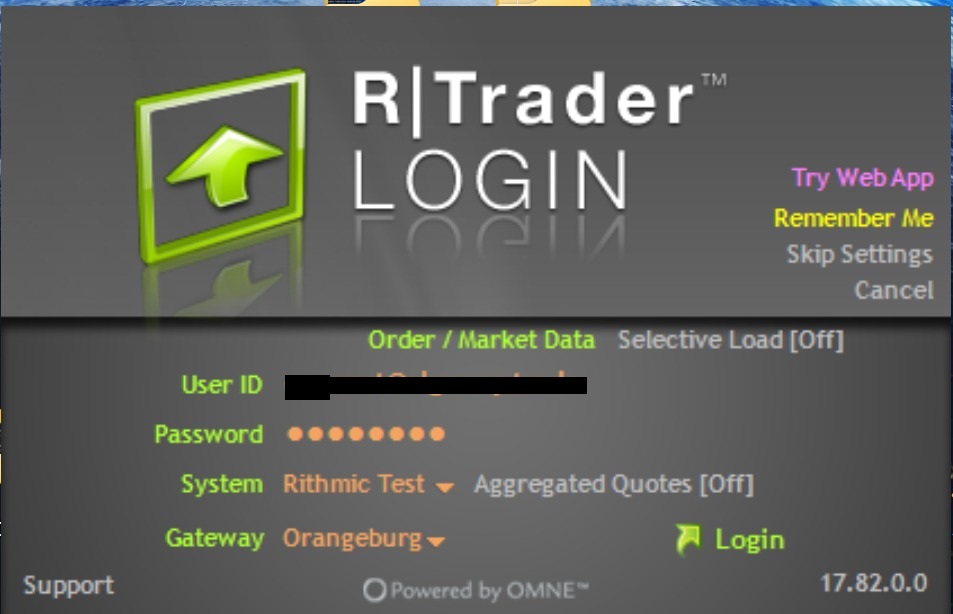
The current AlgoWay Rithmic form includes these system choices:
Rithmic 01Rithmic Paper TradingRithmic 04 ColoRithmic Test
Select the system that matches your Rithmic credentials. A valid username and password can still fail when the wrong system is selected.
Step 2. Create the Rithmic Webhook in AlgoWay
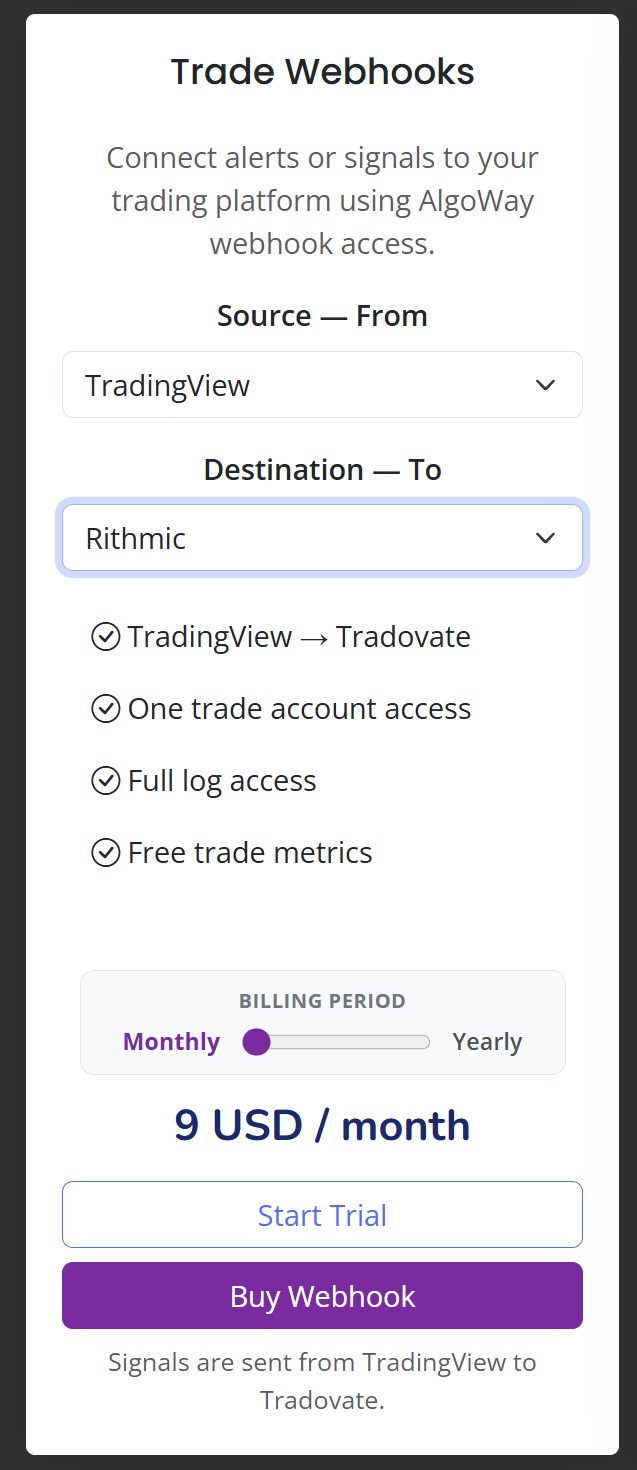
Open Trade Webhooks in the AlgoWay dashboard and create a new webhook. Select TradingView as the source and Rithmic as the destination.
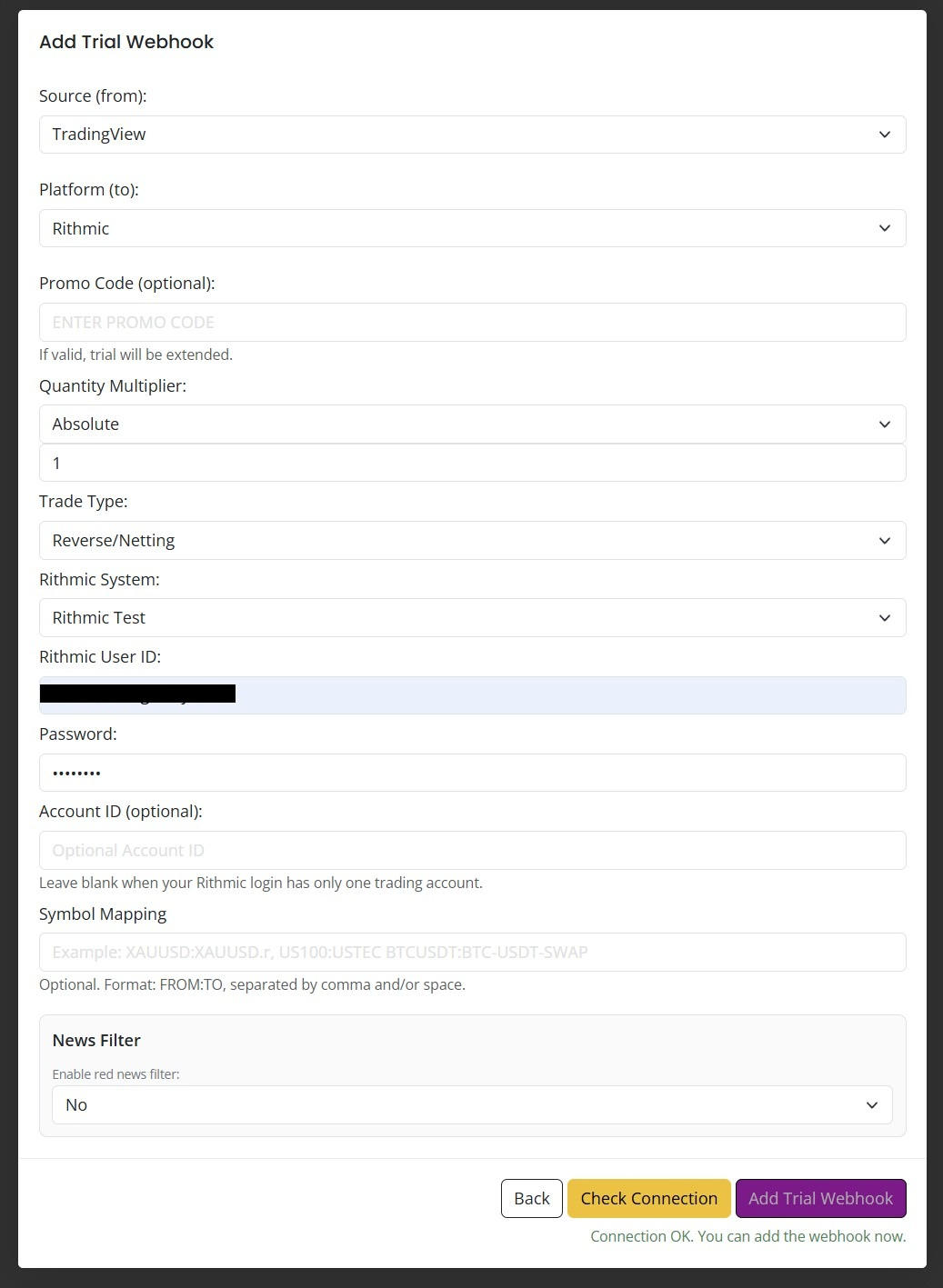
In the Rithmic webhook form, configure:
- Source (from): TradingView
- Platform (to): Rithmic
- Quantity Multiplier: Absolute with the multiplier you want to apply
- Trade Type: Reverse/Netting
- Rithmic System: the system assigned to your login
- Rithmic User ID: your Rithmic login
- Password: your Rithmic password
- Account ID: optional when the login has only one trading account
- Symbol Mapping: optional when your TradingView symbol needs a custom destination symbol
Step 3. Run Check Connection Before Saving
For Rithmic, AlgoWay requires a successful Check Connection before the webhook can be added. The connection check authenticates the Rithmic session and verifies that the selected account is available.
When the Rithmic login has one trading account, the Account ID can stay blank and AlgoWay can select that account automatically. When the login exposes multiple accounts, enter the required account ID so the destination is unambiguous.
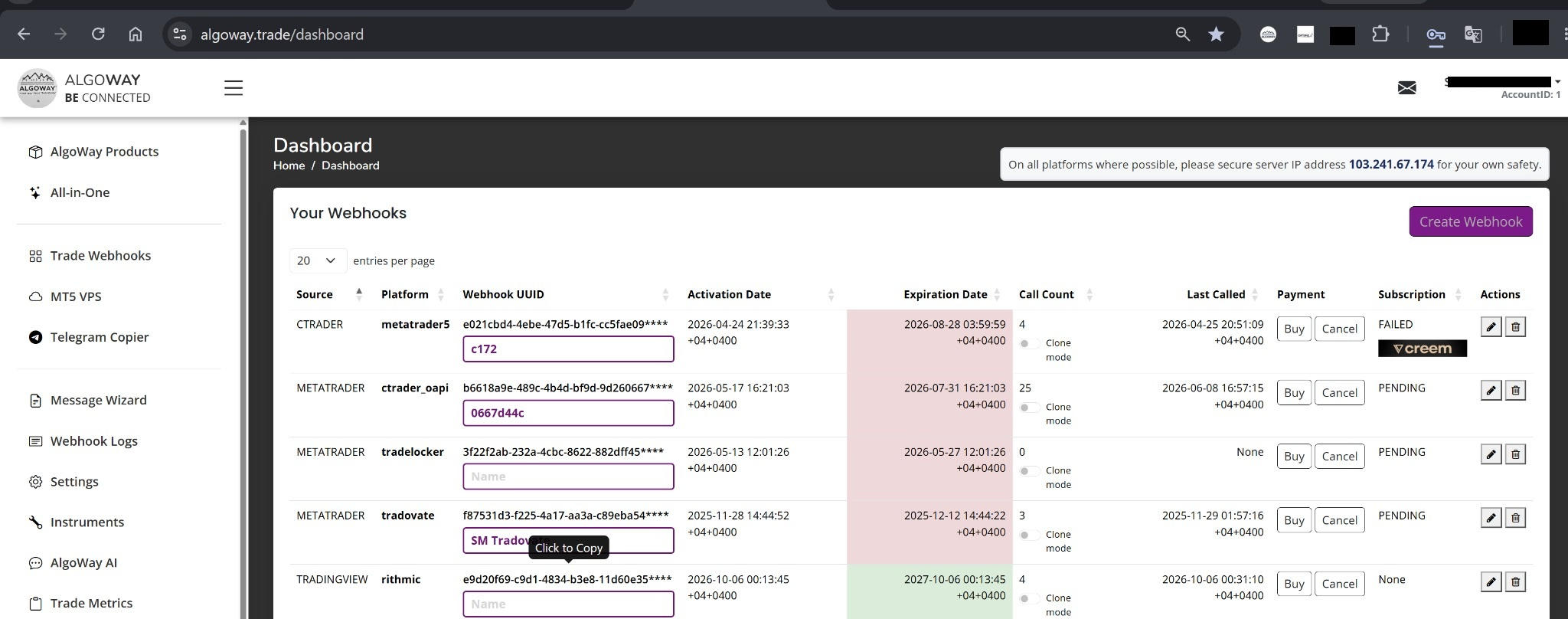
After the check returns Connection OK, add the webhook. The new Rithmic webhook then appears in the dashboard with its unique UUID.
Step 4. Create the TradingView JSON Message
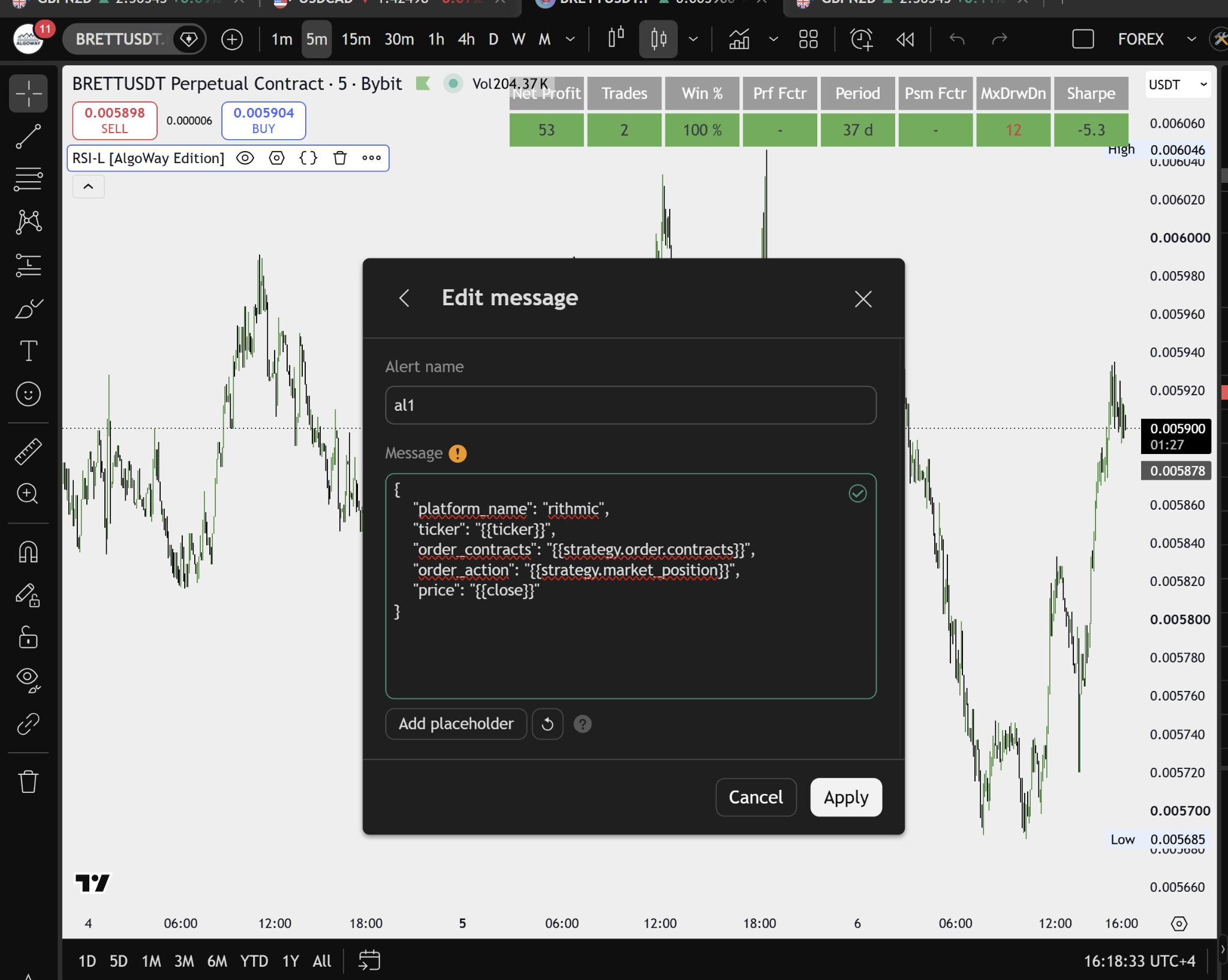
Rithmic orders are futures orders, so contract quantity must resolve to a whole number. A basic TradingView strategy message can use the strategy order action directly:
{
  "platform_name": "rithmic",
  "ticker": "{{ticker}}",
  "order_contracts": "{{strategy.order.contracts}}",
  "order_action": "{{strategy.order.action}}",
  "order_type": "market",
  "price": "{{close}}"
}
The webhook URL identifies the Rithmic destination configured in AlgoWay. Keeping "platform_name": "rithmic" in the message also makes the alert easier to read and troubleshoot.
Step 5. Add the AlgoWay Webhook URL in TradingView
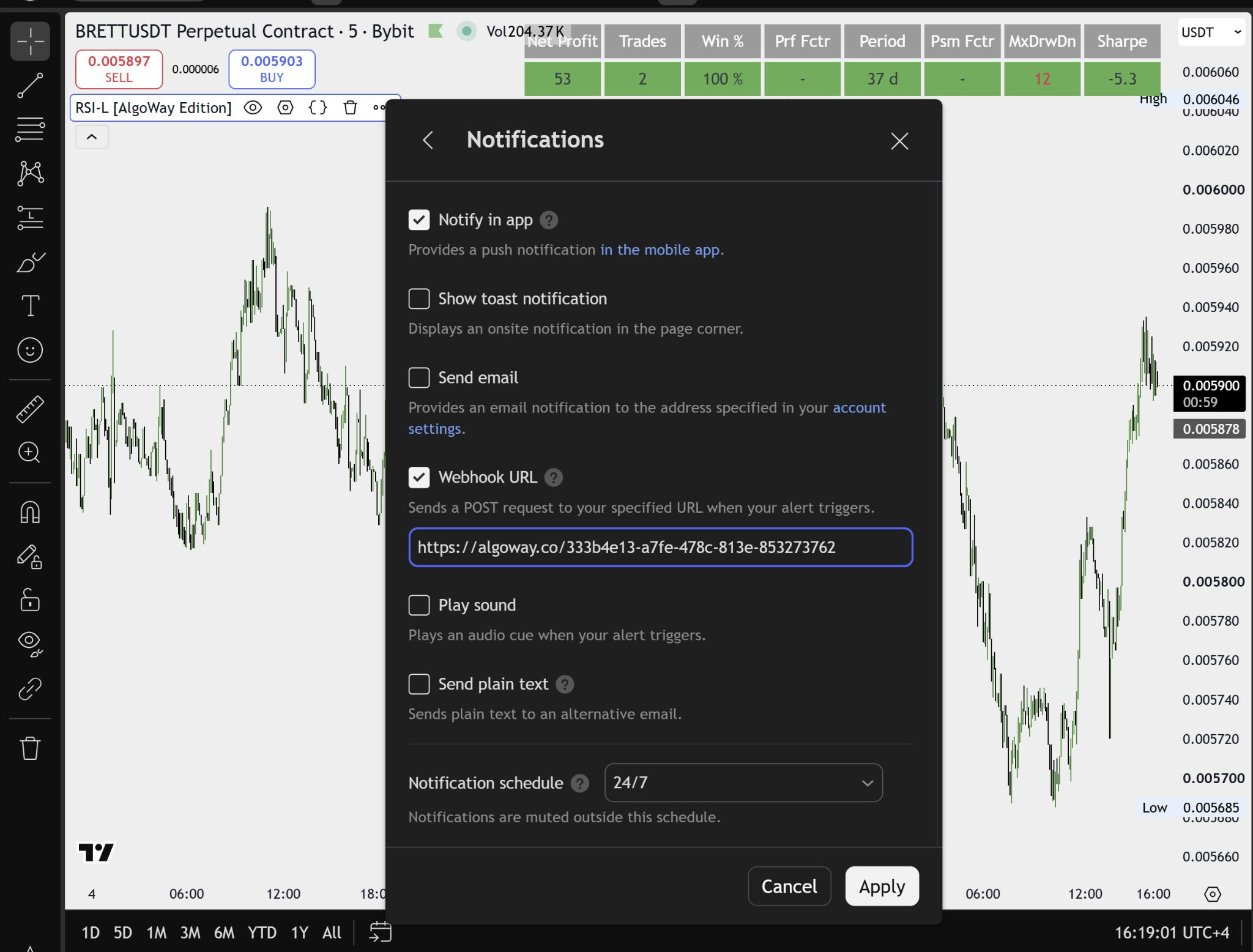
Open the TradingView alert notifications, enable Webhook URL, and paste the unique URL for your AlgoWay webhook:
https://algoway.co/your-webhook-uuidKeep the JSON message in the alert message field and the AlgoWay URL in the Webhook URL field. When the alert fires, TradingView sends the JSON to AlgoWay and AlgoWay routes it to the Rithmic connection attached to that webhook UUID.
Rithmic Market Order Example
A direct market order can be sent with a whole-contract quantity:
{
  "platform_name": "rithmic",
  "ticker": "MES1!",
  "order_contracts": 1,
  "order_action": "buy",
  "order_type": "market",
  "tv_order_id": "mes-market-001"
}
For Rithmic, order_contracts must resolve to a positive whole number. A fractional quantity such as 0.5 is rejected because futures contracts are not submitted as fractional contracts.
Rithmic Limit, Stop and Stop-Limit Orders
The current Rithmic integration accepts market, limit, stop and stop_limit as order types.
Limit order:
{
  "platform_name": "rithmic",
  "ticker": "MES1!",
  "order_contracts": 1,
  "order_action": "buy",
  "order_type": "limit",
  "price": 6800.00,
  "tv_order_id": "mes-limit-001"
}
Stop-limit order:
{
  "platform_name": "rithmic",
  "ticker": "MES1!",
  "order_contracts": 1,
  "order_action": "buy",
  "order_type": "stop_limit",
  "price": 6810.25,
  "trigger_price": 6810.00,
  "tv_order_id": "mes-stop-limit-001"
}
A pending order needs a valid price. A stop-limit order also needs a trigger price. Prices are aligned to the contract tick size before submission.
Stop-Loss and Take-Profit for Rithmic
AlgoWay supports both relative and absolute protective exits for Rithmic. Do not mix the two methods in the same request.
Relative SL/TP in Points
{
  "platform_name": "rithmic",
  "ticker": "MES1!",
  "order_contracts": 1,
  "order_action": "buy",
  "order_type": "market",
  "stop_loss": 10,
  "take_profit": 20,
  "sltp_type": "points",
  "tv_order_id": "mes-bracket-001"
}
For futures, using "sltp_type": "points" is the clearest form. AlgoWay converts the distance into contract ticks using the Rithmic reference data for that instrument.
Percentage SL/TP
{
  "platform_name": "rithmic",
  "ticker": "MES1!",
  "order_contracts": 1,
  "order_action": "buy",
  "order_type": "market",
  "stop_loss": 0.25,
  "take_profit": 0.50,
  "sltp_type": "percent",
  "tv_order_id": "mes-percent-001"
}
For a market entry with percentage exits, AlgoWay waits for the actual fill price and then calculates the protective prices from that fill.
Absolute SL/TP Prices
{
  "platform_name": "rithmic",
  "ticker": "MES1!",
  "order_contracts": 1,
  "order_action": "buy",
  "order_type": "market",
  "sl_price": 6790.00,
  "tp_price": 6820.00,
  "tv_order_id": "mes-absolute-001"
}
Absolute exits use sl_price and tp_price. Relative fields such as stop_loss and take_profit should not be added to the same request.
Trailing Stop and Breakeven
A trailing stop can be requested with trail_points or trailing_pips. The Rithmic order must also have a protective stop defined by stop_loss or sl_price; a trailing value without a stop is rejected.
AlgoWay also supports moving an existing protective stop to breakeven. Breakeven uses the current position entry price and modifies the working stop order for that Rithmic position.
Closing a Rithmic Position
To flatten the current position for a symbol, use closeall:
{
  "platform_name": "rithmic",
  "ticker": "MES1!",
  "order_contracts": 1,
  "order_action": "closeall"
}
When no position is open, the request returns successfully with no quantity closed instead of opening a reverse position. This is useful for TradingView strategies that may send a late close alert after the stop has already flattened the Rithmic position.
Rithmic Futures Symbols and Continuous Contracts
The Rithmic connector resolves futures instruments against the routes available to the connected account. TradingView-style continuous symbols such as MES1! or ES1! can be resolved to a routable futures contract. Exchange prefixes in a symbol can also be normalized before the Rithmic lookup.
For a broker-specific naming difference, use the Symbol Mapping field in the AlgoWay webhook configuration.
Quantity Multiplier and Contract Rules
The webhook quantity is multiplied by the Quantity Multiplier configured in AlgoWay before it reaches Rithmic. The final quantity still has to be a whole number of futures contracts.
For example, a TradingView quantity of 2 with multiplier 1 stays at two contracts. A multiplier that produces a fractional final quantity will fail the Rithmic whole-contract check.
Risk-Based Sizing
The current Rithmic integration supports risk_percent sizing when the request includes a usable price and a stop-loss distance. The calculation uses the Rithmic account balance and the futures contract point value, then rounds down to a whole number of contracts.
balance_percent is not used for Rithmic futures because contract margin data is not sufficient for a safe generic balance-percentage calculation. position_percent is supported for partial position closing, not for opening a new Rithmic position.
Rithmic Trade Type: Reverse/Netting
Rithmic uses a net-position model in the current AlgoWay integration. The normal webhook setting is Reverse/Netting. Hedge and inverse position modes are not supported for Rithmic because the connector works with the account's net futures position.
Common Rithmic Webhook Problems
Rithmic Login Fails
Check the User ID, password and selected Rithmic system. The same credentials may belong to a different system, such as Rithmic Paper Trading instead of Rithmic Test.
Account ID Is Required
A blank Account ID works only when the Rithmic login exposes one trading account. When more than one account is returned, select the intended account explicitly.
Order Quantity Must Be a Whole Number
Rithmic futures orders require whole contracts. Check the TradingView quantity and the AlgoWay Quantity Multiplier when the resulting size is fractional.
Price Is Required for a Pending Order
limit, stop and stop_limit entries require a valid price. A stop-limit entry also needs a trigger price.
Mixed Absolute and Relative SL/TP
Use either stop_loss/take_profit or sl_price/tp_price. Mixing the two protection styles in the same request is rejected.
No Working Take-Profit or Stop-Loss Order Found
This message means a modify or breakeven request could not find the working protective order it was supposed to change. Confirm that the position still has an active SL/TP order and that the request targets the same symbol and order context.
Symbol Not Found or Not Routable
The symbol must resolve to a futures contract available through a live Rithmic trade route for the connected account. Check the TradingView ticker, contract month or Symbol Mapping.
Rithmic JSON Field Reference
| Field | Example | Purpose |
|---|---|---|
platform_name |
rithmic |
Identifies the intended platform in the alert message. |
ticker |
MES1! |
TradingView futures symbol to resolve for Rithmic. |
order_contracts |
1 |
Contract quantity. Final Rithmic quantity must be a whole number. |
order_action |
buy |
Supports trading and management actions such as buy, sell, flat, closeall, modify, cancel and breakeven. |
order_type |
market |
Supported values: market, limit, stop, stop_limit. |
price |
6800.00 |
Entry price for pending orders and price input for selected sizing logic. |
trigger_price |
6810.00 |
Trigger price for a stop-limit entry. |
stop_loss |
10 |
Relative stop distance. |
take_profit |
20 |
Relative target distance. |
sltp_type |
points |
Defines relative SL/TP interpretation. Points and percent are the clearest choices for futures. |
sl_price |
6790.00 |
Absolute stop-loss price. |
tp_price |
6820.00 |
Absolute take-profit price. |
trail_points |
5 |
Trailing-stop distance in price points. |
tv_order_id |
mes-long-001 |
Optional client reference for tracking or targeting an order workflow. |
close_side |
long |
Optionally limits a close or management action to the long or short side. |
Rithmic Webhook Trading FAQ
Can I connect TradingView directly to Rithmic with an AlgoWay webhook?
Yes. TradingView sends the alert to the AlgoWay webhook URL, and AlgoWay routes the validated trading command to the Rithmic connection configured for that webhook.
Do I enter a Rithmic API key in AlgoWay?
No separate API-key field is used in the current Rithmic webhook form. You enter the Rithmic User ID, password, system and, when required, the trading account ID.
Can one Rithmic login have multiple accounts?
Yes. When the login returns several trading accounts, specify the Account ID in the webhook configuration. Leaving it blank is intended for a login with only one trading account.
Can I use TradingView continuous futures symbols such as MES1!?
Yes. The Rithmic connector can resolve TradingView-style continuous futures symbols to a routable Rithmic futures contract. Symbol Mapping remains available for custom naming differences.
Does Rithmic accept fractional contract quantities?
No. The final order quantity must be a positive whole number of futures contracts after the AlgoWay quantity multiplier is applied.
Can I send stop-loss and take-profit with the entry?
Yes. Relative point or percentage exits and absolute SL/TP prices are supported. Do not mix relative and absolute protection fields in the same request.
What happens when a close alert arrives after the position is already flat?
A flat or close-all request checks the current Rithmic position. When no position is open, the request returns without opening a new reverse position.
Does Rithmic support hedge mode through AlgoWay?
No. The current Rithmic integration uses a net-position model, so Reverse/Netting is the standard webhook mode.
Related AlgoWay Guides
- How to create a webhook in TradingView
- AlgoWay JSON schema for automated trading webhooks
- How to fix TradingView webhook Error 415
- AlgoWay webhook pricing guide
Key Takeaway
For TradingView to Rithmic webhook trading, configure the Rithmic login and system in AlgoWay, pass the connection check, use whole futures-contract quantities, and send valid JSON to the unique AlgoWay webhook URL. AlgoWay then handles the Rithmic session, contract resolution, order routing and webhook logs without requiring a desktop terminal or VPS to remain open for the TradingView alert route.
