AlgoWay Blog
Guides, manuals and platform references.
Core
- All articles
- FAQ
- PineConnector alternative
- TradersPost alternative
- Automate TradingView alerts
- Automate Telegram signals
- AlgoWay CopyTrader
- cTrader Copier
- TrendSpider with AlgoWay
- How to Automate a TradingView Indicator with Dynamic SL/TP and 1% Risk on MT5
JSON & Alerts
- JSON schema
- Manual alerts
- TradingView without paid subscription
- AlgoWay Strategy Integration in Pine Script
- Python Trading Bot Webhook Integration
- TRALADAL - TradingView Alert Adapter
- TradingView Order Action Alert
- How to use Clone Mode
MT5 / Expert Advisors
Errors
Integrations
- MetaTrader 5
- Tradovate
- TradeLocker
- cTrader
- Match-Trader
- DXtrade
- Capital.Com
- Binance
- Bybit
- MEXC
- OKX
- Bitget
- Hyperliquid
- BingX
- Alpaca
- Interactive Brokers
- Gate.io
- Coinbase
- TooBit
- WEEX
- ProjectX
- Rithmic
Other Publications
- MT5 EA Webhook JSON Reference
- OANDA MT5 with AlgoWay
- Buy Webhook via Buy Me a Coffee
- AlgoWay vs PineConnector
- Compare AlgoWay with other trading automation tools
- AlgoWay Red News Filter
- Why Paid Trading Indicators Avoid Verifiable Backtests
- How Trade Automation Tools Mislead You
- utomating a Prop-Firm Eval End to End:
- ATP Premium Indicator Testing Bot
- Why TradingView Backtests Win but Live Trades Lose
- Best Prop Firms for Trading Automation and Telegram Signal Copy in 2026
- Four AIs, One Trader, and the Strange Case of TradingView to Alpaca
- TradingView Automation
AlgoWay Strategy Lab
How to Use AlgoWay Red News Filter in Webhook Settings
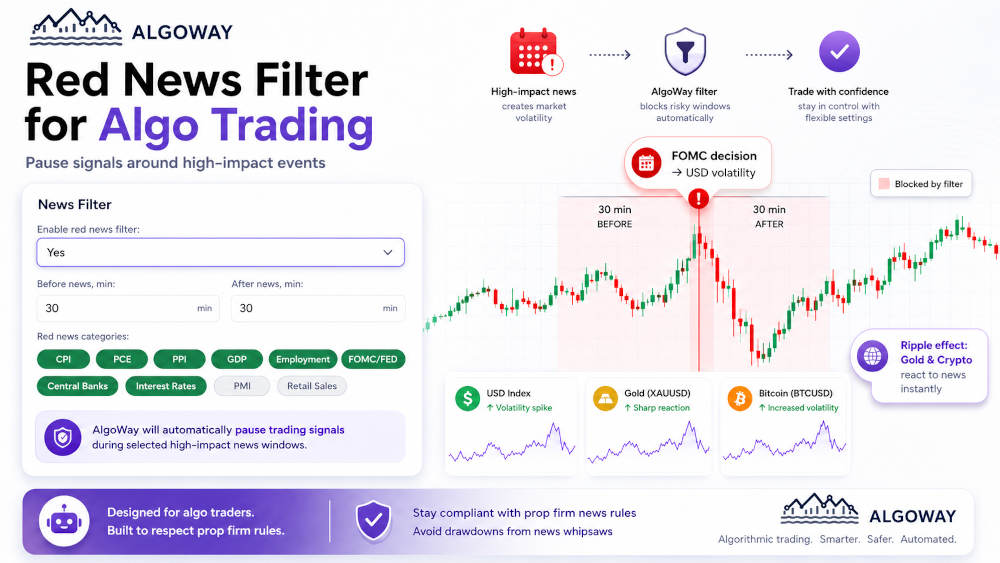
AlgoWay Red News Filter lets you pause automated trading signals around high-impact news events directly from webhook settings. When creating or editing a webhook, you can enable the filter, define how many minutes to block signals before and after news, select the red-news categories, and save the webhook configuration.
This guide explains how to use the AlgoWay news filter during webhook creation for automated trading setups based on TradingView alerts, Telegram trading signals, AI-parsed signals, MetaTrader 5 execution, crypto exchange routing, and prop firm trading rules.
The basic route is:
TradingView or Telegram signal -> AlgoWay webhook -> Red News Filter check -> execution platformThis guide explains how to configure the AlgoWay Red News Filter, select high-impact event categories, define blocked time windows, and stop signals before they reach the execution platform.
Why Red News Filtering Matters for Algo Traders
Many prop firms restrict trading during major economic news. A manual trader can check the calendar and avoid opening a trade. An automated setup can behave differently: a TradingView strategy may send an alert, a Telegram channel may publish a signal, or an MT5 Expert Advisor may receive an execution command while a restricted news window is active.
That creates a practical problem for algo traders. The strategy may be technically valid, but the timing can still violate a prop firm news rule or expose the account to unstable market conditions.
AlgoWay solves this at the webhook level. Before the signal is routed to the execution platform, the Red News Filter checks whether the signal arrives during a selected high-impact news window.
What the AlgoWay Red News Filter Does
The Red News Filter can automatically block trading signals around selected news categories. The filter is controlled from the webhook configuration screen.
You can configure:
- Enable red news filter: turn the filter on or off for the webhook.
- Before news, min: how many minutes before the event signals should be blocked.
- After news, min: how many minutes after the event signals should be blocked.
- Red news categories: which high-impact event types should activate the filter.
This allows you to control the rhythm of automated trading without rewriting the strategy, disabling a Telegram channel, or changing the execution platform.
Step 1. Create or Edit a Webhook in AlgoWay
Log in to the AlgoWay dashboard and open the webhook form.
- Click Add Trial Webhook or Add Main Webhook when creating a new webhook.
- Open an existing webhook if you want to add news filtering to an already configured route.
- Select the signal source, such as TradingView or Telegram.
- Select the execution platform, such as MetaTrader 5, TradeLocker, cTrader, Bybit, Binance, OKX, or another supported destination.
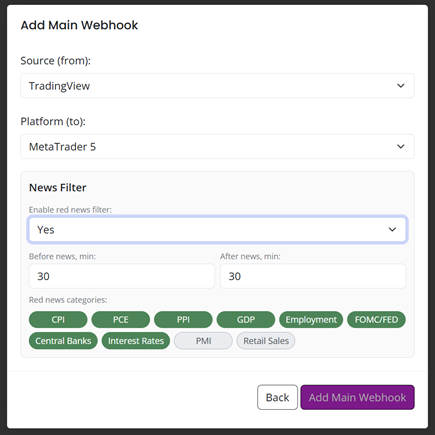
For MetaTrader 5 webhooks, many execution-side settings are controlled inside the Expert Advisor. The News Filter remains a webhook-level control in AlgoWay, so it can stop risky signals before they reach MT5.
Step 2. Enable the Red News Filter
Find the News Filter section in the webhook settings. In the field Enable red news filter, select Yes.
When the filter is enabled, AlgoWay starts checking incoming signals against the selected high-impact news categories and the configured blocked time window.
Step 3. Set the Blocked Time Before and After News
Use the two minute fields to define the protection window:
- Before news, min: blocks signals before the news release.
- After news, min: blocks signals after the news release.
A common starting setup is:
Before news, min: 30
After news, min: 30
With this configuration, a signal that arrives 30 minutes before the selected event or 30 minutes after the event can be blocked by AlgoWay before execution.
Step 4. Select Red News Categories
Select the categories that should activate the filter. The available categories include:
| Category | Typical market impact |
|---|---|
| CPI | Inflation data that can move USD, gold, indices, and crypto. |
| PCE | Federal Reserve inflation measure that can affect rate expectations. |
| PPI | Producer inflation data that can trigger volatility before CPI-style repricing. |
| GDP | Growth data that can affect currency, index, and macro sentiment. |
| Employment | Jobs data, including NFP-style events, that can create fast USD movement. |
| FOMC/FED | Federal Reserve decisions and statements that can affect USD, gold, and risk assets. |
| Central Banks | Policy decisions and statements from major central banks. |
| Interest Rates | Rate decisions that can create immediate repricing across FX, gold, and indices. |
| PMI | Business activity data that can affect currencies and indices. |
| Retail Sales | Consumer spending data that can affect USD and index sentiment. |
If you trade prop firm accounts, start with the categories that your firm treats as restricted. If you trade your own account, select the categories that create unacceptable volatility for your strategy.
Step 5. Save the Webhook
After enabling the filter, setting the minute window, and selecting the categories, click Save Changes.
From that point, the webhook can check incoming signals against the Red News Filter before routing them to the selected execution platform.
What Happens When a Signal Arrives During Red News
When a TradingView alert, Telegram signal, or other webhook message reaches AlgoWay, the platform checks the webhook settings before execution.
- AlgoWay receives the signal.
- The webhook settings are loaded.
- The Red News Filter checks whether the current time falls inside a blocked news window.
- If the signal is outside the blocked window, normal routing continues.
- If the signal is inside the blocked window, AlgoWay blocks the signal before execution.
This keeps the control layer between the signal source and the execution platform.
Example 1. FOMC, USD, Gold, and Crypto
Assume a trader runs automated strategies for XAUUSD and BTCUSD. The webhook receives TradingView alerts and sends them to the selected execution platform.
On an FOMC day, the trader enables these settings:
Enable red news filter: Yes
Before news, min: 30
After news, min: 30
Selected category: FOMC/FED
If an alert arrives during that 60-minute blocked window, AlgoWay can stop it before execution. This is useful because an FOMC decision can move the US dollar first, then trigger sharp reactions in gold, indices, and crypto assets.
Example 2. Employment Data and Prop Firm Rules
Assume a trader uses a Telegram signal channel for forex entries and the prop firm restricts trading around major employment releases.
The trader can enable the Red News Filter and select Employment. If the Telegram signal arrives during the configured blocked window, AlgoWay can prevent the signal from reaching the trading account.
The Telegram channel does not need to understand the prop firm rule. The TradingView strategy does not need to be rewritten. The control happens at the AlgoWay webhook layer.
Recommended Starting Settings
For many prop firm and high-volatility setups, a practical first configuration is:
| Setting | Suggested value |
|---|---|
| Enable red news filter | Yes |
| Before news, min | 30 |
| After news, min | 30 |
| Main categories | CPI, PCE, Employment, FOMC/FED, Central Banks, Interest Rates |
You can adjust these values according to the trading account, prop firm rules, signal source, and market type.
Where the Red News Filter Fits in AlgoWay Automation
The Red News Filter is not a trading strategy. It is a timing and execution-control layer inside the webhook route.
It is useful when your signals come from:
- TradingView strategies and alerts;
- Telegram trading signal channels;
- AI Telegram signal parsing;
- custom JSON webhook payloads;
- manual webhook commands;
- external bots and alert systems.
And it can protect routes going to:
- MetaTrader 5;
- TradeLocker;
- cTrader;
- Match-Trader;
- DXtrade;
- crypto exchanges;
- other AlgoWay-supported execution destinations.
Common Setup Mistakes
Leaving the Filter Disabled
If Enable red news filter is set to No, the selected categories and minute fields will not protect the webhook route.
Selecting Too Few Categories
If your prop firm restricts CPI, FOMC, NFP, and rate decisions, select all relevant categories. Selecting only one category will not cover the others.
Using a Window That Is Too Short
A 5-minute window may be too narrow for some prop firm rules or market conditions. If the rule says 30 minutes before and after news, configure the webhook with that timing.
Changing the Strategy Instead of the Execution Layer
You do not need to rewrite every TradingView strategy or Telegram signal parser just to pause during news. Keep the news restriction in the AlgoWay webhook when the goal is execution control.
Related AlgoWay Guides
These guides help complete the webhook automation workflow:
- How to create a webhook in TradingView
- AlgoWay JSON schema for automated trading webhooks
- AI Telegram signal parsing with AlgoWay
- TradingView to MetaTrader 5 automation setup
- TradingView webhook alerts and automation basics
- AlgoWay webhook pricing guide
Key Takeaway
The AlgoWay Red News Filter adds a news-context control layer to webhook automation. Instead of relying only on the strategy, Telegram channel, or trading bot, the webhook itself can pause signals around high-impact events.
When creating a webhook in AlgoWay, enable the Red News Filter, set the before-and-after news window, select the relevant red-news categories, and save the webhook before running automated trading during major market events.
