AlgoWay Blog
Guides, manuals and platform references.
Core
- All articles
- FAQ
- PineConnector alternative
- TradersPost alternative
- Automate TradingView alerts
- Automate Telegram signals
- AlgoWay CopyTrader
- cTrader Copier
- TrendSpider with AlgoWay
- How to Automate a TradingView Indicator with Dynamic SL/TP and 1% Risk on MT5
JSON & Alerts
- JSON schema
- Manual alerts
- TradingView without paid subscription
- AlgoWay Strategy Integration in Pine Script
- Python Trading Bot Webhook Integration
- TRALADAL - TradingView Alert Adapter
- TradingView Order Action Alert
MT5 / Expert Advisors
Errors
Integrations
- MetaTrader 5
- TradeLocker
- Match-Trader
- DXtrade
- Capital.Com
- Binance
- Bybit
- MEXC
- OKX
- Bitget
- Hyperliquid
- BingX
- Alpaca
- Interactive Brokers
- Gate.io
- Coinbase
- TooBit
- WEEX
- ProjectX
- cTrader logic
Other Publications
- MT5 EA Webhook JSON Reference
- OANDA MT5 with AlgoWay
- Buy Webhook via Buy Me a Coffee
- AlgoWay vs PineConnector
- Compare AlgoWay with other trading automation tools
- AlgoWay Red News Filter
- Why Paid Trading Indicators Avoid Verifiable Backtests
- How Trade Automation Tools Mislead You
- utomating a Prop-Firm Eval End to End:
- ATP Premium Indicator Testing Bot
- Why TradingView Backtests Win but Live Trades Lose
- Best Prop Firms for Trading Automation and Telegram Signal Copy in 2026
- Four AIs, One Trader, and the Strange Case of TradingView to Alpaca
- TradingView Automation
AlgoWay Strategy Lab
TradingView Algo Trading Without a Paid Subscription: Email Alert Automation with AlgoWay
This guide explains how to send a TradingView alert to AlgoWay when the direct Webhook URL option is unavailable. The alert can be delivered by plain text email, processed by AlgoWay, and routed to the selected trading platform.
The cleanest automation route is still the normal TradingView webhook: an alert fires, TradingView sends an HTTP POST request, and AlgoWay receives the JSON order instruction. But if the direct webhook option is not available in your account, AlgoWay can also work with TradingView email alerts when TradingView lets you use Send plain text or an alternative email for alerts.
Quick answer
You cannot turn TradingView itself into a broker-side trading engine. TradingView creates alerts. AlgoWay receives those alerts and routes them to trading platforms such as MetaTrader 5, TradeLocker, cTrader, DXtrade, Match-Trader, Binance, OKX, Bybit, BitMEX, MEXC, Capital.com, and other supported destinations.
If you have direct TradingView webhooks, paste the AlgoWay webhook URL into the alert. If you do not have direct webhook access, and your account still supports plain text alert email, send the alert to your dedicated WebhookUUID@algoway.co address and put the AlgoWay JSON in the alert message.
Contents
- 1) What “TradingView algo trading without paid subscription” really means
- 2) Direct TradingView webhook vs email alert automation
- 3) When this method should be used
- 4) Create your AlgoWay webhook
- 5) Add the AlgoWay webhook email in TradingView
- 6) Confirm TradingView’s email verification code inside AlgoWay
- 7) Create the TradingView alert
- 8) Use Send plain text and JSON message
- 9) JSON examples for automated TradingView signals
- 10) Limitations of email-based TradingView automation
- 11) Troubleshooting
- 12) Related AlgoWay guides
- 13) FAQ
1) What this email-based automation method does
A TradingView strategy, indicator, or manual alert can detect a condition, but another system is still needed to execute the order on a broker or exchange. AlgoWay receives the alert, reads the JSON instruction, and sends the order to the platform configured for that webhook.
This page focuses on email delivery as a fallback when the direct Webhook URL field is unavailable. It does not change the trading logic or the JSON format. Only the delivery path changes.
2) Direct TradingView webhook vs email alert automation
Direct webhook delivery is the preferred route whenever it is available. It sends a request directly to AlgoWay when the alert fires. Email delivery is a fallback route: TradingView sends a plain text alert email to AlgoWay, and AlgoWay processes that email as a signal.
| Route | How it works | Best use case | Main limitation |
|---|---|---|---|
| Direct Webhook URL | TradingView sends an HTTP POST request to the AlgoWay webhook URL. | Real-time TradingView automation, multi-platform routing, serious live execution. | Usually requires a TradingView plan that supports webhooks. |
| Plain text email | TradingView sends the alert message to WebhookUUID@algoway.co. |
Users who want a TradingView webhook alternative when direct webhook access is unavailable. | Depends on TradingView account access to Send plain text / alternative alert email. |
Both routes can carry the same basic trading instruction. The important part is the Message field.
AlgoWay expects the alert message to contain structured JSON with fields such as platform_name,
ticker, order_action, order_contracts, stop_loss,
take_profit, sl_price, or tp_price, depending on the platform and strategy.
3) When this method should be used
Use the email-based method when your goal is to test or run TradingView alert automation without using the direct Webhook URL field. It is especially useful when the alert message is simple, the target route is clear, and you are sending the signal to one AlgoWay webhook destination.
This method is useful for:
- TradingView email alert automation with JSON messages.
- TradingView to broker automation when direct webhook access is unavailable.
- TradingView to MetaTrader 5 testing through AlgoWay.
- TradingView to TradeLocker automation with basic buy/sell JSON.
- Simple automated alert delivery when direct webhook access is unavailable.
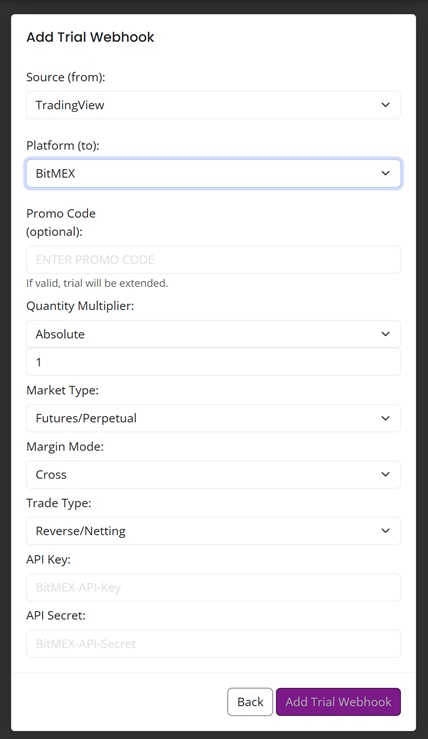
4) Create your AlgoWay webhook
First, open the AlgoWay Dashboard and create a webhook for the platform you want to trade on. The platform can be MetaTrader 5, TradeLocker, cTrader, DXtrade, Match-Trader, Binance, OKX, Bybit, BitMEX, MEXC, Capital.com, or another supported destination.
- Select TradingView as the signal source.
- Select the target platform.
- Fill the platform credentials and account fields.
- Save the webhook.
- Copy the webhook UUID.
The UUID becomes the email route for this setup. The format is:
WebhookUUID@algoway.co
Example:
e7a19089-f14d-4cc0-ac2c-5379b974e2c4@algoway.co
5) Add the AlgoWay webhook email in TradingView
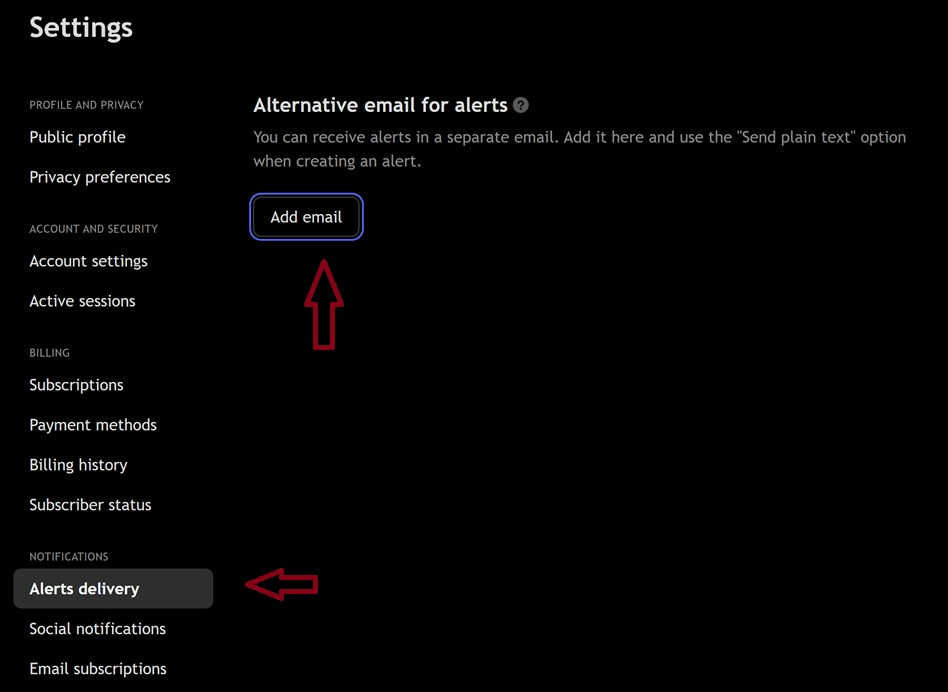
In TradingView, open the alert delivery settings. The current TradingView help pages describe the path as Settings and billing >> Alerts delivery, where you can add an alternative email address for alert notifications.
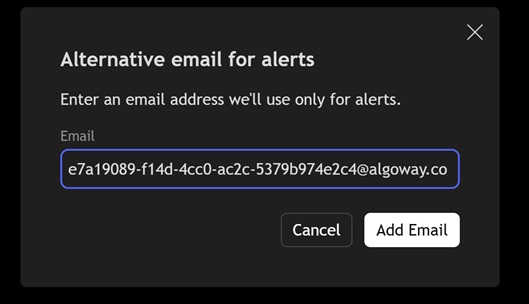
Paste your AlgoWay webhook email in this format:
YourWebhookUUID@algoway.co
6) Confirm TradingView’s email verification code inside AlgoWay
TradingView sends a verification code to the alternative email address. Since that address belongs to the AlgoWay webhook, the verification message appears inside AlgoWay, not in your personal mailbox.
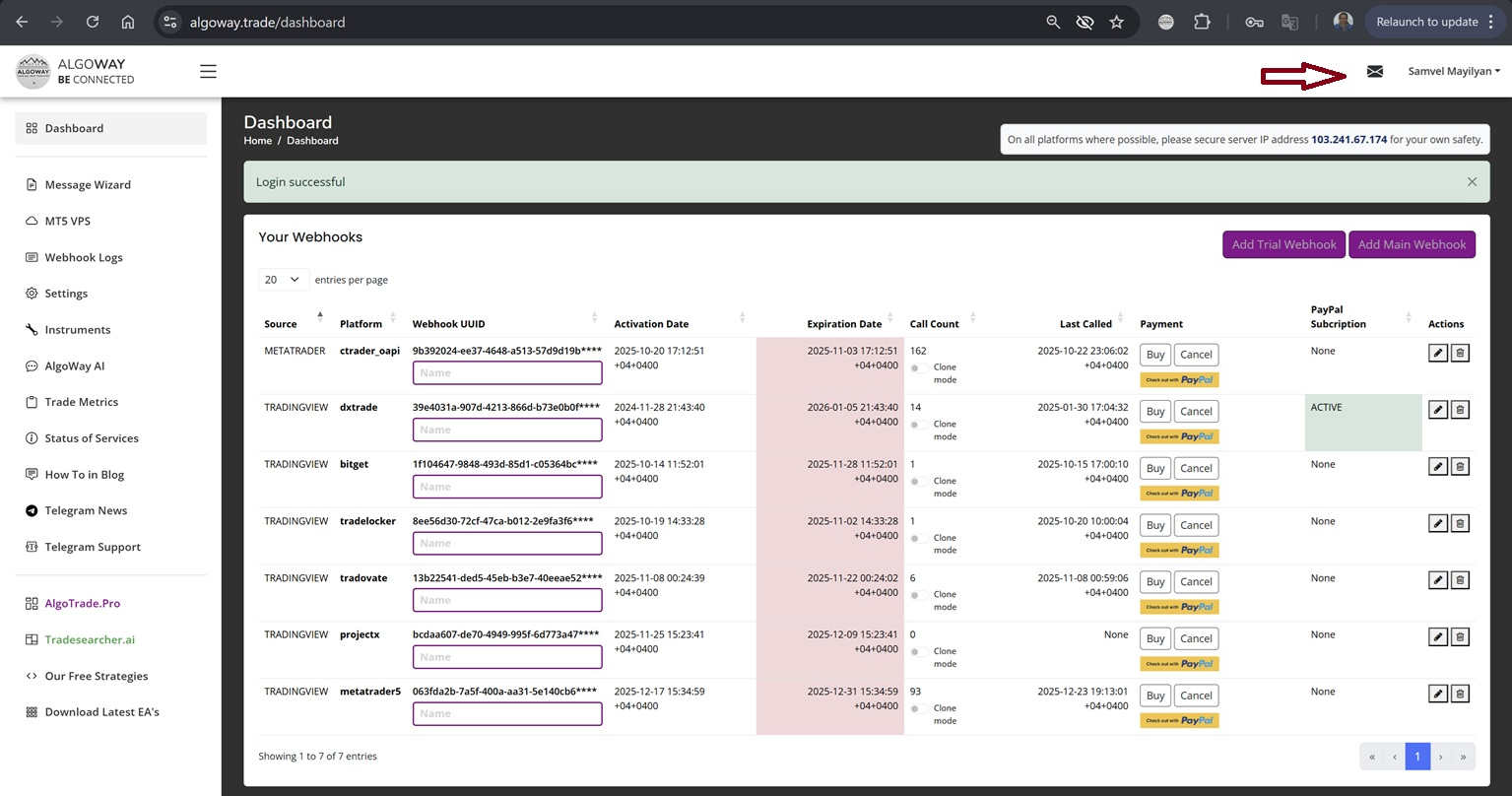
Open the mail icon in the AlgoWay dashboard, find the TradingView verification email, copy the code, and enter it back in TradingView. The same area can later be used to check whether TradingView alert emails are arriving.
7) Create the TradingView alert
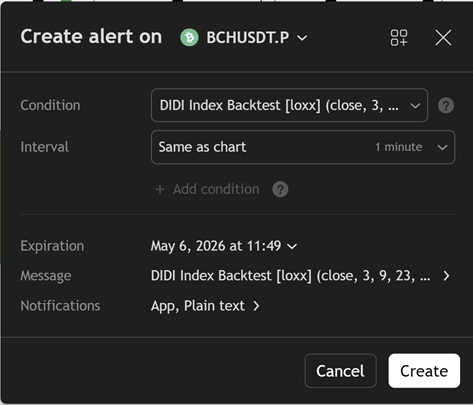
Open your TradingView chart, indicator, or Pine Script strategy and create an alert. Choose the condition that should trigger the trade. This can be a strategy order event, an indicator signal, a price crossing, or another TradingView alert condition.
The important alert settings are:
- Condition: the rule that fires the signal.
- Message: the JSON payload that AlgoWay will process.
- Notifications: the delivery method. For this setup, use plain text email if available.
8) Use Send plain text and JSON message
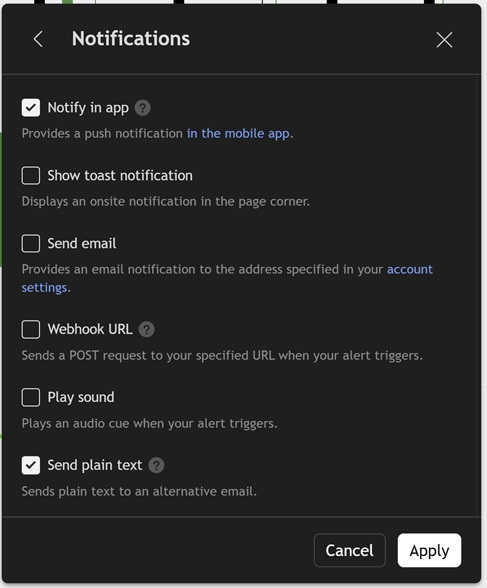
In the alert notifications section, enable Send plain text if TradingView shows that option in your account. This is the email-based route that replaces the direct webhook field for this workflow.
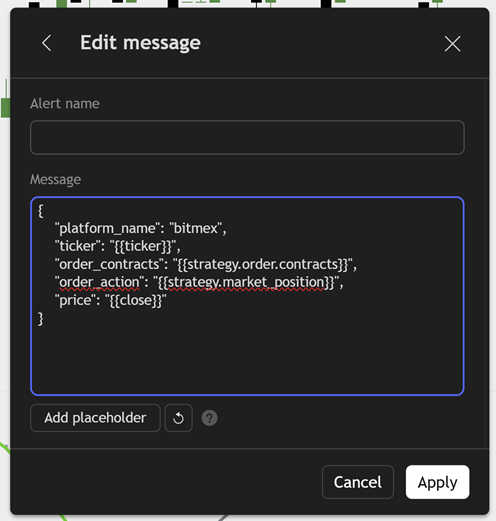
Then fill the Message field with AlgoWay JSON. The message should be clean, structured, and valid. Avoid extra text around the JSON unless your specific AlgoWay route is designed to parse it.
9) JSON examples for automated TradingView signals
The exact JSON depends on your platform and webhook configuration. Below are simple examples that show the structure. Use the JSON template from your AlgoWay dashboard for production setup.
MetaTrader 5 market order example:
{
  "platform_name": "metatrader5",
  "ticker": "{{ticker}}",
  "order_action": "{{strategy.market_position}}",
  "order_contracts": "{{strategy.order.contracts}}",
  "price": "{{close}}"
}
TradeLocker buy alert with SL/TP:
{
  "platform_name": "tradelocker",
  "ticker": "EURUSD",
  "order_action": "buy",
  "order_contracts": 1,
  "stop_loss": 25,
  "take_profit": 50
}
Crypto exchange signal example:
{
  "platform_name": "binance",
  "ticker": "BTCUSDT",
  "order_action": "buy",
  "order_contracts": 0.01,
  "price": "{{close}}"
}
For all supported fields, see the AlgoWay JSON Schema Guide. For direct webhook setup, see How to Create a Webhook in TradingView.
10) Limitations of email-based TradingView automation
Email automation is a fallback for accounts that can send plain text alerts to an alternative address. It is not the same as direct webhook delivery.
- Availability: the method depends on TradingView showing Send plain text or alternative alert email in your account.
- Delivery path: email is a relay path, while webhook is a direct HTTP request.
- Routing: one dedicated AlgoWay webhook email is best treated as one target route.
- Message quality: the alert must contain valid JSON if you want deterministic execution.
- Serious live trading: if direct Webhook URL is available, it is usually the cleaner route.
11) Troubleshooting
The TradingView Send plain text option is missing
Check your TradingView account, plan, region, and current UI. If the option is not available, this method cannot be used from that account. Use direct Webhook URL delivery with a supported plan, or use another signal source supported by AlgoWay.
The verification email does not appear in AlgoWay
Confirm that the email address was copied exactly in the WebhookUUID@algoway.co format.
Check that the AlgoWay webhook exists and that the UUID belongs to the webhook you are trying to use.
The alert email arrives, but no order is executed
Check the JSON first. The most common issues are invalid JSON, wrong platform name, unsupported ticker format, missing order action, or wrong quantity field for the selected platform.
The order goes to the wrong platform
The email address is tied to one AlgoWay webhook UUID. Make sure the UUID belongs to the webhook route you want to trigger.
I want to automate multiple brokers or exchanges
Use AlgoWay direct webhook routing where possible. AlgoWay is designed to connect TradingView alerts to multiple platforms, but direct webhook routing is cleaner than trying to force multiple destinations through one email alert path.
12) Related AlgoWay guides
- TradingView Webhook Free: Send Alerts Without Paid Webhook URL
- How to Create a Webhook in TradingView
- TradingView to MetaTrader 5 Setup Guide
- TradingView to TradeLocker Setup Guide
- AlgoWay JSON Schema Guide
FAQ
Can I automate TradingView alerts without a paid TradingView subscription?
You can use the AlgoWay email route if TradingView lets your account send plain text alerts to an alternative email. If that option is unavailable, use direct Webhook URL delivery with a plan that supports it.
Is TradingView Webhook URL free?
Direct Webhook URL delivery is usually not the free route. This article targets users looking for a practical TradingView webhook alternative through email alert automation.
What if TradingView removed the email option from my account?
Then this specific workaround cannot be used from that account. Use direct webhook delivery with a supported plan or another signal source supported by AlgoWay.
Do I need JSON in the alert message?
Yes. AlgoWay uses the JSON in the message body as the trading instruction.
Can I use this with MetaTrader 5?
Yes, if your AlgoWay webhook is configured for MetaTrader 5 and the incoming TradingView alert message contains the correct JSON.
Can I use this with TradeLocker?
Yes, if your AlgoWay webhook is configured for TradeLocker and the JSON contains the required fields for your TradeLocker route.
Is email automation as fast as direct webhook automation?
No. Direct webhook delivery is the cleaner path for speed and reliability. Email automation is a workaround for accounts that can send plain text alerts to an alternative email.