AlgoWay Blog
Guides, manuals and platform references.
Core
- All articles
- FAQ
- PineConnector alternative
- TradersPost alternative
- Automate TradingView alerts
- Automate Telegram signals
- AlgoWay CopyTrader
- cTrader Copier
- TrendSpider with AlgoWay
- How to Automate a TradingView Indicator with Dynamic SL/TP and 1% Risk on MT5
JSON & Alerts
- JSON schema
- Manual alerts
- TradingView without paid subscription
- AlgoWay Strategy Integration in Pine Script
- Python Trading Bot Webhook Integration
- TRALADAL - TradingView Alert Adapter
- TradingView Order Action Alert
MT5 / Expert Advisors
Errors
Integrations
- MetaTrader 5
- TradeLocker
- Match-Trader
- DXtrade
- Capital.Com
- Binance
- Bybit
- MEXC
- OKX
- Bitget
- Hyperliquid
- BingX
- Alpaca
- Interactive Brokers
- Gate.io
- Coinbase
- TooBit
- WEEX
- ProjectX
- cTrader logic
Other Publications
- MT5 EA Webhook JSON Reference
- OANDA MT5 with AlgoWay
- Buy Webhook via Buy Me a Coffee
- AlgoWay vs PineConnector
- Compare AlgoWay with other trading automation tools
- AlgoWay Red News Filter
- Why Paid Trading Indicators Avoid Verifiable Backtests
- How Trade Automation Tools Mislead You
- utomating a Prop-Firm Eval End to End:
- ATP Premium Indicator Testing Bot
- Why TradingView Backtests Win but Live Trades Lose
- Best Prop Firms for Trading Automation and Telegram Signal Copy in 2026
- Four AIs, One Trader, and the Strange Case of TradingView to Alpaca
- TradingView Automation
AlgoWay Strategy Lab
TradingView Alert Adapter for Indicator Automation: TRALADAL by AlgoWay
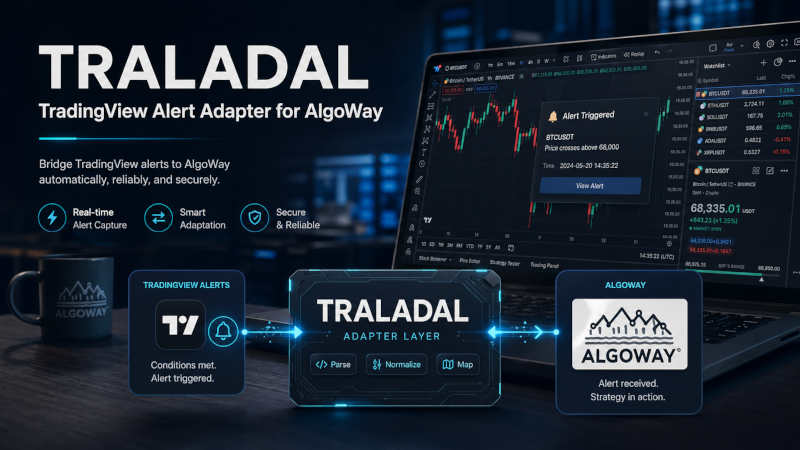
TRALADAL is a TradingView alert adapter for traders who already use indicators, invite-only scripts, visual signals, arrows, oscillator lines, or custom plots, but need a structured way to turn those outputs into backtestable strategy logic and JSON webhook alerts for AlgoWay execution.
The core problem is simple: many TradingView indicators show useful signals, but they are not strategies, cannot be tested properly in Strategy Tester, and do not automatically produce broker-ready order instructions. TRALADAL sits between the indicator layer and AlgoWay. It reads selected chart sources, applies signal, confirmation, filter, exit, and risk rules, then produces an alert payload that AlgoWay can route to MetaTrader 5, TradeLocker, cTrader, DXtrade, Match-Trader, Binance, OKX, Bybit, BitMEX, MEXC, Capital.com, and other supported platforms.
Official script page: TradingView Alert Adapter for AlgoWay
Quick answer
If you have an indicator that produces a visible long/short output, a plotted value, a non-zero event, an arrow stream, or a usable source value, TRALADAL can help you test that logic as a TradingView strategy and send the same decision as a webhook alert to AlgoWay. AlgoWay then converts the JSON message into the correct action on the selected execution platform.
This gives traders one workflow for both testing and automation: indicator output → adapter logic → Strategy Tester → JSON alert → AlgoWay webhook → broker or exchange execution.
Contents
- 1) Why a TradingView alert adapter is needed
- 2) What TRALADAL does
- 3) How the input-source model works
- 4) Signal → Confirmation → Filter pipeline
- 5) Strategy Mode vs Alert Mode
- 6) Entry, exit, reverse, and flat logic
- 7) Risk parameters for webhook trading automation
- 8) JSON alert payload for AlgoWay
- 9) Practical setup guide
- 10) Full input reference
- 11) Use cases for indicator-based automation
- 12) Troubleshooting
- 13) Related AlgoWay guides
- 14) FAQ
1) Why a TradingView alert adapter is needed
Traders often have an indicator but not a strategy, visual buy or sell signals but no historical test, alerts without a structured JSON payload, or a setup that cannot be routed cleanly into MetaTrader 5, TradeLocker, Binance, OKX, or another execution venue.
A normal indicator can display lines, labels, arrows, oscillator values, and conditions. That is useful for chart reading, but it is not enough for systematic trading. To evaluate a system, the trader needs entries, exits, position behavior, stop loss, take profit, trailing stop, and measurable performance metrics such as win rate, drawdown, profit factor, net profit, and average trade behavior.
TRALADAL is built for this gap. It does not replace the indicator. It reads the indicator output and turns that output into a repeatable strategy decision that can be tested, converted into JSON and sent through an AlgoWay webhook.
| Problem | Without adapter | With TRALADAL |
|---|---|---|
| Indicator is not a strategy | Signals are visual, but performance is hard to measure objectively. | Indicator output becomes entry/exit logic inside a TradingView strategy. |
| Closed-source or invite-only script | The trader cannot edit the Pine code. | The adapter reads available plotted source outputs from the chart. |
| No webhook-ready JSON | Manual alert text may be inconsistent or incomplete. | The adapter produces structured payloads for AlgoWay routing. |
| No clear execution logic | Opposite signals, neutral states, and exits may be ambiguous. | Buy, sell, flat, reverse, SL, TP, and trailing behavior are explicitly configured. |
2) What TRALADAL does
TRALADAL is an open-source TradingView strategy and alert adapter. Its job is to connect indicator outputs to AlgoWay automation without forcing the trader to rewrite the original indicator. In practical terms, it provides a configurable bridge between chart signals and automated execution.
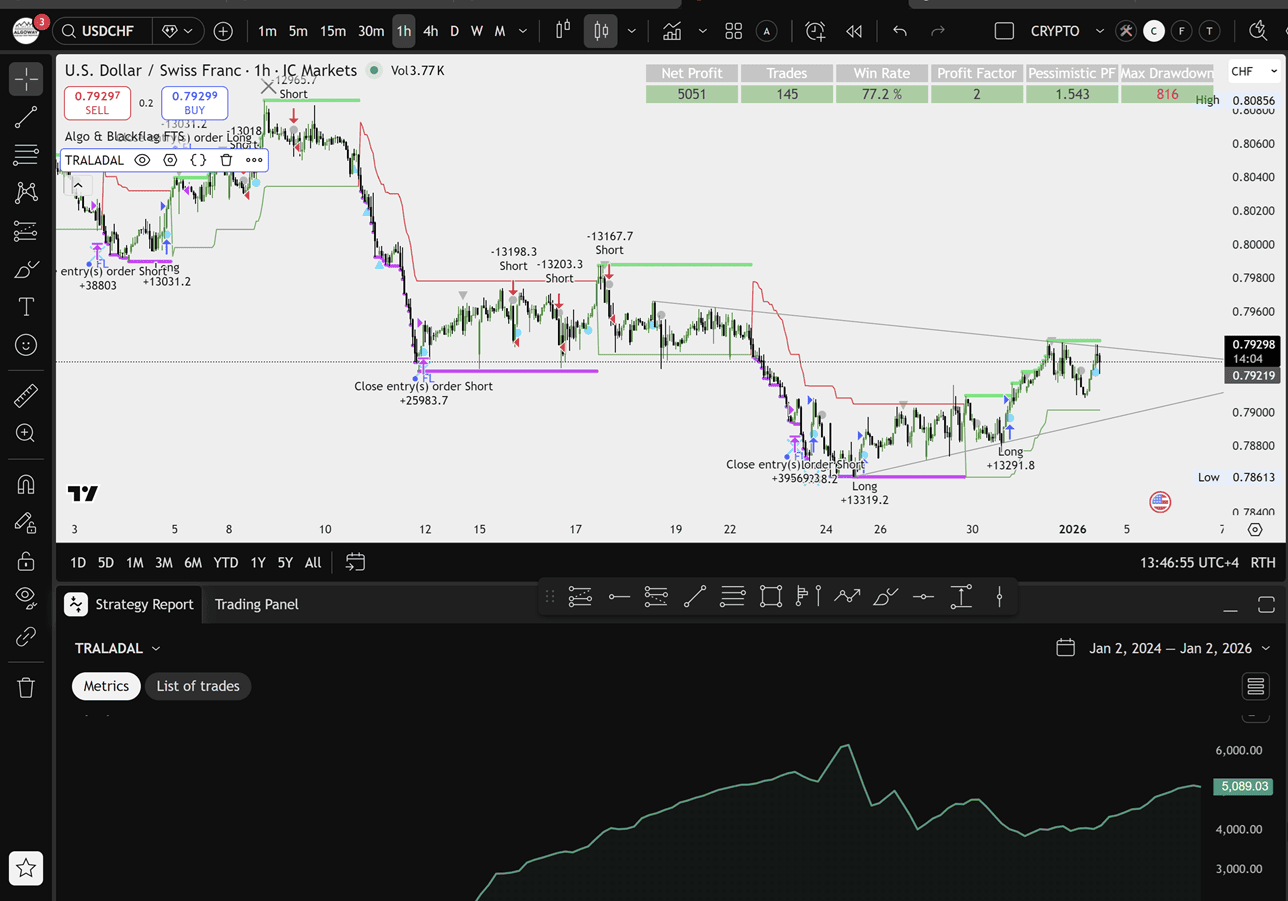
TRALADAL focuses on five operational tasks:
- Read indicator sources: connect long, short, confirmation, filter, and close sources from TradingView chart outputs.
- Build strategy logic: convert source values into backtestable buy, sell, flat, and reverse behavior.
- Control signal quality: combine triggers with confirmation and filter logic using strict or flexible rules.
- Define risk: attach stop loss, take profit, trailing stop, and sizing values to the automation workflow.
- Generate alerts: produce JSON messages that AlgoWay can receive, parse, and route to the selected platform.
3) How the input-source model works
TRALADAL is based on TradingView input.source logic. That matters because a source input can read values
from chart data or from another indicator’s plotted output. This is the key mechanism that allows the adapter to work
with external indicators, including many closed or invite-only scripts that expose usable plots on the chart.
The adapter can evaluate different source styles:
- Event outputs: values such as
1,-1, non-zero spikes, arrows, labels, or shape streams. - Continuous values: EMA, VWAP, RSI, MACD, ATR, custom oscillators, levels, or trend lines.
- State outputs: values that remain active while a condition is true, for example trend-up or trend-down states.
- Close sources: separate values that trigger an explicit flat or exit action.
This design is important for TradingView indicator automation because the user does not always control the original script. Many commercial indicators are invite-only. TRALADAL does not need to edit them. It only needs a reliable output source that can be selected in the adapter settings.
4) Signal → Confirmation → Filter pipeline
The adapter uses a three-layer decision model. This structure is easier to test than one large condition because each layer has a specific role.
| Layer | Purpose | Typical source | Automation impact |
|---|---|---|---|
| Signal | Primary entry trigger. | Arrow, label, crossover event, breakout marker, non-zero event. | Creates buy or sell permission. |
| Confirmation | Directional validation. | Trend line, higher-timeframe state, moving average regime, momentum direction. | Blocks entries that do not match the larger condition. |
| Filter | Noise and environment control. | Volatility filter, session filter, spread guard, oscillator zone, market condition value. | Allows trades only when the environment is acceptable. |
Strict gate
Use strict logic when the signal should only trade if all conditions agree.
final_long_ok  = SignalLong  AND ConfirmLong  AND FilterOK
final_short_ok = SignalShort AND ConfirmShort AND FilterOK
Flexible triggers
Use flexible logic only when the system is intentionally built around several valid trigger sources.
final_long_ok  = (SignalLong OR ConfirmLong) AND FilterOK
final_short_ok = (SignalShort OR ConfirmShort) AND FilterOK
Minimal adapter test
Use this mode when checking whether long and short sources are wired correctly.
final_long_ok  = SignalLong
final_short_ok = SignalShort5) Strategy Mode vs Alert Mode
TRALADAL is useful because it connects two workflows that are often separated: historical testing and live alert delivery. A trader can first test indicator logic in TradingView Strategy Tester, then use the same configured logic to generate automation alerts.
| Mode | Purpose | What happens | Best use |
|---|---|---|---|
| Strategy Mode | Backtest-first workflow. | Entries, exits, SL, TP, trailing, and position behavior are evaluated inside Strategy Tester. | Checking whether the indicator logic has objective historical value. |
| Alert Mode | Automation-first workflow. | The same decisions are emitted as JSON alert messages for AlgoWay. | Sending TradingView alerts to external trading platforms through webhook automation. |
The same configuration can therefore be used first for backtesting indicator signals and then for TradingView webhook trading after the logic has been tested.
6) Entry, exit, reverse, and flat logic
Automated trading fails when entries are defined but exits are vague. TRALADAL treats exit behavior as part of the automation design. That matters because AlgoWay needs to know whether the alert should open, close, reverse, or flatten a position.
Entry behavior
- Buy: emitted when final long permission becomes true.
- Sell: emitted when final short permission becomes true.
- Event-based entry: one-bar signal from an arrow, label, or spike.
- State-based entry: condition remains active while the source stays above, below, equal to, or different from a threshold.
Exit behavior
- Flat on neutral: close the current position when the system no longer confirms direction.
- Flat on explicit close source: close the position when a dedicated close signal fires.
- Reverse on opposite signal: close the current side and open the opposite side when the opposite signal is confirmed.
- Close only: use opposite or close conditions only to exit, not to open the opposite side immediately.
Task mapping
| System state | Task | Meaning for AlgoWay |
|---|---|---|
| Long entry confirmed | buy |
Open or maintain a long position according to route settings. |
| Short entry confirmed | sell |
Open or maintain a short position according to route settings. |
| Neutral or close condition | flat |
Close the current position. |
| Opposite confirmed signal | buy or sell |
Reverse or re-enter depending on the selected route behavior. |
7) Risk parameters for webhook trading automation
A TradingView alert adapter becomes much more useful when it sends risk parameters together with the entry action. TRALADAL can include common AlgoWay risk fields so the execution route receives a full instruction, not only a buy or sell word.
| Risk field | Meaning | Automation use |
|---|---|---|
stop_loss |
Distance-based stop loss, often in pips or platform-specific units. | Attach protective SL after entry. |
take_profit |
Distance-based take profit. | Attach target TP after entry. |
trailing_pips |
Trailing stop distance. | Move protection as price moves in favor of the trade. |
order_contracts |
Size, contracts, lots, or quantity depending on platform mapping. | Control position size. |
sl_price / tp_price |
Absolute stop loss or take profit prices where supported. | Use exact price levels from the strategy or alert. |
The correct risk model depends on the destination. MetaTrader 5, TradeLocker, Binance, OKX, Bybit, MEXC, and other connectors may use different execution rules, symbol formats, and precision. AlgoWay handles the platform route, while TRALADAL keeps the alert payload explicit and consistent.
8) JSON alert payload for AlgoWay
The alert payload is the bridge between TradingView and AlgoWay. TradingView fires the alert. AlgoWay reads the message. The destination connector executes the instruction. This is why JSON quality matters: every field should be explicit.
Generic AlgoWay payload
{
  "platform_name": "metatrader5",
  "ticker": "{{ticker}}",
  "order_action": "buy",
  "order_contracts": 1.0,
  "stop_loss": 25,
  "take_profit": 50,
  "trailing_pips": 0,
  "comment": "TRALADAL"
}
Flat payload
{
  "platform_name": "metatrader5",
  "ticker": "{{ticker}}",
  "order_action": "flat",
  "order_contracts": 999999,
  "comment": "TRALADAL flat"
}
TradeLocker example with absolute SL/TP
{
  "platform_name": "tradelocker",
  "ticker": "XAUUSD",
  "order_action": "buy",
  "order_contracts": 1.0,
  "sl_price": 2310.50,
  "tp_price": 2350.00,
  "comment": "TRALADAL"
}
Crypto exchange example
{
  "platform_name": "binance",
  "ticker": "BTCUSDT",
  "order_action": "sell",
  "order_contracts": 0.01,
  "stop_loss": 300,
  "take_profit": 800,
  "comment": "TRALADAL"
}9) Practical setup guide
Use this workflow to connect a TradingView indicator to AlgoWay through TRALADAL.
Step 1 — Add the original indicator
Add the indicator that produces your long, short, confirmation, or filter output. Make sure its visual or plotted values are visible and stable.
Step 2 — Add TRALADAL to the same chart
Add the TradingView Alert Adapter for AlgoWay. Open the strategy settings and go to the inputs.
Step 3 — Select signal sources
Choose the long source and short source. If the original indicator exposes separate long and short plots, map each one separately. If it exposes one numeric stream, configure the threshold and comparator carefully.
Step 4 — Add confirmation and filter logic
Use confirmation for direction and filter for environment. For example, signal can be an arrow, confirmation can be a trend line, and filter can be a volatility or session condition.
Step 5 — Configure risk and flat behavior
Set stop loss, take profit, trailing stop, order size, and flat behavior. Test whether the strategy should reverse immediately or close first.
Step 6 — Backtest before live routing
Open TradingView Strategy Tester and review trades, drawdown, profit factor, and signal frequency. Do not judge the adapter by one or two trades; judge the signal logic across enough historical data for the instrument and timeframe.
Step 7 — Create the TradingView alert
Create an alert on the TRALADAL strategy. Select the option that listens to alert function calls or the strategy alert message, paste the AlgoWay webhook URL, and make sure the payload is generated in the expected JSON format.
10) Full input reference
This reference explains the main TRALADAL input groups and how they affect TradingView automation.
10.1 AlgoWay routing
| Input | Role | Payload impact | Recommended use |
|---|---|---|---|
| Webhook UUID | Identifies the AlgoWay route. | Connects alert to the selected webhook. | Use the exact UUID from AlgoWay dashboard. |
| Platform | Selects destination connector logic. | Sets platform-specific routing behavior. | Use one platform per route for clean testing. |
| Symbol override | Maps TradingView ticker to broker symbol. | Changes the final ticker sent to execution. | Use when broker symbol differs from TradingView symbol. |
10.2 Signal sources
| Input | Role | Best source type | Common mistake |
|---|---|---|---|
| Long Signal Source | Triggers long entries. | Bullish event output, arrow, marker, or positive stream. | Selecting a source that remains active forever. |
| Short Signal Source | Triggers short entries. | Bearish event output, arrow, marker, or negative stream. | Using the same polarity as long without inversion. |
| Threshold | Defines when a source is active. | Numeric level that separates signal from noise. | Setting threshold too low on noisy oscillator values. |
| Comparator | Defines how the source is evaluated. | Greater than, less than, equal, not equal, crossing, or non-zero logic. | Using equality on values that rarely match exactly. |
10.3 Confirmation and filter
| Input | Role | Recommended source | Automation effect |
|---|---|---|---|
| Enable Confirmation | Adds directional validation. | Trend, higher timeframe, MA regime, momentum direction. | Reduces entries against the main condition. |
| Confirmation Logic | Combines signal and confirmation. | AND for strict automation, OR for controlled flexibility. | Changes entry frequency. |
| Enable Filter | Adds environment control. | Volatility, session, spread, market-state, or risk condition. | Blocks trades when the market environment is not acceptable. |
| Filter Comparator | Evaluates filter source. | Threshold comparison based on the chosen indicator. | Controls when automation is allowed or blocked. |
10.4 Exit and risk behavior
| Input | Role | Payload impact | Recommended use |
|---|---|---|---|
| Stop Loss | Defines downside protection. | Sets SL field in JSON or strategy risk model. | Use a value larger than normal spread and noise. |
| Take Profit | Defines target distance. | Sets TP field in JSON or strategy risk model. | Align with historical movement and reward/risk design. |
| Trailing Stop | Defines moving protection. | Sets trailing field for supported routes. | Use only after testing trend persistence. |
| Flat behavior | Defines closing behavior. | Can emit flat tasks. |
Enable when neutral or close-source exits are part of the system. |
11) Use cases for indicator-based automation
Closed-source indicator backtesting
If an invite-only indicator displays long and short values on the chart, TRALADAL can help evaluate those outputs in Strategy Tester. This is useful when the trader wants objective statistics before sending live alerts to AlgoWay.
TradingView indicator to webhook bot
A trader can connect indicator signals to TRALADAL, generate a JSON alert, and send it to AlgoWay. This creates a practical TradingView webhook bot workflow without hardcoding the original indicator logic into a new script.
Multi-platform signal routing
The same strategy decision can be routed to different platforms through separate AlgoWay webhooks. This is useful when a trader wants one TradingView logic layer but different execution routes for MetaTrader 5, TradeLocker, cTrader, crypto exchanges, or proprietary accounts.
Signal quality testing before automation
Instead of activating a webhook immediately, the trader can first run the adapter in Strategy Tester, review historical behavior, adjust filters, and only then enable live alert delivery.
12) Troubleshooting
| Problem | Likely cause | What to check |
|---|---|---|
| No trades in Strategy Tester | Selected source never becomes active. | Check source selection, threshold, comparator, and long/short polarity. |
| Too many repeated entries | State source is treated as event source. | Use transition logic, stricter confirmation, or flat behavior. |
| Only long or only short signals fire | Wrong source mapping or comparator direction. | Verify whether bearish output is negative, zero/non-zero, or a separate plot. |
| Alert fires but AlgoWay does not execute | Invalid JSON, wrong webhook URL, wrong platform field, or missing symbol mapping. | Check AlgoWay logs, alert message body, and platform-specific required fields. |
| Backtest and live behavior differ | Realtime bar behavior, repainting source, or different alert frequency. | Use confirmed-bar logic where needed and test alert timing before live execution. |
13) Related AlgoWay guides
- How to Turn a TradingView Indicator into a Trading Strategy
- Guide to Creating a Webhook in TradingView
- AlgoWay JSON Schema Guide
- TradingView to MetaTrader 5 Setup Guide
- TradingView to TradeLocker Setup Guide
- TradingView Algo Trading Without a Paid Subscription
FAQ
What is a TradingView alert adapter?
A TradingView alert adapter is a script or workflow that converts chart signals, indicator outputs, or strategy decisions into structured alert messages. In this case, TRALADAL converts selected TradingView sources into strategy logic and JSON alerts for AlgoWay.
Can TRALADAL automate closed-source TradingView indicators?
It can work with closed or invite-only indicators when their usable outputs are available as selectable chart sources. It does not need to edit the original source code.
Does TRALADAL generate trading signals?
No. TRALADAL does not create signals by itself. It evaluates the sources, confirmations, filters, and exit rules selected by the user.
Can I use TRALADAL for TradingView webhook trading?
Yes. The adapter can generate structured alert payloads that are sent to AlgoWay through a TradingView webhook alert.
Can I backtest indicator signals before sending alerts?
Yes. That is one of the main purposes of the adapter. It turns selected indicator outputs into strategy logic so they can be reviewed in TradingView Strategy Tester.
Which platforms can AlgoWay route TRALADAL alerts to?
AlgoWay can route TradingView alerts to supported platforms including MetaTrader 5, TradeLocker, cTrader, DXtrade, Match-Trader, Binance, OKX, Bybit, BitMEX, MEXC, Capital.com, and others.
What should I select in the TradingView alert condition?
Use the alert option that matches the adapter’s alert generation mode, typically an alert function call or a strategy alert message configuration. The webhook URL should be the AlgoWay webhook endpoint.
Why is JSON important for TradingView automation?
JSON gives AlgoWay a structured instruction: platform, ticker, order action, size, stop loss, take profit, trailing stop, and any platform-specific fields. This is more reliable than plain natural-language alert text.