AlgoWay Blog
Guides, manuals and platform references.
Core
- All articles
- FAQ
- PineConnector alternative
- TradersPost alternative
- Automate TradingView alerts
- Automate Telegram signals
- AlgoWay CopyTrader
- cTrader Copier
- TrendSpider with AlgoWay
- How to Automate a TradingView Indicator with Dynamic SL/TP and 1% Risk on MT5
JSON & Alerts
- JSON schema
- Manual alerts
- TradingView without paid subscription
- AlgoWay Strategy Integration in Pine Script
- Python Trading Bot Webhook Integration
- TRALADAL - TradingView Alert Adapter
- TradingView Order Action Alert
- How to use Clone Mode
MT5 / Expert Advisors
Errors
Integrations
- MetaTrader 5
- Tradovate
- TradeLocker
- cTrader
- Match-Trader
- DXtrade
- Capital.Com
- Binance
- Bybit
- MEXC
- OKX
- Bitget
- Hyperliquid
- BingX
- Alpaca
- Interactive Brokers
- Gate.io
- Coinbase
- TooBit
- WEEX
- KuCoin
- Kraken
- ProjectX
- Rithmic
Other Publications
- MT5 EA Webhook JSON Reference
- OANDA MT5 with AlgoWay
- Buy Webhook via Buy Me a Coffee
- AlgoWay vs PineConnector
- Compare AlgoWay with other trading automation tools
- AlgoWay Red News Filter
- Why Paid Trading Indicators Avoid Verifiable Backtests
- How Trade Automation Tools Mislead You
- utomating a Prop-Firm Eval End to End:
- ATP Premium Indicator Testing Bot
- Why TradingView Backtests Win but Live Trades Lose
- Best Prop Firms for Trading Automation and Telegram Signal Copy in 2026
- Four AIs, One Trader, and the Strange Case of TradingView to Alpaca
- TradingView Automation
AlgoWay Strategy Lab
ATP Premium Indicator Testing Bot: Build, Backtest and Automate TradingView Strategies with AlgoWay
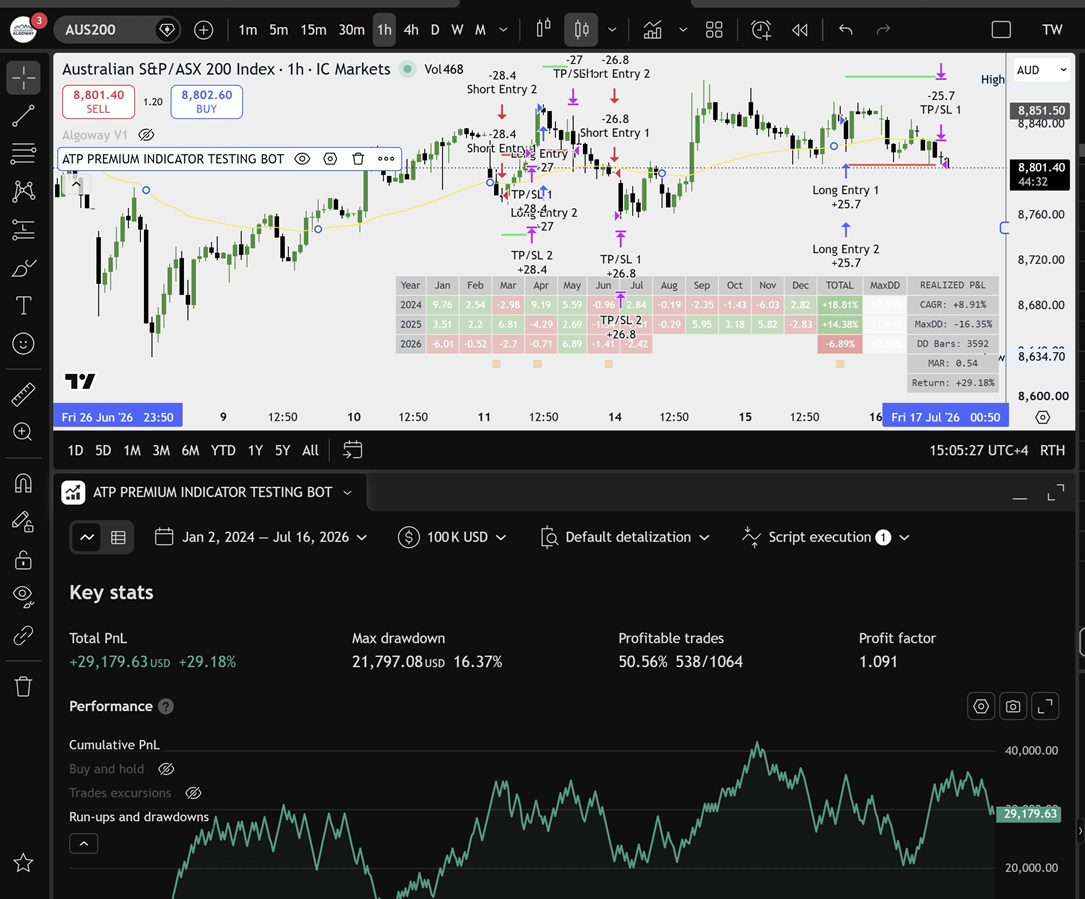
The ATP Premium Indicators Testing Bot by AlgoTrade Pro is not a single fixed trading signal. It is a strategy construction and testing environment inside TradingView. Traders can combine entry triggers, confirmation filters, baselines, volume conditions and exit logic, apply structured risk rules, review Strategy Tester results and then use the same strategy logic for live alert automation through AlgoWay.
Last updated: 2026-07-16 • Author: AlgoWay
ATP Premium is developed by AlgoTrade Pro, an AlgoWay integration partner. The current TradingView script includes AlgoWay as an automation provider and exposes an AlgoWay platform selector for routing compatible strategy alerts toward supported broker, prop trading and exchange destinations.
Quick Answer: What Is the ATP Premium Indicator Testing Bot?
ATP Premium is an invite-only TradingView strategy builder with more than 70 integrated indicators. Instead of forcing the trader to write a complete Pine Script strategy from the beginning, it separates the system into practical components:
| ATP component | Purpose inside the strategy |
|---|---|
| C1 trigger | Defines the primary event that can begin a long or short setup. |
| C2 filter | Adds a second condition that must agree before the entry is allowed. |
| Baseline | Filters trades according to a broader trend or price relationship. |
| Volume confirmation | Requires a selected volume or volatility condition to confirm the setup. |
| Exit indicator | Provides a separate signal for closing or managing an open position. |
| Risk management | Controls position sizing, Stop Loss, Take Profit, ATR and trailing behavior. |
| Backtesting controls | Limits the test by dates, sessions and trading days and displays performance statistics. |
| Automation provider | Prepares TradingView alerts for a selected execution workflow such as AlgoWay. |
This distinction matters. ATP Premium does not promise that one secret indicator will work in every market. It gives the trader a controlled place to combine rules and inspect what those rules actually produced. Traders who are still working with a normal visual indicator can first read our guide on turning a TradingView indicator into a testable strategy. ATP Premium already provides much of that strategy-building framework through configurable inputs.
A Strategy Builder, Not a Collection of Random Buy and Sell Arrows
The large indicator library is useful, but the real value is the role assigned to each selected indicator. A moving average, oscillator or trend tool can behave very differently depending on whether it is used as the first trigger, a confirmation filter, a baseline or an exit condition.
A practical ATP configuration may use one indicator to detect a possible change in direction, another to reject entries against the broader trend, a baseline to confirm price location and a separate exit condition to close the trade. The trader can then change one component without rebuilding the entire strategy.
This modular design is more useful than scrolling through a long list of indicators and choosing whichever one produces the most attractive recent chart. It encourages a more disciplined question: what job does each rule perform inside the complete system?
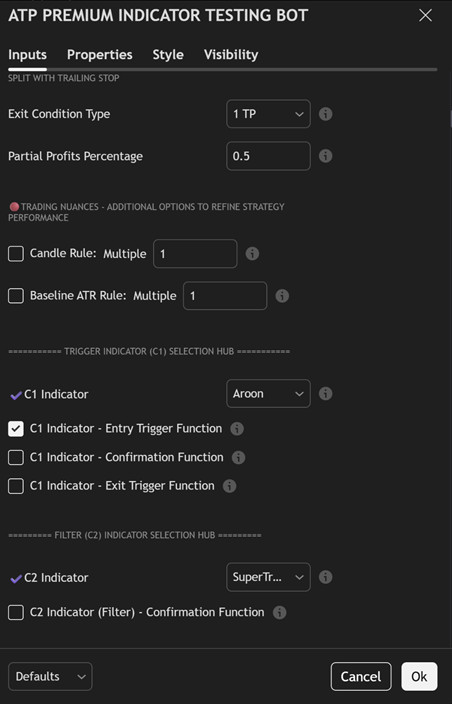
C1 Trigger, C2 Filter, Baseline, Volume and Exit Logic
C1: the primary strategy trigger
The C1 indicator is the main strategy event. It can be assigned as an entry trigger, a confirmation condition or an exit trigger. In a simple configuration, C1 creates the first long or short opportunity. In a more selective configuration, the same indicator can be used only as confirmation while another component controls the actual entry.
C2: a second layer of confirmation
The C2 filter is used to reject setups that meet the primary trigger but fail a second market condition. For example, a momentum signal may be accepted only when the selected trend filter agrees. Adding more conditions does not automatically improve a strategy, but ATP makes the relationship visible and testable rather than leaving it as an unverified assumption.
Baseline and volume confirmation
The baseline can act as a broader directional filter, while the volume section can require participation, volatility or another volume-related condition. These layers can reduce the number of trades and change the balance between win rate, average trade, drawdown and missed opportunities. Their effect should be evaluated across more than one market period.
Independent exit logic
Entries and exits do not need to use the same indicator. ATP allows the trader to select a dedicated exit indicator or use protective rules such as Stop Loss, Take Profit and trailing logic. This is important because a strong entry condition can still produce poor results when the exit design is inconsistent.
Risk Management Is Part of the Strategy, Not an Afterthought
ATP Premium includes fixed risk and fixed-contract options, ATR-based position management, pip distances, Stop Loss, Take Profit and trailing Stop Loss settings. These controls make it possible to test the same entry logic under different risk assumptions.
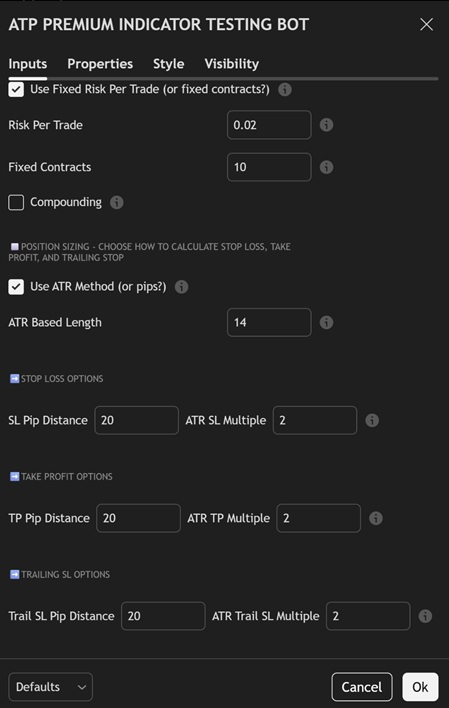
The screenshot shows the structure rather than a recommendation. A value that works for one symbol or timeframe may be unsuitable for another. ATR-based distances adapt to recent market movement, while fixed pip distances remain constant. Neither method is automatically superior. The correct choice depends on the market, timeframe, strategy design and execution destination.
AlgoWay users who execute through MetaTrader 5 can continue with our detailed guide to automated trading risk management. That page explains the execution side of position size, SL/TP, trailing stop, breakeven and other controls after a TradingView alert reaches AlgoWay.
Backtesting Across Dates, Sessions and Trading Days
ATP Premium lets the trader define a testing range, choose trading sessions and restrict the days of the week. This makes it possible to compare a rule set across different market windows rather than judging it from a few recent trades.
The chart and Strategy Tester screenshot demonstrates the information available during analysis: individual long and short entries, TP/SL events, a monthly performance table, net profit, maximum drawdown, profitable trades, profit factor and the cumulative result curve. The numbers in the screenshot belong to one example configuration on one chart. They are not a performance promise for ATP Premium, AlgoTrade Pro or AlgoWay.
A useful review should examine more than total return. Check maximum drawdown, trade count, profit factor, average trade, concentration of profits in a few months and whether results remain acceptable outside the period used for configuration. Our separate guide on TradingView backtesting and AlgoWay trade metrics explains how to compare the chart simulation with alerts and real execution records.
From ATP Strategy Logic to Live Execution Through AlgoWay
Backtesting and execution are separate jobs. ATP Premium builds and evaluates the strategy inside TradingView. AlgoWay receives the resulting alert, validates the message and routes the action to the destination configured by the user.
ATP strategy logic >> TradingView alert >> AlgoWay webhook >> broker, prop platform, MetaTrader 5 terminal or exchange
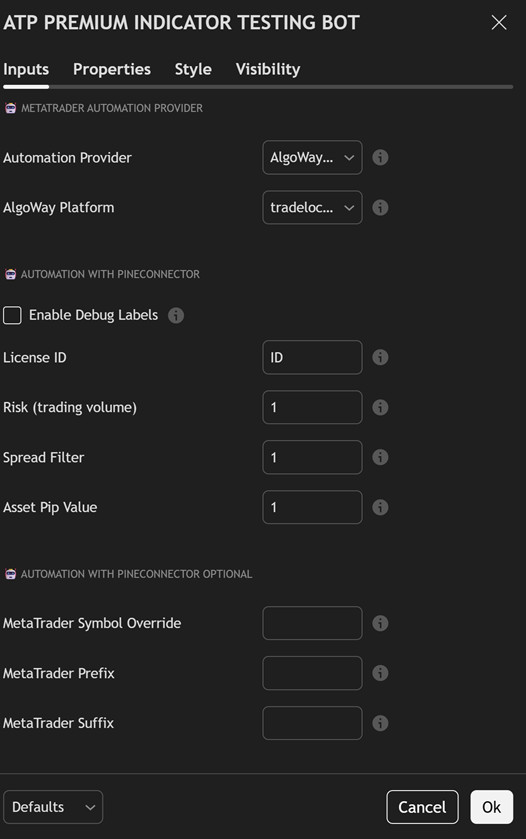
AlgoWay was added to the ATP TradingView script as a dedicated automation provider, followed by additional automation options and broader broker integration support. This removes the need to treat ATP only as a MetaTrader-specific tool. The same tested strategy concept can be prepared for any destination currently supported by both the ATP alert format and the selected AlgoWay route.
The general setup process is:
- Build the ATP strategy and confirm that its entries and exits behave as intended.
- Run historical tests across a meaningful date range, multiple market conditions and realistic cost assumptions.
- Select AlgoWay in the ATP Automation Provider setting.
- Select the required AlgoWay platform in the ATP settings.
- Create the matching destination webhook in the AlgoWay dashboard.
- Create the TradingView alert and paste the AlgoWay webhook URL.
- Test the smallest practical size and inspect both AlgoWay logs and the destination platform history.
- Only after entries, exits and protective logic are confirmed should normal live sizing be considered.
For the exact ATP alert mapping, including separate position legs, order IDs, partial exits, Stop Loss, Take Profit and trailing logic, use the existing ATP Premium Indicator webhook setup guide. For the broader routing workflow, read how AlgoWay automates TradingView alerts across supported platforms.
Why the AlgoWay Integration Matters
A strategy builder is most useful when the tested logic can leave the chart without being rewritten for every broker API. ATP defines the signal and risk intent. AlgoWay handles the external route, platform connection, message validation and execution feedback.
This separation also makes troubleshooting clearer:
| Problem location | What to inspect |
|---|---|
| ATP strategy logic | Entry rules, C1/C2 filters, exit conditions, session limits and risk settings. |
| TradingView alert | Alert condition, frequency, webhook URL and message generated by the strategy. |
| AlgoWay route | Webhook logs, selected platform, JSON validation, symbol mapping and route status. |
| Destination platform | Broker or exchange rejection, market status, size rules, margin, permissions and fills. |
This is safer than treating every failed trade as a strategy error or every attractive backtest as proof that live execution will be identical.
ATP Premium Compared with Other Indicator Automation Workflows
ATP Premium is designed for traders who want a large integrated library and a ready-made strategy framework inside one invite-only TradingView script. It is different from starting with an ordinary indicator and manually converting its Pine code into a strategy.
It is also different from an adapter workflow. When a closed-source external indicator exposes usable chart outputs, an adapter may read those outputs and convert them into backtestable conditions. AlgoWay's TRALADAL TradingView alert adapter guide covers that separate use case. ATP Premium already contains its own indicator database, strategy roles, risk controls and performance reporting.
For traders comparing several strategy types, the most useful approach is not to search for one universally best indicator. Compare trend-following, momentum, mean-reversion and breakout ideas under the same testing discipline. The algorithmic trading basics guide explains how different strategy families fit into a complete signal, risk and execution workflow.
Who ATP Premium Is Designed For
ATP Premium is most relevant for traders who:
- want to build multi-condition TradingView strategies without assembling every component from an empty Pine Script file;
- need objective Strategy Tester results instead of relying only on visual chart signals;
- want separate entry, filter, baseline, volume and exit roles;
- need configurable Stop Loss, Take Profit, ATR, trailing and position-sizing logic;
- want to automate the tested alerts through AlgoWay to a supported destination;
- understand that backtesting is a research step and not a guarantee of future profitability.
It may be less suitable for someone who wants a completely finished black-box system with no configuration or analysis. ATP is a toolkit. The result depends on the selected market, timeframe, rules, costs, data range and risk model.
Access ATP Premium from AlgoTrade Pro
ATP Premium is offered through the ATP Core subscription from AlgoTrade Pro. Access includes the invite-only TradingView strategy builder, its current indicator database and the support resources described by the developer.
View ATP Premium on AlgoTrade Pro
You can also review the public description and update history on the ATP Premium Indicator Testing Bot TradingView page.
Continue the ATP and AlgoWay Workflow
After choosing and backtesting an ATP configuration, use the dedicated ATP alert setup guide to map entries, position legs and exits. Then use the AlgoWay JSON schema reference when reviewing message fields. Traders sending ATP alerts into MT5 should continue with the TradingView to MetaTrader 5 automation guide. These pages cover the execution details that do not belong inside the strategy-builder overview itself.
FAQ: ATP Premium Indicator Testing Bot and AlgoWay
Is ATP Premium one ready-made trading strategy?
No. ATP Premium is a strategy construction and testing environment. The user selects indicators and assigns them roles such as trigger, filter, baseline, volume confirmation or exit.
Can ATP Premium backtest strategies in TradingView?
Yes. It runs as a TradingView strategy and provides chart trades, Strategy Tester statistics and additional performance information such as monthly results.
Does ATP Premium include risk management?
Yes. Its inputs include risk or fixed-contract sizing, ATR or fixed-distance methods, Stop Loss, Take Profit and trailing stop controls. The final behavior must still be tested for the selected market and execution route.
Can ATP Premium send alerts through AlgoWay?
Yes. The current script includes AlgoWay as an Automation Provider and includes an AlgoWay Platform selector. The user must still create the correct AlgoWay webhook and TradingView alert.
Does a profitable ATP backtest guarantee the same live result?
No. Live trading introduces alert timing, spread, slippage, broker rules, platform restrictions, rejected orders and changing market conditions. Historical results should be followed by demo or paper testing and a small live route test.
Where can I get ATP Premium?
Access is provided by AlgoTrade Pro through its ATP Core offering. The TradingView script is invite-only and requires approval from its author.
