AlgoWay Blog
Guides, manuals and platform references.
Core
- All articles
- FAQ
- PineConnector alternative
- TradersPost alternative
- Automate TradingView alerts
- Automate Telegram signals
- AlgoWay CopyTrader
- cTrader Copier
- TrendSpider with AlgoWay
- How to Automate a TradingView Indicator with Dynamic SL/TP and 1% Risk on MT5
JSON & Alerts
- JSON schema
- Manual alerts
- TradingView without paid subscription
- AlgoWay Strategy Integration in Pine Script
- Python Trading Bot Webhook Integration
- TRALADAL - TradingView Alert Adapter
- TradingView Order Action Alert
MT5 / Expert Advisors
Errors
Integrations
- MetaTrader 5
- TradeLocker
- Match-Trader
- DXtrade
- Capital.Com
- Binance
- Bybit
- MEXC
- OKX
- Bitget
- Hyperliquid
- BingX
- Alpaca
- Interactive Brokers
- Gate.io
- Coinbase
- WEEX
- ProjectX
- cTrader logic
Other Publications
- MT5 EA Webhook JSON Reference
- OANDA MT5 with AlgoWay
- Buy Webhook via Buy Me a Coffee
- AlgoWay vs PineConnector
- Compare AlgoWay with other trading automation tools
- AlgoWay Red News Filter
- Why Paid Trading Indicators Avoid Verifiable Backtests
- How Trade Automation Tools Mislead You
- utomating a Prop-Firm Eval End to End:
- ATP Premium Indicator Testing Bot
- Why TradingView Backtests Win but Live Trades Lose
- Best Prop Firms for Trading Automation and Telegram Signal Copy in 2026
- Four AIs, One Trader, and the Strange Case of TradingView to Alpaca
AlgoWay Strategy Lab
Can AlgoWay Automate a TradingView Indicator with Dynamic SL/TP and 1% Risk on MT5?
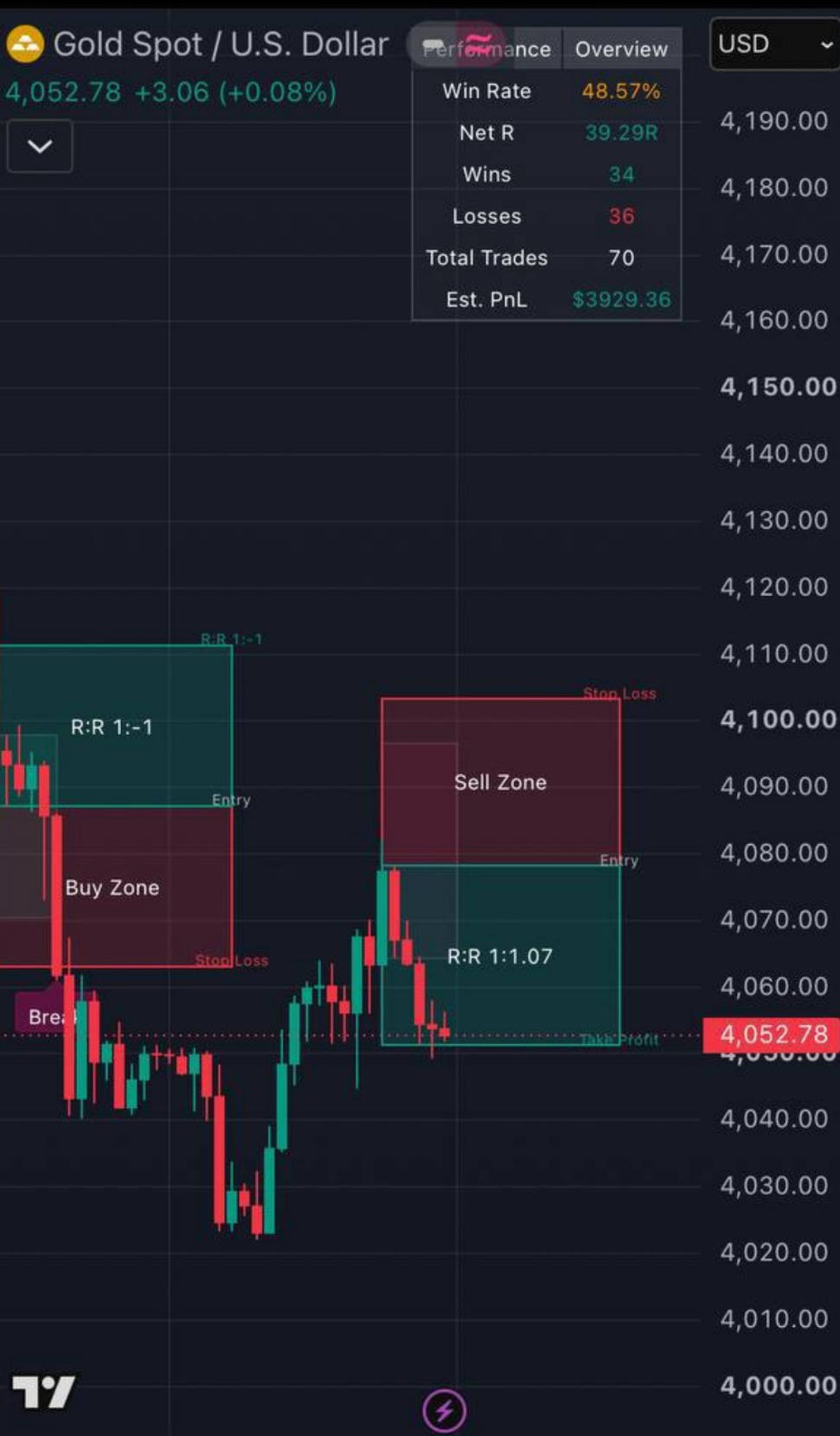
This is a real automation problem: the indicator shows Entry, Stop Loss and Take Profit on the TradingView chart, but the SL distance changes from trade to trade. The goal is to send those values to MT5 and keep every trade at a fixed percentage of account risk.
The User's Question
Hi! I’m looking for a system to automate a TradingView indicator. But I have a question. So, the indicator sends a Buy/ sell alert, and when the trade reaches SL or TP| level it sends a new alert to close the trade. The trades come with 1:2 risk / reward, but the size in pips is always different. Sometimes is 10 , sometimes 13, sometimes 20, and so on. But, on the chart the trade with all levels, entry, SL, and TP are visible. So, I’d like to know if AlgoWay can “see” the charts, and regardless of the number of pips, to always trade 1% (for instance) based on the accounts size…
Short Answer: Yes, This Can Be Automated
AlgoWay does not visually read a TradingView chart. It does not look at the red and green boxes and try to recognize where Entry, SL or TP are drawn.
But AlgoWay does not need to see the chart if TradingView can expose the indicator's actual Entry, SL and TP values through alert placeholders. In this case, TradingView can substitute the numerical levels into a plain-text alert, AlgoWay AI can convert that text into a structured trading command, and the AlgoWay MT5 EA can calculate the lot size from the real account equity and the actual Stop Loss distance.
TradingView indicator -> plain-text alert with real SL/TP -> AlgoWay AI -> AlgoWay command -> MT5 EA -> risk-based position sizeThis means the Stop Loss can be 10 pips on one trade, 13 pips on the next, and 20 pips later. The position size changes automatically while the selected account risk remains the same.
1. The Important Question Is Not Whether AlgoWay Can See the Chart
The first thing to check is whether the indicator exposes its calculated levels to TradingView alerts. Open the alert editor and click Add placeholder.
In this real example, TradingView exposes values including:
{{plot("Long Entry")}}{{plot("Long TP")}}{{plot("Long SL")}}{{plot("Short Entry")}}{{plot("Short TP")}}{{plot("Short SL")}}{{plot_0}},{{plot_1}}and other available plot outputs.
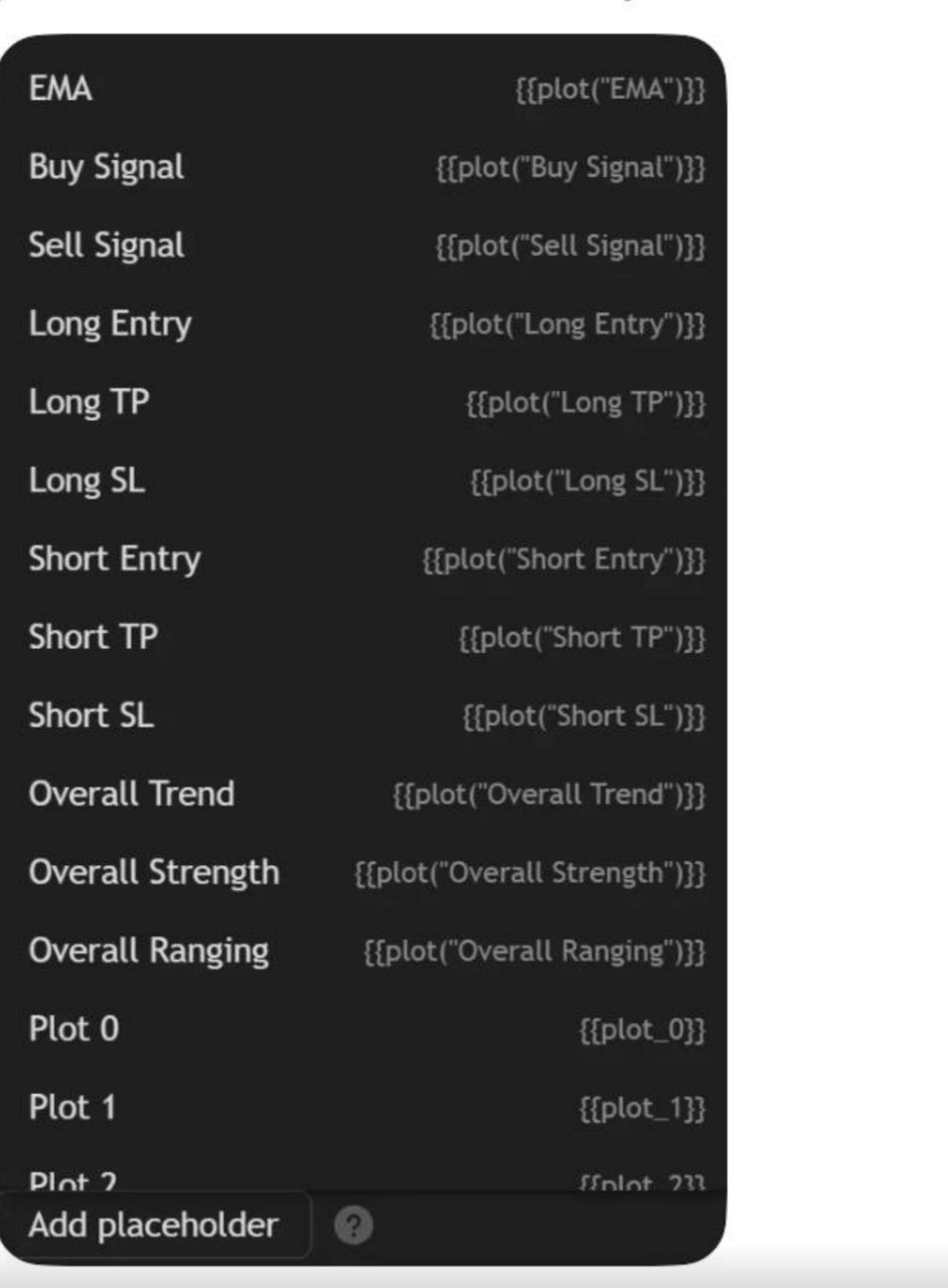
This is the key. The levels may look visual on the chart, but they are also numerical outputs of the indicator. If TradingView offers them in Add placeholder, they can be inserted into an alert message when the alert fires.
If an SL or TP exists only as a visual drawing and is not available as an alert placeholder, AlgoWay cannot obtain that value from the webhook. In this example, however, the required Long and Short Entry/SL/TP values are exposed by TradingView.
2. Why the Obvious JSON Solution Fails
Normally, AlgoWay documentation uses structured JSON alerts. A natural attempt is therefore to place the indicator placeholders directly into an AlgoWay JSON message:
{
  "platform_name": "metatrader5",
  "ticker": "XAUUSD",
  "order_action": "sell",
  "order_contracts": 1,
  "sl_price": {{plot("Short SL")}},
  "tp_price": {{plot("Short TP")}}
}
The problem is visible directly in TradingView's alert editor: once the message is treated as JSON, the nested quotation marks in placeholders such as {{plot("Short SL")}} can trigger TradingView's JSON validation error before the alert can be saved.
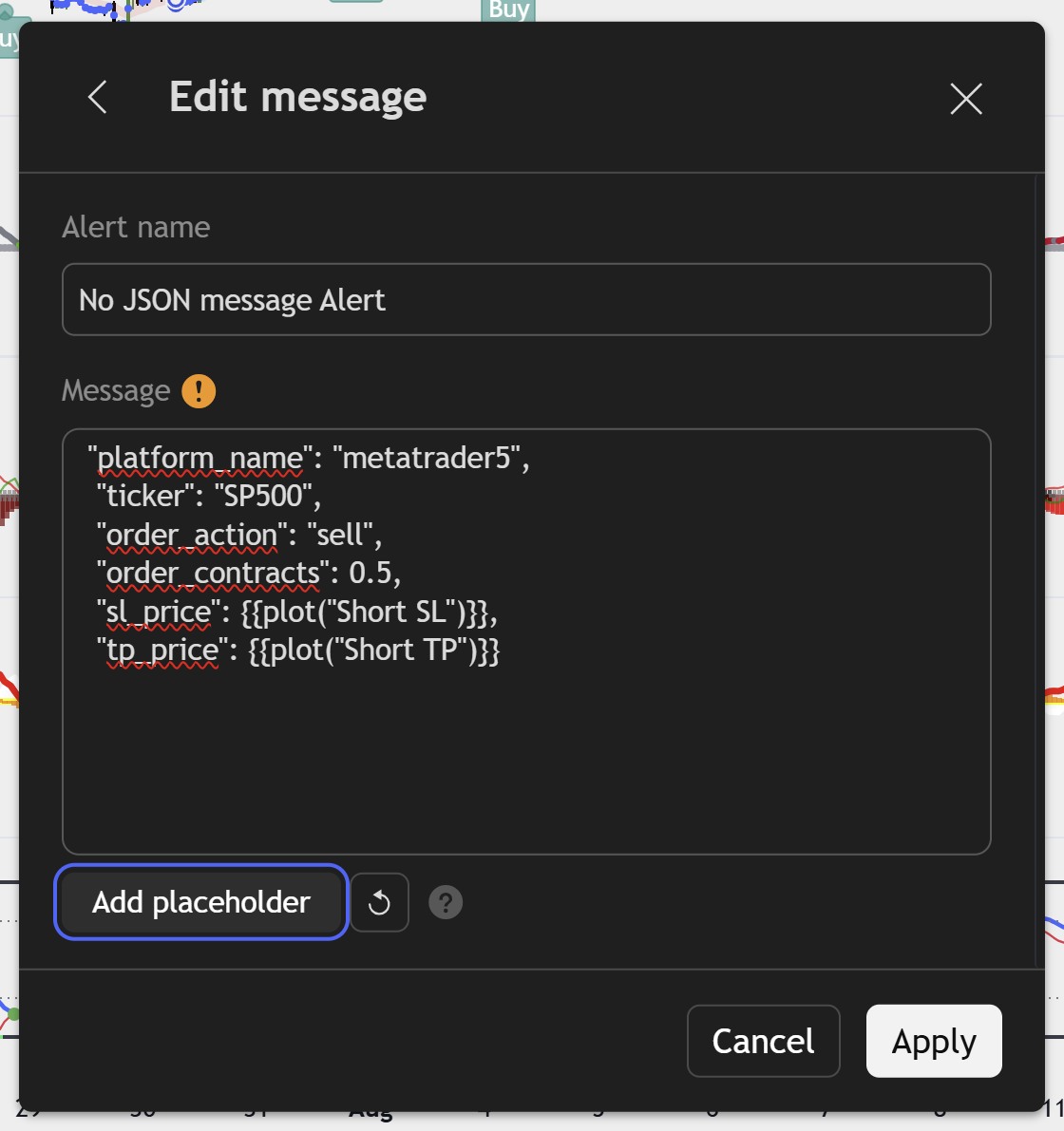
Without the JSON object: TradingView accepts the alert text and the plot placeholders can be used.
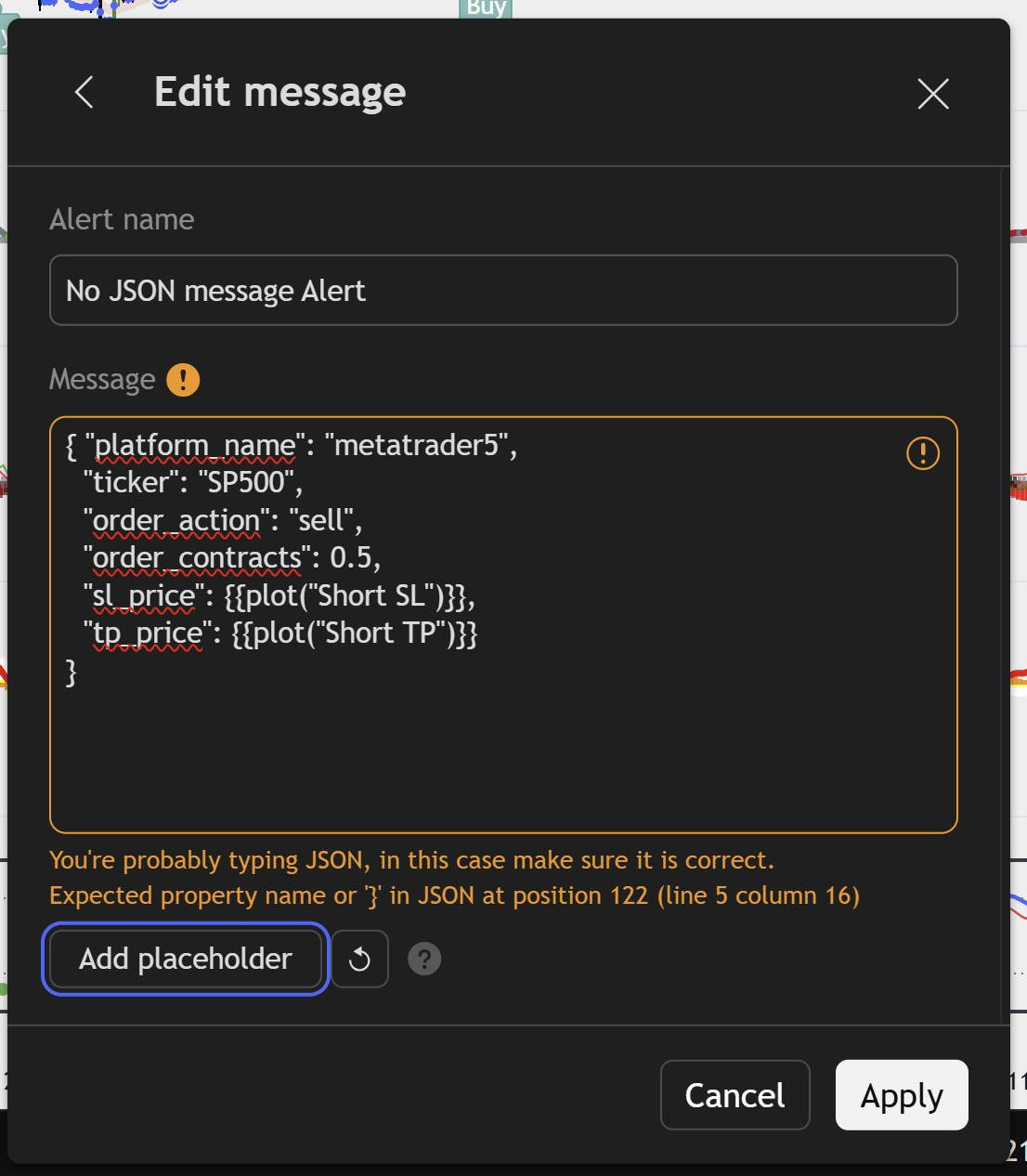
With the JSON object: TradingView reports a JSON validation error.
So the limitation is not that the indicator cannot provide the values. TradingView can provide them. The problem is the direct placeholder -> JSON step in the alert editor.
3. The Practical Solution: Send Plain Text and Let AlgoWay AI Normalize It
Instead of forcing the dynamic plot placeholders into valid JSON, the alert can be sent as ordinary text. TradingView substitutes the indicator values first, and AlgoWay AI reads the resulting message and converts it into the structured format used by the AlgoWay execution engine.
A simple sell alert can be written like this:
platform_name: metatrader5
ticker: XAUUSD
order_action: sell
order_contracts: 1
sl_price: {{plot("Short SL")}}
tp_price: {{plot("Short TP")}}
When the alert fires, TradingView replaces the placeholders with the current numerical values calculated by the indicator. AlgoWay AI then identifies the platform, symbol, side, risk value, Stop Loss and Take Profit and creates the normal internal trading command.
The AI is not looking at the chart image. It is parsing values that TradingView has already extracted from the indicator. This AI parsing route may add roughly an extra second compared with a direct valid JSON webhook, but it removes the JSON-placeholder conflict and allows the indicator's dynamic levels to be automated without changing the Pine Script.
4. You Do Not Need to Calculate the Lot Size in Pine Script
This is the second important part of the question. TradingView does not need to know the MT5 account balance or calculate how many lots correspond to 1% risk.
In AlgoWayWS-MT5, set Position size: Lots / Risk% / Balance% to SIZE_RISK_PERCENT.
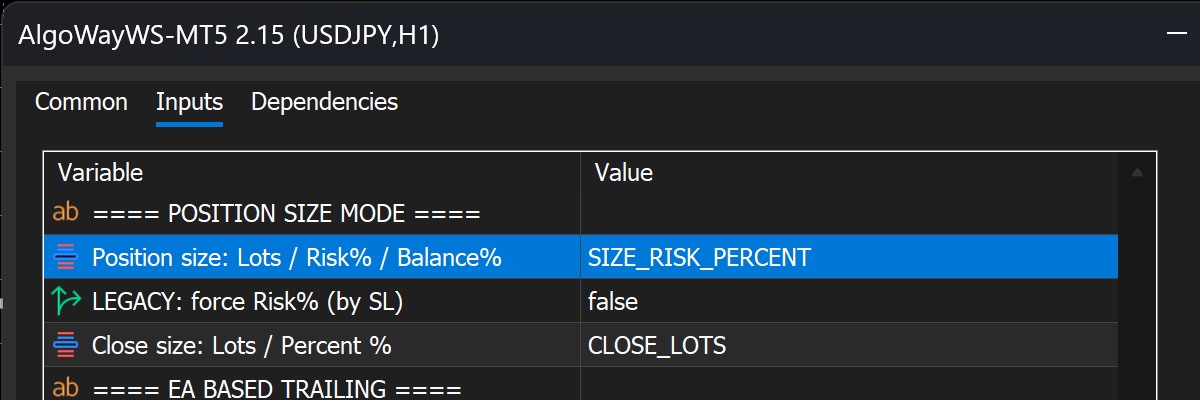
With this mode, the order size value represents the percentage of equity to risk. For example:
order_contracts: 1means risk 1% of the current MT5 account equity;order_contracts: 0.5means risk 0.5%;- the EA uses the actual Stop Loss level received for that trade to calculate the required volume.
The result is automatic variable position sizing:
Smaller SL distance -> larger lot size
Larger SL distance  -> smaller lot size
Selected risk       -> remains 1% of equity
If the strategy generates a 10-pip SL, MT5 calculates the volume for 1% risk at 10 pips. If the next trade has a 13-pip SL, the volume is recalculated. If the next SL is 20 pips away, the volume becomes smaller again. The trader does not need to hard-code a fixed lot size.
5. What Happens to the Indicator's Existing TP/SL Close Alerts?
The indicator can continue to send its separate close alert when its TP or SL condition is reached. That close signal is independent from the position-sizing calculation.
The entry alert can provide the SL value required for 1% risk sizing and can also provide the TP value. If the position has already been closed in MT5 by a broker-side SL or TP before the later TradingView close alert arrives, there is simply no remaining position for that close command to manage.
The Complete Workflow for This Exact Case
- The TradingView indicator produces a Buy or Sell signal.
- The same indicator exposes Entry, SL and TP through TradingView's Add placeholder menu.
- The alert message is kept as plain text instead of forcing those placeholders into JSON.
- TradingView replaces
{{plot("Long SL")}},{{plot("Long TP")}},{{plot("Short SL")}}or{{plot("Short TP")}}with the current values. - AlgoWay AI parses the text and converts it into the structured AlgoWay command.
- AlgoWay sends the command to the connected MT5 EA.
- With
SIZE_RISK_PERCENTenabled, MT5 calculates the lot size from current equity and the actual SL distance. - The trade therefore risks the selected percentage even though the number of pips changes on every signal.
What Is Required for This to Work?
You do not need AlgoWay to visually recognize the chart, and you do not need to rewrite the indicator just to calculate the account-risk lot size.
You do need the indicator's required values to be available to TradingView alerts. The easiest verification is exactly what is shown above: open Add placeholder and confirm that the indicator exposes the required Entry, SL and TP outputs.
For this specific indicator, the menu contains Long Entry, Long TP, Long SL, Short Entry, Short TP and Short SL. That gives AlgoWay the information required to build the trade.
Final Answer
Yes. AlgoWay can automate this TradingView indicator and maintain 1% risk on MT5 even when the Stop Loss distance is different on every trade.
AlgoWay does not need to “see” the chart. TradingView can substitute the indicator's exposed Entry/SL/TP plot values into a plain-text alert. AlgoWay AI converts that message into the normal AlgoWay trading command, and the MT5 EA calculates the lot size using SIZE_RISK_PERCENT and the actual SL distance.
The only special part of this workflow is that the dynamic plot placeholders are sent as plain text rather than forced directly into TradingView JSON. Everything after the AI parsing stage returns to the normal AlgoWay execution flow.
Related AlgoWay Guides
