AlgoWay Blog
Guides, manuals and platform references.
Core
- All articles
- FAQ
- PineConnector alternative
- TradersPost alternative
- Automate TradingView alerts
- Automate Telegram signals
- AlgoWay CopyTrader
- cTrader Copier
- TrendSpider with AlgoWay
- How to Automate a TradingView Indicator with Dynamic SL/TP and 1% Risk on MT5
JSON & Alerts
- JSON schema
- Manual alerts
- TradingView without paid subscription
- AlgoWay Strategy Integration in Pine Script
- Python Trading Bot Webhook Integration
- TRALADAL - TradingView Alert Adapter
- TradingView Order Action Alert
MT5 / Expert Advisors
Errors
Integrations
- MetaTrader 5
- TradeLocker
- Match-Trader
- DXtrade
- Capital.Com
- Binance
- Bybit
- MEXC
- OKX
- Bitget
- Hyperliquid
- BingX
- Alpaca
- Interactive Brokers
- Gate.io
- Coinbase
- WEEX
- ProjectX
- cTrader logic
Other Publications
- MT5 EA Webhook JSON Reference
- OANDA MT5 with AlgoWay
- Buy Webhook via Buy Me a Coffee
- AlgoWay vs PineConnector
- Compare AlgoWay with other trading automation tools
- AlgoWay Red News Filter
- Why Paid Trading Indicators Avoid Verifiable Backtests
- How Trade Automation Tools Mislead You
- utomating a Prop-Firm Eval End to End:
- ATP Premium Indicator Testing Bot
- Why TradingView Backtests Win but Live Trades Lose
- Best Prop Firms for Trading Automation and Telegram Signal Copy in 2026
- Four AIs, One Trader, and the Strange Case of TradingView to Alpaca
AlgoWay Strategy Lab
IronBot Trading Journal Demo: Tracking a Private TradingView Strategy Automated Through AlgoWay
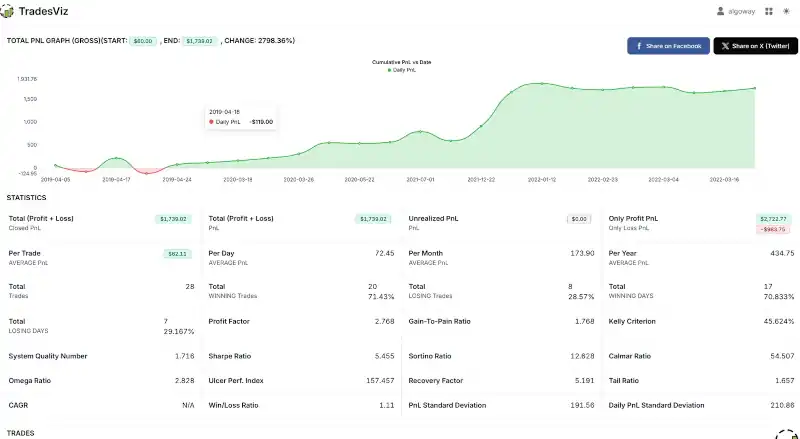
IronBot is a private demonstration strategy used to show how a TradingView strategy can be connected to AlgoWay, automated through webhook alerts, and documented in a trading journal dashboard. The purpose of this page is not to sell a trading system. The purpose is to show the workflow: strategy signal, webhook automation, execution layer, and journal tracking.
Many traders test indicators and strategies inside TradingView, but the hard part starts after the signal. A chart signal is only useful if it can be routed, executed, tracked, and reviewed. AlgoWay was built for this execution layer: it connects TradingView alerts, Telegram signals, and structured JSON webhooks to multiple brokers, exchanges, and trading platforms.
The demonstration route is:
TradingView strategy -> webhook alert -> AlgoWay -> broker/exchange execution -> trading journal dashboardLast updated: 2026-05-14 • Author: AlgoWay
What This IronBot Demo Shows
The IronBot demo shows a complete automation loop. A private TradingView strategy generates signals. Those signals are sent as webhook alerts. AlgoWay receives the alert, normalizes the order request, routes it to the selected destination, and allows the trader to review the resulting activity in an external trading journal.
The public dashboard screenshot above is useful because it does not only show one trade. It shows a journal-style view with cumulative PnL, winning trade percentage, profit factor, average PnL per trade, trade table data, and day-by-day tracking. This is the type of reporting that helps a trader review whether an automated strategy is behaving consistently after the signal leaves TradingView.
In this demonstration, the journal is not the execution engine. The execution layer is AlgoWay. The journal is the reporting layer. Keeping these two layers separate is important because a strategy can send alerts correctly and still need independent tracking after execution.
Why a Trading Journal Matters for Automated Strategies
Automated trading is not only about opening and closing orders. A trader also needs to understand what the system did over time. Without a journal, the user may only see open positions, closed orders, and broker history. That is not always enough to understand behavior across multiple days, symbols, timeframes, and strategy conditions.
A trading journal helps answer questions such as:
- How many trades were closed?
- What percentage of trades were winners?
- What was the average PnL per trade?
- Did the strategy have long flat periods or concentrated profit periods?
- Did losing trades cluster around specific market conditions?
- Which symbols, sessions, or tags performed better?
- Did the automation behave the way the TradingView strategy expected?
For manual traders, a journal is a review tool. For automated traders, it is also an audit layer. It helps compare what the strategy was supposed to do with what actually happened after the webhook alert reached the execution platform.
IronBot Demo Result View
The dashboard view used in this article presents a demonstration trading journal with summary statistics, cumulative PnL, and a trades table. The visible journal metrics include a closed PnL total, winning trade percentage, profit factor, average PnL per trade, and individual trade rows.
| Dashboard area | What it shows | Why it matters |
|---|---|---|
| Cumulative PnL graph | Progression of the journal result over time. | Helps review whether profit came steadily or from a few isolated moves. |
| Win rate and profit factor | Basic performance quality metrics. | Helps evaluate whether the system depends only on win rate or also on payoff structure. |
| Average PnL per trade | Mean closed result across journaled trades. | Helps estimate whether the strategy has enough edge after costs and execution friction. |
| Trades table | Individual trades, symbols, timestamps, direction, notes and tags. | Helps connect automated execution back to strategy logic and market context. |
| Notes and tags | Human-readable context around the trade or strategy group. | Helps turn raw trade history into searchable review data. |
The public demo dashboard can be opened here: IronBot-style trading journal dashboard.
Where AlgoWay Fits in the Workflow
AlgoWay is the automation layer between the signal source and the destination account. A TradingView alert by itself does not know how to manage different platforms, account modes, broker formats, JSON fields, symbol mappings, order types, or trade-routing logic. AlgoWay handles that middle layer.
For a TradingView strategy such as the private IronBot demo, the workflow can be summarized like this:
| Layer | Role | Example |
|---|---|---|
| TradingView | Generates the strategy signal and sends a webhook alert. | Buy, sell, close, limit, stop, stop loss, take profit. |
| AlgoWay | Receives, validates, normalizes and routes the order request. | TradingView to MT5, cTrader, TradeLocker, DXtrade, Binance, OKX, MEXC, Bybit and others. |
| Broker or exchange | Executes the final order on the account. | Market order, limit order, stop order, SL/TP update, close action. |
| Trading journal | Documents the result after execution. | Cumulative PnL, win rate, profit factor, notes, tags and trade table. |
Why This Is Better Than Only Watching TradingView Backtests
A TradingView backtest is useful, but it is not the same as an execution journal. Backtests are controlled by strategy assumptions, historical bars, commission settings, slippage settings, and TradingView execution rules. A real or demo execution route adds another layer: broker rules, symbol mapping, order filling, account mode, latency, spread, session rules, and platform-specific behavior.
That is why a journal workflow matters. It allows a trader to compare the TradingView strategy idea with the actual automation result. The signal may be correct, but execution can still be affected by order type, lot size, broker limits, symbol naming, account mode, or platform-specific restrictions.
AlgoWay helps bridge this gap by keeping the signal format structured and the routing logic clear. The journal then helps document what happened after the order was sent.
Example TradingView Alert JSON
A private strategy can send structured JSON to AlgoWay. A simple example for a market order may look like this:
{
  "platform_name": "metatrader5",
  "ticker": "{{ticker}}",
  "order_action": "{{strategy.market_position}}",
  "order_contracts": "{{strategy.order.contracts}}",
  "price": "{{close}}"
}
For more advanced workflows, AlgoWay can also work with fields for absolute stop loss and take profit prices, order type, trade mode, platform-specific settings and strategy identifiers.
{
  "platform_name": "metatrader5",
  "ticker": "EURUSD",
  "order_action": "buy",
  "order_contracts": 0.10,
  "order_type": "market",
  "sl_price": 1.08000,
  "tp_price": 1.09000,
  "trade_type": "hedge"
}
This structure is useful when one trader wants different strategies, account modes or destinations to behave differently without manually rebuilding the execution process for every signal.
What Makes AlgoWay Useful for Strategy Automation
AlgoWay is not limited to a single platform route. The same TradingView automation idea can be adapted to different destinations depending on the trader's setup. That matters because many traders do not stay inside one broker or one platform forever.
- TradingView webhook automation: send structured alerts from indicators or strategies.
- Multi-platform execution: route signals to MT5, cTrader, TradeLocker, DXtrade, Match-Trader, crypto exchanges and other supported destinations.
- Order type support: use market, limit and stop order workflows where supported.
- Risk fields: pass stop loss and take profit values as part of the alert payload.
- Trade modes: control different execution behavior such as hedge, netting, opposite or inverse when required.
- Telegram signal automation: combine TradingView workflows with Telegram signal parsing in the same broader automation environment.
- Journal-ready workflow: review executed activity later in a trading journal instead of only relying on chart screenshots.
IronBot Is Private, AlgoWay Is the Product
This point is important. IronBot is not the product being offered here. IronBot is not published, not sold, not licensed, and not shared for free. It is a private demonstration strategy used to show a real automation pattern.
The product is AlgoWay: the routing and automation layer that can receive TradingView webhooks and send them to trading platforms. The same workflow can be used with a user's own TradingView strategy, Pine Script indicator, manual alert, or another structured signal source.
In other words, the value of this article is not “copy this strategy.” The value is “this is how a private TradingView strategy can become an automated, trackable workflow.”
Recommended Setup for a Similar Workflow
- Create or prepare a TradingView strategy or indicator with clear entry and exit conditions.
- Create an AlgoWay webhook route for the destination platform.
- Build the TradingView alert message in valid JSON format.
- Send small test alerts first and check AlgoWay logs.
- Confirm order execution on the broker or exchange side.
- Export or sync results into a trading journal for review.
- Use notes and tags to document strategy versions, symbols, timeframes and execution conditions.
This approach is especially useful for traders who want to compare a TradingView backtest with forward test behavior, demo account execution, or real account automation.
Signal, Execution and Journal as Separate Layers
A reliable automation workflow treats the TradingView signal, the AlgoWay execution layer and the trading journal as separate components. This makes it easier to identify whether a problem comes from the strategy, webhook delivery, platform execution or later performance review.
AlgoWay handles the automation layer. The trading journal handles review. The private IronBot demo shows how these parts can work together without exposing or selling the strategy source code.
Public IronBot TradeBench Review Entries
The TradeBench journal below is used as an additional public review layer for the IronBot-style automation demo. It presents imported closed trades from a mixed MT5 symbol set, including BTCUSDM and ETHUSDM crypto contracts together with other CFD-style symbols, so the result can be reviewed outside the original trading terminal.
In the imported TradeBench sample, the public table reports a net result of 61 journal units, or approximately 0.29% on the displayed account basis. This is not presented as audited investment performance and it is not a public sale record for IronBot. It is a demonstration of how an automated TradingView strategy workflow can be documented with public trade reviews after AlgoWay routes the signal to an execution destination.
The purpose of these links is to make the workflow transparent: each public TradeBench page shows one closed entry, while this AlgoWay article explains the automation layer behind the signal route.
| # | Symbol | Direction | Trade date | P/L | P/L % | Public review |
|---|---|---|---|---|---|---|
| 1 | EURGBPM | Long | 14 May 2026 | 0.00 | -0.01% | EURGBPM long review 01 |
| 2 | EURGBPM | Long | 14 May 2026 | 0.00 | -0.02% | EURGBPM long review 02 |
| 3 | EURGBPM | Long | 14 May 2026 | 0.00 | -0.02% | EURGBPM long review 03 |
| 4 | BTCUSDM | Long | 14 May 2026 | 10.00 | 1.28% | BTCUSDM long review 01 |
| 5 | BTCUSDM | Long | 13 May 2026 | 8.20 | 1.02% | BTCUSDM long review 02 |
| 6 | BTCUSDM | Long | 12 May 2026 | -1.84 | -0.11% | BTCUSDM long review 03 |
| 7 | XAUUSDM | Long | 12 May 2026 | -1.40 | -0.98% | XAUUSDM long review |
| 8 | EURGBPM | Long | 12 May 2026 | 0.00 | 0.01% | EURGBPM long review 04 |
| 9 | BTCUSDM | Long | 09–12 May 2026 | 19.00 | 1.16% | BTCUSDM long swing review |
| 10 | BTCUSDM | Long | 05 May 2026 | 4.47 | 0.28% | BTCUSDM long review 04 |
| 11 | BTCUSDM | Long | 03–05 May 2026 | 29.00 | 0.61% | BTCUSDM long review 05 |
| 12 | BTCUSDM | Long | 02 May 2026 | -0.27 | -0.03% | BTCUSDM long review 06 |
| 13 | BTCUSDM | Long | 02 May 2026 | -2.57 | -0.11% | BTCUSDM long review 07 |
| 14 | BTCUSDM | Long | 02 May 2026 | -0.30 | -0.04% | BTCUSDM long review 08 |
| 15 | ETHUSDM | Long | 26 Apr 2026 | -1.30 | -0.06% | ETHUSDM long review 01 |
| 16 | ETHUSDM | Long | 26 Apr 2026 | -2.02 | -0.09% | ETHUSDM long review 02 |
| 17 | BTCUSDM | Long | 25 Apr 2026 | -0.15 | -0.02% | BTCUSDM long review 09 |
This TradeBench review set is useful for traders who want to understand the full automation path: TradingView signal generation, AlgoWay webhook routing, broker or exchange execution, and public journal review. It also shows why a trading journal should be part of every automated strategy workflow, especially when a system trades crypto symbols such as BTCUSDM and ETHUSDM through an MT5-style environment.
Related AlgoWay Guides
- How to create a TradingView webhook
- AlgoWay JSON schema guide
- How to turn a TradingView indicator into a strategy
- TradingView automation adapter
- AlgoWay trade modes guide
- TradingView free webhook alerts guide
- Advanced risk management and trade automation
- TradersPost alternative
- PineConnector alternative
Final Summary
The IronBot trading journal demo shows how a private TradingView strategy can be automated through AlgoWay and reviewed in a trading journal dashboard. The strategy itself is private and not distributed. The important lesson is the workflow: TradingView signal, AlgoWay webhook routing, execution on the selected platform, and journal-based review.
If you already have a TradingView strategy and want to automate its alerts across multiple platforms, AlgoWay provides the execution layer that connects the signal to real trading destinations.