AlgoWay Blog
Guides, manuals and platform references.
Core
- All articles
- FAQ
- PineConnector alternative
- TradersPost alternative
- Automate TradingView alerts
- Automate Telegram signals
- AlgoWay CopyTrader
- cTrader Copier
- TrendSpider with AlgoWay
- How to Automate a TradingView Indicator with Dynamic SL/TP and 1% Risk on MT5
JSON & Alerts
- JSON schema
- Manual alerts
- TradingView without paid subscription
- AlgoWay Strategy Integration in Pine Script
- Python Trading Bot Webhook Integration
- TRALADAL - TradingView Alert Adapter
- TradingView Order Action Alert
- How to use Clone Mode
MT5 / Expert Advisors
Errors
Integrations
- MetaTrader 5
- Tradovate
- TradeLocker
- cTrader
- Match-Trader
- DXtrade
- Capital.Com
- Binance
- Bybit
- MEXC
- OKX
- Bitget
- Hyperliquid
- BingX
- Alpaca
- Interactive Brokers
- Gate.io
- Coinbase
- TooBit
- WEEX
- ProjectX
- Rithmic
Other Publications
- MT5 EA Webhook JSON Reference
- OANDA MT5 with AlgoWay
- Buy Webhook via Buy Me a Coffee
- AlgoWay vs PineConnector
- Compare AlgoWay with other trading automation tools
- AlgoWay Red News Filter
- Why Paid Trading Indicators Avoid Verifiable Backtests
- How Trade Automation Tools Mislead You
- utomating a Prop-Firm Eval End to End:
- ATP Premium Indicator Testing Bot
- Why TradingView Backtests Win but Live Trades Lose
- Best Prop Firms for Trading Automation and Telegram Signal Copy in 2026
- Four AIs, One Trader, and the Strange Case of TradingView to Alpaca
- TradingView Automation
AlgoWay Strategy Lab
How to Set Up Telegram Trading Notifications in AlgoWay

AlgoWay Telegram notifications let you receive real-time messages about trading automation, webhook events, test messages and platform activity directly in Telegram. To enable them, you create a Telegram bot with BotFather, copy the bot token, retrieve your chat_id, add both values in AlgoWay settings, and send a test notification.
This guide explains how to create a Telegram bot, retrieve the bot token and chat_id, configure both values in AlgoWay, test notification delivery, and troubleshoot common setup problems.
The setup route is:
BotFather -> Telegram bot token -> getUpdates chat_id -> AlgoWay Telegram settings -> test notificationTelegram notifications do not execute trades by themselves. They are a notification layer for your AlgoWay trading automation workflow.
Last updated: 2026-05-12 • Author: AlgoWay
Quick Answer: How to Enable Telegram Notifications in AlgoWay
To set up Telegram notifications in AlgoWay:
- Open Telegram and search for
@BotFather. - Send
/newbot. - Create a bot name and a unique username ending in
bot. - Copy the bot token from BotFather.
- Open your new bot and send it any message, for example
Hello. - Open
https://api.telegram.org/bot<TOKEN>/getUpdatesin your browser. - Copy
chat.idfrom the JSON response. - Open AlgoWay settings and enable Telegram notifications.
- Paste the bot token without the word
bot. - Paste the
chat_id. - Click Send Test Notification.
What AlgoWay Telegram Notifications Do
Telegram notifications are useful when you want to monitor AlgoWay activity without keeping the dashboard open all the time.
Depending on your AlgoWay setup, Telegram messages can help you monitor:
- test notification delivery;
- webhook activity;
- trading automation events;
- platform connection status;
- execution confirmations;
- errors or rejected actions where supported;
- important account or route events shown by AlgoWay.
Telegram is a fast notification channel, but it should not replace AlgoWay Webhook Logs, platform logs or broker/exchange order history. Use Telegram for awareness and logs for investigation.
Where Telegram Notifications Fit in Trading Automation
AlgoWay Telegram notifications are not only basic account messages. They are part of a wider trading automation monitoring workflow. When a TradingView webhook alert, manual webhook signal, Telegram signal copier event or platform connector event reaches AlgoWay, the dashboard and logs remain the main source of technical detail. Telegram gives you the fast external notification layer, so you can see important trading activity without keeping the AlgoWay dashboard open every minute.
This is especially useful for traders who run automated trading alerts on several routes. A trader may have one webhook for TradingView to MetaTrader 5, another route for TradingView to TradeLocker, and a separate crypto route for Binance or Bybit. In that setup, Telegram notifications become a practical way to monitor whether the system is alive, whether test messages are delivered, and whether key events are reaching the user.
The goal is not to replace execution logs. Telegram provides a fast notification, while AlgoWay logs show the received payload, parsed command, destination response and debugging details. Together they make the trading workflow easier to supervise.
Telegram Notifications vs Telegram Signal Copier
AlgoWay has two Telegram-related workflows, and they should not be confused. Telegram notifications send messages from AlgoWay to your Telegram chat. They are used for monitoring, alerts, status checks and test messages. AI Telegram Signals work in the opposite direction: AlgoWay reads Telegram channels or groups, understands trading signals with AI, and routes those signals to a connected trading platform.
In simple terms, Telegram notifications are for receiving updates from AlgoWay, while the Telegram signal copier is for using Telegram as a trade signal source. A user who wants to receive a message when a webhook fires should configure Telegram notifications. A user who wants to copy trading signals from a Telegram channel to MT5, cTrader, TradeLocker, Tradovate or a crypto exchange should configure the AI Telegram Signals feature.
This page covers notifications sent from AlgoWay to Telegram. For copying Telegram trading signals into a broker or exchange account, use the AI Telegram signal copier manual.
Before You Start
Prepare:
- Telegram account;
- access to
@BotFatherin Telegram; - AlgoWay account;
- AlgoWay dashboard access;
- a browser to call
getUpdates; - a safe place to temporarily copy the bot token and
chat_id.
Step 1. Create a Telegram Bot with BotFather
Telegram bots are created and managed through @BotFather.
- Open Telegram.
- Search for
@BotFather. - Open the official BotFather chat.
- Click Start.
- Send the command
/newbot. - Choose a display name, for example
AlgoWayBot. - Choose a unique username ending in
bot, for exampleAlgoWayTradeBot. - Copy the bot token that BotFather gives you.
Example token format:
1234567890:ABCDEF12345ghIkl-zyx57W2v1u123ew11Do not include the word bot before the token when pasting it into AlgoWay settings.
Step 2. Get Your Telegram chat_id
AlgoWay needs a chat_id so Telegram knows where to deliver notifications.
- Open your newly created bot in Telegram.
- Send any message to the bot, for example
Hello. - Open your browser.
- Paste the following URL, replacing
<TOKEN>with your real bot token:
https://api.telegram.org/bot<TOKEN>/getUpdatesExample:
https://api.telegram.org/bot1234567890:ABCDEF12345ghIkl-zyx57W2v1u123ew11/getUpdatesYou should see a JSON response. Find chat.id.
{
  "ok": true,
  "result": [
    {
      "update_id": 987654321,
      "message": {
        "chat": {
          "id": 1122334455,
          "type": "private"
        },
        "text": "Hello"
      }
    }
  ]
}
In this example, the chat_id is:
1122334455getUpdates URL.
Step 3. Configure Telegram Notifications in AlgoWay
Now add the token and chat ID inside AlgoWay.
- Log in to AlgoWay.
- Open Settings.
- Find the Telegram Notifications section.
- Enable notifications.
- Paste the bot token into the Bot Token field.
- Paste the
chat_idinto the Chat ID field. - Save the settings if the interface requires saving.
- Click Send Test Notification.
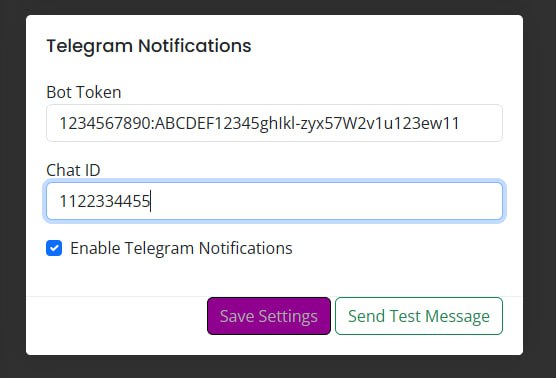
Correct token format in AlgoWay:
1234567890:ABCDEF12345ghIkl-zyx57W2v1u123ew11Incorrect token format in AlgoWay:
bot1234567890:ABCDEF12345ghIkl-zyx57W2v1u123ew11Step 4. Send a Test Notification
After entering the token and chat ID, send a test notification from AlgoWay.
- Click Send Test Notification.
- Open Telegram.
- Open the chat with your bot.
- Confirm that the test message arrived.
- If it arrived, Telegram notifications are configured.
- If it did not arrive, check the troubleshooting section below.
A successful test means AlgoWay can call the Telegram Bot API with your bot token and deliver a message to your configured chat ID.
Best Notification Workflow for Webhook Trading
A strong Telegram notification setup should confirm the full route, not only the bot token. The first successful test proves that AlgoWay can send a message through the Telegram Bot API. After that, the next check is whether real trading automation events are visible in the correct place: AlgoWay Webhook Logs, platform logs and Telegram notifications.
For example, if you use TradingView alerts with AlgoWay, the complete monitoring path is:
TradingView alert fires -> AlgoWay webhook receives payload -> AlgoWay routes command -> platform responds -> Telegram notification informs userThis workflow is useful for webhook trading bots, MT5 automation, crypto exchange routes, prop-firm platform routing and manual alert testing. Telegram gives fast visibility, but the exact reason for success or rejection should still be checked inside AlgoWay logs and the connected platform.
During setup, start with a test notification, then trigger a small test event from the real route. This helps separate three different problems: a Telegram delivery issue, a webhook delivery issue, or a destination platform execution issue.
Private Chat, Group and Channel Notes
The easiest setup is a private chat between you and your bot. Groups and channels can also work, but they require extra attention.
Private Chat
Private chat is the simplest option. Send a message to the bot and use the chat.id from getUpdates.
Group Chat
To send notifications to a group:
- Add the bot to the group.
- Send a message in the group.
- Call
getUpdates. - Find the group
chat.id.
Group chat IDs can be negative numbers. That is normal.
Channel
For channels, the bot usually must be added as an administrator with permission to post messages. Use channel setup only if you understand Telegram channel permissions.
Security Notes for Telegram Notifications
Telegram bot tokens should be treated like passwords.
- Do not publish the bot token.
- Do not expose the token in public screenshots.
- Do not reuse the same bot for unrelated systems.
- Do not add the bot to public groups unless you need it there.
- If the token is leaked, revoke it in BotFather and create a new token.
- If notifications stop unexpectedly, verify that the bot still exists and the token was not regenerated.
If you regenerate the token in BotFather, update the token in AlgoWay immediately.
Common Telegram Notification Problems
Test Notification Does Not Arrive
Check bot token, chat ID, whether notifications are enabled, and whether you sent at least one message to the bot before calling getUpdates.
getUpdates Shows Empty result
Open the bot chat in Telegram and send a new message. Then refresh the getUpdates URL.
Token Was Pasted with bot Prefix
In the URL, Telegram uses bot<TOKEN>. In AlgoWay settings, paste only the token itself, without the word bot.
Wrong chat_id
Make sure you copied message.chat.id from the correct chat. If you want private notifications, use the private chat ID, not a group ID.
Group Notifications Do Not Work
Add the bot to the group, send a new group message, call getUpdates, and copy the group chat ID. For some group/channel setups, bot permissions must be adjusted.
Bot Was Blocked
If you blocked the bot in Telegram, unblock it and send a new message before testing again.
Token Was Regenerated
If you regenerated the token in BotFather, the old token no longer works. Update AlgoWay with the new token.
Notifications Work in Test but Not During Trading
Check whether the relevant AlgoWay event type actually sends Telegram notifications, and check AlgoWay webhook logs for the trading route.
Telegram Notifications vs Webhook Trading
Telegram notifications and webhook trading are different parts of the AlgoWay system.
| Feature | Purpose |
|---|---|
| TradingView webhook | Sends trading commands to AlgoWay. |
| AlgoWay webhook route | Routes trading commands to platforms such as MT5, Coinbase, ProjectX or Tradovate. |
| Telegram notifications | Sends monitoring messages to your Telegram chat. |
Telegram is for notification. AlgoWay webhooks are for automation.
Use Cases for Telegram Trading Notifications
Telegram notifications are useful for solo traders, small trading teams and account managers who need fast awareness around automated trading activity. The most common use case is simple: you want to know when AlgoWay receives an important event, sends a test message or reports platform activity. But the same setup can also support more advanced workflows.
- TradingView webhook monitoring: receive Telegram alerts when your TradingView automation route is being tested or used.
- MT5 automation monitoring: keep an external notification channel for MetaTrader 5 automated trading routes.
- Crypto execution awareness: monitor webhook routes connected to Binance, Bybit, OKX, Coinbase or other supported exchanges.
- Manual alert testing: confirm that a manual AlgoWay alert or webhook test reaches the expected monitoring channel.
- Team visibility: send notifications to a private Telegram group when several people need to monitor the same automation setup.
For traders who manage several systems, this creates a clean separation: AlgoWay handles automation, the connected platform handles execution, and Telegram handles fast external notifications. This makes the setup easier to operate than checking every platform manually after each alert.
Telegram Bot Token, chat_id and AlgoWay Alerts
The essential terms in this setup are simple. The Telegram bot token identifies the bot created with BotFather. The Telegram chat_id identifies the private chat, group or channel where messages should be delivered. The getUpdates method helps you find that chat ID after the bot receives a message. AlgoWay stores the token and chat ID in the Telegram Notifications settings and uses them to send trading automation notifications.
The final result is a Telegram alert channel connected to your AlgoWay account, with a verified bot token, the correct chat_id, and tested delivery from AlgoWay.
Related AlgoWay Guides
- How to create a TradingView webhook alert
- How to create manual TradingView webhook alerts
- How to automate TradingView alerts to any broker with AlgoWay
- AlgoWay JSON schema guide
- How to fix AlgoWay webhook Error 415
- TradingView to MetaTrader 5 with AlgoWay
- TradingView to ProjectX with AlgoWay
- TradingView to Coinbase with AlgoWay
Final Summary
To set up AlgoWay Telegram notifications, create a bot in BotFather, copy the bot token, send a message to the bot, retrieve chat_id through getUpdates, add both values in AlgoWay settings, and send a test notification.
Once configured, Telegram becomes a fast monitoring layer for your AlgoWay trading automation. Keep the bot token private, verify test delivery, and use AlgoWay logs for detailed debugging.