AlgoWay Blog
Guides, manuals and platform references.
Core
- All articles
- FAQ
- PineConnector alternative
- TradersPost alternative
- Automate TradingView alerts
- Automate Telegram signals
- AlgoWay CopyTrader
- cTrader Copier
- TrendSpider with AlgoWay
- How to Automate a TradingView Indicator with Dynamic SL/TP and 1% Risk on MT5
JSON & Alerts
- JSON schema
- Manual alerts
- TradingView without paid subscription
- AlgoWay Strategy Integration in Pine Script
- Python Trading Bot Webhook Integration
- TRALADAL - TradingView Alert Adapter
- TradingView Order Action Alert
MT5 / Expert Advisors
Errors
Integrations
- MetaTrader 5
- TradeLocker
- Match-Trader
- DXtrade
- Capital.Com
- Binance
- Bybit
- MEXC
- OKX
- Bitget
- Hyperliquid
- BingX
- Alpaca
- Interactive Brokers
- Gate.io
- Coinbase
- TooBit
- WEEX
- ProjectX
- cTrader logic
Other Publications
- MT5 EA Webhook JSON Reference
- OANDA MT5 with AlgoWay
- Buy Webhook via Buy Me a Coffee
- AlgoWay vs PineConnector
- Compare AlgoWay with other trading automation tools
- AlgoWay Red News Filter
- Why Paid Trading Indicators Avoid Verifiable Backtests
- How Trade Automation Tools Mislead You
- utomating a Prop-Firm Eval End to End:
- ATP Premium Indicator Testing Bot
- Why TradingView Backtests Win but Live Trades Lose
- Best Prop Firms for Trading Automation and Telegram Signal Copy in 2026
- Four AIs, One Trader, and the Strange Case of TradingView to Alpaca
- TradingView Automation
AlgoWay Strategy Lab
MT5 Copier EA Setup Guide: Copy MetaTrader 5 Trades to TradeLocker, DXtrade, cTrader, Tradovate or Another MT5 Account
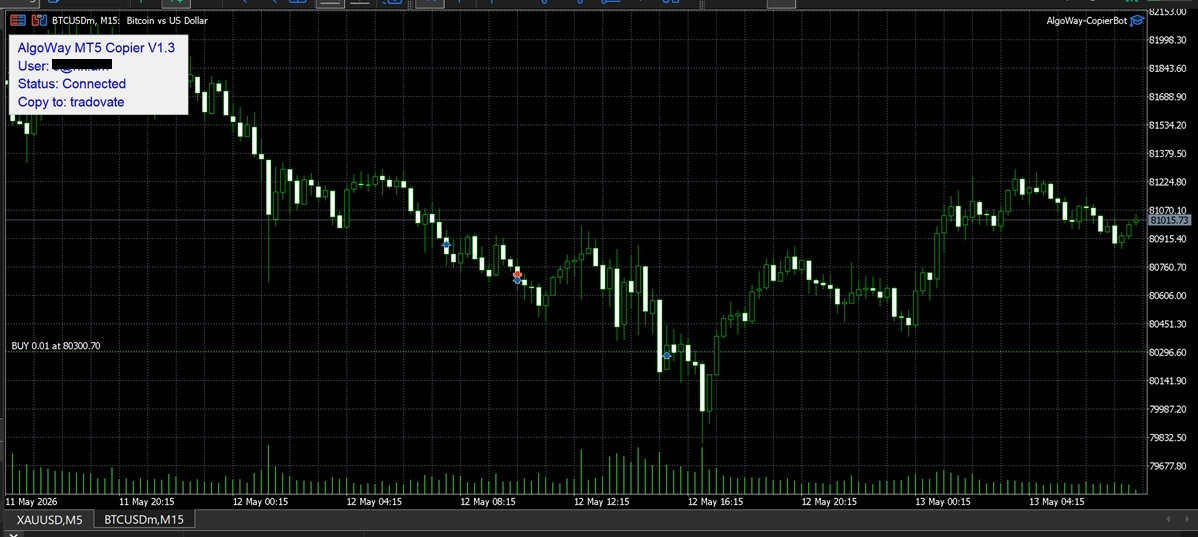
AlgoWay MT5 Copier EA is used when MetaTrader 5 is the signal source. It watches trades opened on your source MT5 account and sends them to an AlgoWay webhook. AlgoWay then routes those trade events to the selected destination platform, such as TradeLocker, DXtrade, cTrader, Match-Trader, Tradovate, ProjectX, Binance, OKX, Bybit, MEXC, BitMEX, or another supported execution route.
This page replaces the older per-platform MT5 copier manuals. The current workflow uses one EA file:
Download AlgoWay-MT5-CopierBot.ex5
Use this guide when trades originate in a MetaTrader 5 terminal and need to be copied to another supported platform through AlgoWay. This workflow does not use TradingView alerts or Pine Script. The source is the MetaTrader 5 account on which the CopierBot is installed.
The normal route is:
Source MetaTrader 5 account >> AlgoWay MT5 Copier EA >> AlgoWay webhook >> destination platformFor MT5 to MT5 copying, the route is different and has a separate section below. In that case, the destination MT5 account must be connected through the AlgoWayWS-MT5 WebSocket EA, and Clone Mode is used to forward the copied JSON to the destination MT5 webhook.
Last updated: 2026-05-13 • Product: AlgoWay MT5 CopierBot • Source platform: MetaTrader 5
Quick Answer: How to Install AlgoWay MT5 Copier EA
To copy trades from MetaTrader 5 through AlgoWay:
- Create a webhook in AlgoWay.
- Set Source (from) to MetaTrader.
- Set Platform (to) to the destination platform, for example TradeLocker, DXtrade, cTrader, Tradovate or another supported destination.
- Enter the required destination platform credentials in the AlgoWay webhook form.
- Copy the generated webhook UUID or full webhook URL from the dashboard.
- Download AlgoWay-MT5-CopierBot.ex5.
- Install the EA into MQL5 >> Experts inside your MetaTrader 5 data folder.
- Enable Algo Trading and add
https://algoway.coto Allow WebRequest for listed URL. - Attach the EA to a chart and paste the AlgoWay webhook UUID or full URL into the EA input.
- Open a small test position in MT5 and confirm that the position is copied to the destination platform.
- Check MT5 Experts logs and AlgoWay >> Webhook Logs if anything does not work.
What AlgoWay MT5 Copier EA Does
The MT5 Copier EA is a source-side bridge. It is installed on the MetaTrader 5 account where trades are opened. When a new position appears, changes, or closes, the EA sends the relevant trade event to AlgoWay. AlgoWay then translates that event into the destination platform format.
This makes the EA useful for several copy-trading and cross-platform automation workflows:
- MT5 to TradeLocker - copy MetaTrader positions to a TradeLocker account configured in the webhook.
- MT5 to DXtrade - use MT5 as the source and DXtrade as the execution destination.
- MT5 to cTrader - route source MT5 trades to a cTrader account.
- MT5 to Match-Trader - copy trades from an MT5 strategy to a Match-Trader destination.
- MT5 to Tradovate or ProjectX - use MT5 as the source interface and route supported symbols to futures destinations.
- MT5 to crypto exchanges - when symbol mapping and destination rules are configured, MT5 events can be routed to supported exchange integrations.
The copier does not need a TradingView alert. It does not need Pine Script. It does not wait for a webhook from TradingView. The trade event starts from the MT5 source account itself.
This Manual Is Not for TradingView Alerts
AlgoWay has different automation routes, and confusing them is the most common setup mistake. This page is for MetaTrader 5 as the source. The correct source in the webhook form is MetaTrader.
| Workflow | Source | Tool installed | Use this guide? |
|---|---|---|---|
| TradingView alert to MT5 | TradingView | AlgoWayWS-MT5 EA on destination MT5 | No |
| MT5 trade copier to TradeLocker / DXtrade / cTrader | MetaTrader | AlgoWay-MT5-CopierBot.ex5 on source MT5 | Yes |
| MT5 to MT5 copy trading | MetaTrader source + MT5 WebSocket destination | CopierBot on source MT5 and AlgoWayWS-MT5 EA on destination MT5 | Partly; see MT5 to MT5 section |
If the wrong source is selected, the EA can show a red status such as Wrong Webhook or Invalid Webhook. That usually means the webhook UUID does not belong to a valid MetaTrader source route for this CopierBot workflow.
Step 1: Create the MetaTrader Source Webhook in AlgoWay
Open your AlgoWay dashboard and click the button to create a webhook. You can start with a 14-day trial webhook or create a main paid webhook. Functionally, the trial webhook works like the paid webhook during the trial period. After the trial expires, the same webhook can be activated with a subscription.
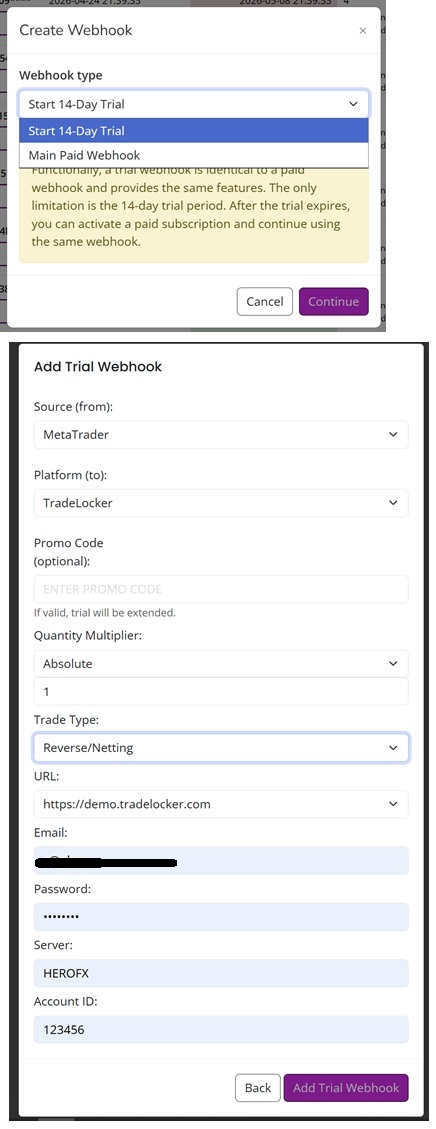
In the webhook form, use this logic:
- Source (from): choose MetaTrader.
- Platform (to): choose the destination platform where copied trades should be executed.
- Promo Code: optional.
- Quantity Multiplier: choose how the source MT5 volume should be converted.
- Trade Type: select the behavior needed for the destination route, for example Reverse/Netting where available.
- URL / Email / Password / Server / Account ID: fill the destination platform credentials when the selected destination requires them.
For example, when copying MT5 trades to TradeLocker, the AlgoWay form must contain the TradeLocker URL, email, password, server and account ID. The EA itself only needs the AlgoWay webhook UUID or full URL. It does not need your TradeLocker password.
After the webhook is created, it appears in the dashboard. Copy the UUID or full webhook URL from the Webhook UUID column.
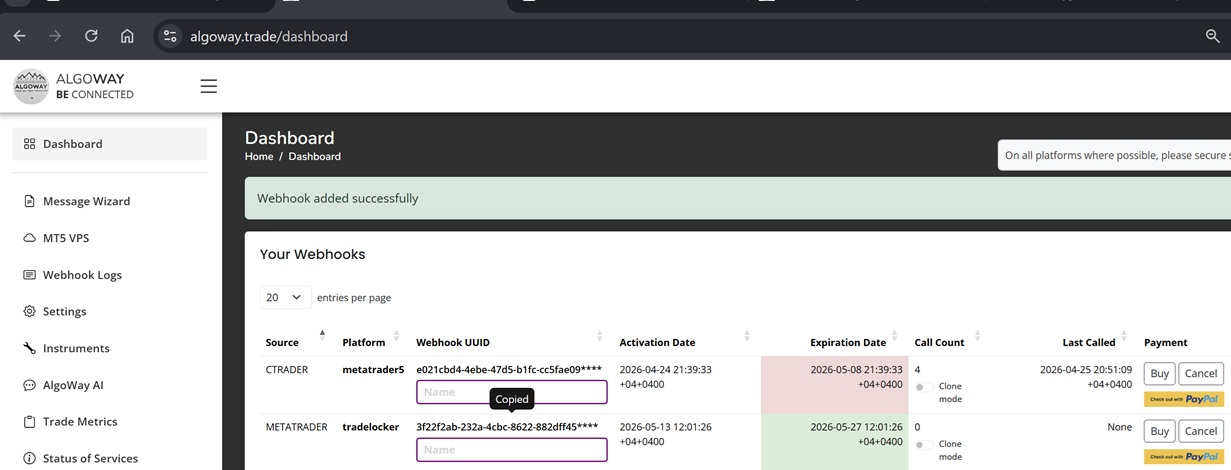
Step 2: Download the Current AlgoWay MT5 CopierBot EA
The current MT5 copier uses one Expert Advisor file:
AlgoWay-MT5-CopierBot.ex5Download it here:
https://algoway.trade/downloads/MT5-Copier/AlgoWay-MT5-CopierBot.ex5
AlgoWay MT5 CopierBot is also published on the official MQL5 Market: AlgoWay MT5 CopierBot on MQL5 Market.
The old model with separate per-platform EA files is no longer the main setup. The current EA sends MT5 source events to AlgoWay, and AlgoWay handles destination routing according to the webhook configuration.
Step 3: Install the EA in MetaTrader 5
Install the .ex5 file into the MetaTrader 5 data folder of the terminal that will act as the source account. This is the MT5 account where trades are opened manually, by another EA, or by your own trading system.
Use the normal MT5 Expert Advisor installation process:
- Open MetaTrader 5.
- Click File >> Open Data Folder.
- Open the MQL5 folder.
- Open the Experts folder.
- Copy
AlgoWay-MT5-CopierBot.ex5into that folder. - Return to MT5.
- In the Navigator panel, right-click Expert Advisors and click Refresh, or restart MT5.
- Find AlgoWay-CopierBot under Expert Advisors.
- Drag it onto a chart.
The chart symbol does not define the destination platform. The destination is defined by the AlgoWay webhook. The chart is the runtime place where the EA remains attached and running.
Step 4: Enable Algo Trading and WebRequest for algoway.co
Before the EA can communicate with AlgoWay, MetaTrader 5 must allow automated trading and WebRequest access.
- Open Tools >> Options in MetaTrader 5.
- Open the Expert Advisors tab.
- Enable Allow algorithmic trading.
- Enable Allow DLL imports if your current CopierBot build requires it.
- Enable Allow WebRequest for listed URL.
- Add this URL exactly:
https://algoway.co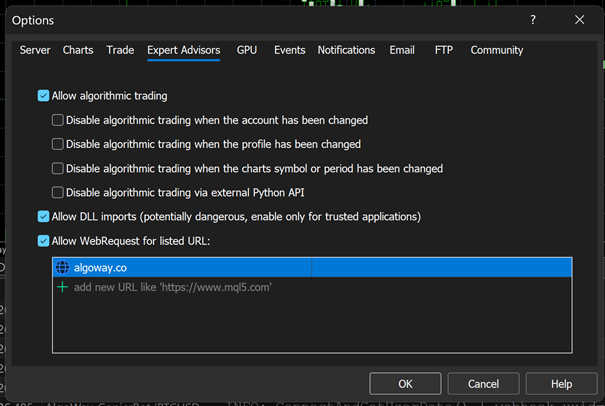
The new CopierBot communicates with AlgoWay. You do not need to add every destination platform URL inside MT5 for this current workflow. The required WebRequest domain is https://algoway.co.
Step 5: Configure the EA Inputs
After dragging the EA onto the chart, open the Inputs tab and configure the main fields.
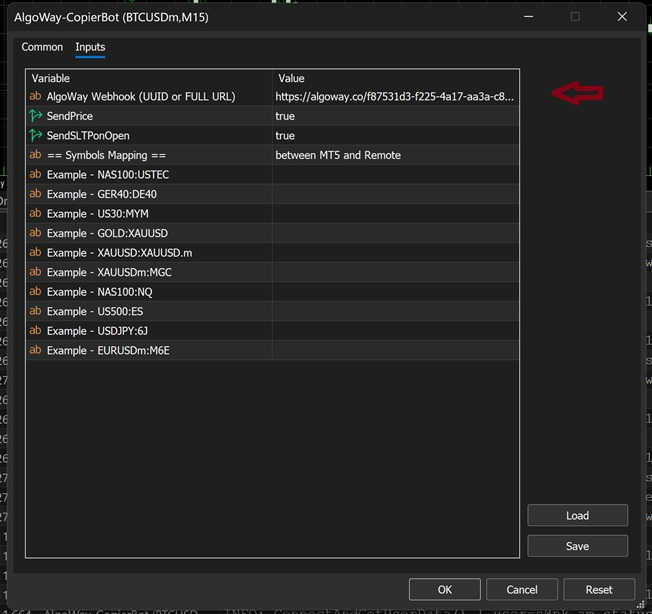
| Input | What to enter | Purpose |
|---|---|---|
| AlgoWay Webhook (UUID or FULL URL) | Paste the copied webhook UUID or the full AlgoWay URL. | Identifies the AlgoWay route that will receive MT5 trade events. |
| SendPrice | true or false |
Sends the MT5 trade price with the copied event when enabled. |
| SendSLTPonOpen | true or false |
Sends Stop Loss and Take Profit values together with the open event when available. |
| Symbols Mapping | Examples such as NAS100:USTEC or XAUUSD:XAUUSD.m |
Maps MT5 source symbols to destination symbols when names are different. |
Symbol mapping is important because MetaTrader brokers and destination platforms often use different symbols for the same instrument. For example, the source MT5 account may use XAUUSD, while the destination may require a futures symbol, broker-specific symbol, exchange symbol, or a different contract code. The mapping tells the MT5 CopierBot how to translate the local MT5 symbol before AlgoWay sends the copied trade to the remote destination platform.
In the current MT5 CopierBot interface, symbol mapping is entered in the dedicated fields named Map 01, Map 02, Map 03 and so on. Each mapping field must use this exact format:
LOCAL_MT5_SYMBOL:REMOTE_DESTINATION_SYMBOLThe value before the colon is the symbol exactly as it appears in your local MetaTrader 5 source account. The value after the colon is the symbol required by the remote destination platform where the trade will be copied. Do not add spaces around the colon.
Examples:
XAUUSD:GC
EURUSD:6E
NAS100:NQ
BTCUSDm:BTCUSD
After filling the inputs, click OK. Keep the chart open and keep MT5 running.
Step 6: Check Connected Status on the Chart
When the configuration is correct, the chart panel should show that the EA is connected. It can display information such as the AlgoWay user, connection status and the destination platform.
A normal successful state looks like:
Status: Connected
Copy to: tradovate
If there is a problem, the status can appear in red. Common red statuses include:
- Wrong Webhook - the webhook was created with the wrong source or does not match this CopierBot workflow.
- Invalid Webhook - the UUID or full URL format is wrong, incomplete or not found.
- Expired Webhook - the trial or paid period is no longer active.
- Webhook not active - the route exists but is not active for execution.
- Connection error - MT5 cannot reach AlgoWay, often because WebRequest is not enabled for
https://algoway.co.
When the status is red, do not open large test trades. First fix the webhook, subscription, source/platform selection or WebRequest setting.
Step 7: Open One Small Test Position and Check the Copy
After the EA shows connected status, test the copier with one small position from the source MT5 account.
- Choose a symbol that exists on both the source and destination sides, or configure symbol mapping first.
- Open a small BUY or SELL position in the source MT5 account.
- Watch the MT5 chart and the Experts tab.
- Open the destination platform and confirm that the copied position appears.
- Close or modify the source position only after the first copied open event is confirmed.
- Check AlgoWay >> Webhook Logs to confirm the event was received and routed.
The first test should prove the complete path:
MT5 source position opened >> CopierBot sends event >> AlgoWay receives event >> destination platform receives copied orderIf the source MT5 order opens but the destination does not copy it, do not guess. Check the logs in this order: MT5 Experts tab first, then AlgoWay Webhook Logs, then destination platform response.
Logs: Where to Check What Happened
There are two main log areas for this setup.
1. MetaTrader 5 Experts Tab
The Experts tab shows the EA-side activity. Use it to confirm whether the EA started, connected, read the webhook, sent the event, or reported an error.
Open it in MetaTrader 5:
Terminal panel >> ExpertsUseful things to check:
- EA loaded successfully;
- AlgoWay webhook was accepted;
- status changed to connected;
- source position was detected;
- event was sent to AlgoWay;
- WebRequest or permission errors;
- wrong webhook or expired webhook messages.
2. AlgoWay Webhook Logs
The AlgoWay dashboard has a Webhook Logs section. This is where the platform-side event and response can be inspected. If the MT5 Experts tab says the event was sent, but the destination did not open the copied trade, Webhook Logs are the next place to check.
Webhook Logs can show:
- incoming event from the MT5 copier;
- parsed symbol, side and volume;
- destination platform response;
- rejected order reason;
- invalid symbol or size issue;
- subscription or route status problem;
- platform credential error.
For support or debugging, the best evidence is a screenshot or copied text from both places: MT5 Experts and AlgoWay Webhook Logs.
Common Problems and Fixes
Wrong Webhook
This usually means the webhook UUID is not a valid MetaTrader source route for the CopierBot. Check that the webhook was created with Source (from) = MetaTrader. Do not use a TradingView source webhook for this EA.
Invalid Webhook
Check the UUID or full URL. A missing character, extra space, copied masked text, or incomplete URL can make the webhook invalid. Copy it again from the AlgoWay dashboard.
Expired Webhook
The trial or paid period has ended. Activate the webhook or create the correct active route.
EA Does Not Connect
Check Tools >> Options >> Expert Advisors. Algo Trading must be enabled and https://algoway.co must be listed under WebRequest. Then reattach the EA or restart MT5.
Position Opens in MT5 but Does Not Copy
Check whether the EA detected the position in the Experts tab. Then check AlgoWay Webhook Logs. If AlgoWay received the event, the issue is usually on destination credentials, symbol mapping, volume, market session or destination platform rules.
Wrong Symbol on Destination
Use symbol mapping. The source symbol and destination symbol do not always match. Examples include suffixes, futures symbols, metals, indices and crypto contract names.
SL/TP Does Not Copy on Open
Check SendSLTPonOpen. If it is enabled and the source position has SL/TP values, the EA can send them with the open event when the destination route supports those fields.
Special Case: MT5 to MT5 Copying Is Different
Copying from one MT5 account to another MT5 account is not the same as copying from MT5 to TradeLocker, DXtrade, cTrader or another API platform.
For MT5 to MT5, the destination account must be connected as a separate AlgoWay MT5 destination. That destination uses the AlgoWayWS-MT5 WebSocket EA, not the CopierBot. The CopierBot is only on the source MT5 account.
The correct MT5 to MT5 route is:
Source MT5 account >> MT5 CopierBot >> primary AlgoWay webhook >> Clone Mode >> destination MT5 webhook >> AlgoWayWS-MT5 EA >> destination MT5 accountHow to set up MT5 to MT5 copying
- Create the source MT5 copier webhook and attach AlgoWay-MT5-CopierBot.ex5 to the source MT5 account.
- Create a second webhook for the destination MT5 account using the MT5 WebSocket workflow.
- Install and connect AlgoWayWS-MT5 EA on the destination MT5 terminal according to the MT5 WebSocket setup guide.
- Do not treat the second MT5 webhook as a normal external platform credential form.
- Do not pay the destination/slave webhook separately when it is used only as the clone receiver.
- Enable Clone Mode for the destination/slave webhook so it can receive the copied JSON events.
- Open one small source MT5 position and confirm that it appears in the destination MT5 account.
Use these related guides for the MT5 to MT5 case:
When This Copier Setup Is the Right Choice
Use this setup when trades begin on a MetaTrader 5 account and must be copied to TradeLocker, DXtrade, cTrader, Match-Trader, Tradovate, ProjectX, another MT5 account, or another supported AlgoWay destination.
The source determines which manual and EA you need. Use the TradingView webhook guides when TradingView generates the signal. Use the MT5 WebSocket guide when MetaTrader 5 is the destination. Use this CopierBot guide when MetaTrader 5 is the source.
FAQ: AlgoWay MT5 Copier EA
Is this EA for TradingView alerts?
No. This EA is for copying trades from a source MetaTrader 5 account. TradingView alerts use a different webhook workflow.
Which webhook source should I choose?
Choose MetaTrader as the source. If you choose TradingView, the CopierBot can reject the webhook as wrong for this workflow.
Where do I enter TradeLocker or DXtrade credentials?
Enter destination platform credentials inside the AlgoWay webhook form. The EA input only needs the AlgoWay webhook UUID or full URL.
What URL should be added to WebRequest in MT5?
Add https://algoway.co in Tools >> Options >> Expert Advisors >> Allow WebRequest for listed URL.
Can I paste only the UUID instead of the full URL?
Yes. The EA input supports the AlgoWay webhook UUID or the full AlgoWay webhook URL.
How do I know the EA is connected?
The chart panel should show a connected status and the destination platform. The MT5 Experts tab should also show connection and activity logs.
Where do I check errors?
Check the MT5 Experts tab first, then check AlgoWay >> Webhook Logs. The chart status can also show red errors such as Wrong Webhook, Invalid Webhook or Expired Webhook.
How does MT5 to MT5 copying work?
MT5 to MT5 requires a source CopierBot webhook plus a separate destination MT5 WebSocket webhook. The destination webhook is connected with AlgoWayWS-MT5 EA and receives copied JSON through Clone Mode.
Final Summary
AlgoWay MT5 Copier EA is the correct setup when MetaTrader 5 is the source account. Create a MetaTrader source webhook, configure the destination platform in AlgoWay, download AlgoWay-MT5-CopierBot.ex5, install it into MT5, enable WebRequest for https://algoway.co, paste the webhook UUID or full URL, and test one small copied position.
If the destination is another MT5 account, use the separate MT5 WebSocket destination workflow and Clone Mode. Do not mix the MT5 source copier workflow with the TradingView alert workflow.