AlgoWay Blog
Guides, manuals and platform references.
Core
- All articles
- FAQ
- PineConnector alternative
- TradersPost alternative
- Automate TradingView alerts
- Automate Telegram signals
- AlgoWay CopyTrader
- cTrader Copier
- TrendSpider with AlgoWay
- How to Automate a TradingView Indicator with Dynamic SL/TP and 1% Risk on MT5
JSON & Alerts
- JSON schema
- Manual alerts
- TradingView without paid subscription
- AlgoWay Strategy Integration in Pine Script
- Python Trading Bot Webhook Integration
- TRALADAL - TradingView Alert Adapter
- TradingView Order Action Alert
- How to use Clone Mode
MT5 / Expert Advisors
Errors
Integrations
- MetaTrader 5
- Tradovate
- TradeLocker
- cTrader
- Match-Trader
- DXtrade
- Capital.Com
- Binance
- Bybit
- MEXC
- OKX
- Bitget
- Hyperliquid
- BingX
- Alpaca
- Interactive Brokers
- Gate.io
- Coinbase
- TooBit
- WEEX
- KuCoin
- Kraken
- ProjectX
- Rithmic
Other Publications
- MT5 EA Webhook JSON Reference
- OANDA MT5 with AlgoWay
- Buy Webhook via Buy Me a Coffee
- AlgoWay vs PineConnector
- Compare AlgoWay with other trading automation tools
- AlgoWay Red News Filter
- Why Paid Trading Indicators Avoid Verifiable Backtests
- How Trade Automation Tools Mislead You
- utomating a Prop-Firm Eval End to End:
- ATP Premium Indicator Testing Bot
- Why TradingView Backtests Win but Live Trades Lose
- Best Prop Firms for Trading Automation and Telegram Signal Copy in 2026
- Four AIs, One Trader, and the Strange Case of TradingView to Alpaca
- TradingView Automation
AlgoWay Strategy Lab
MT5 Tester GMT: Why Session Filters Shift Their Hours
Published 2026-11-25 · AlgoWay
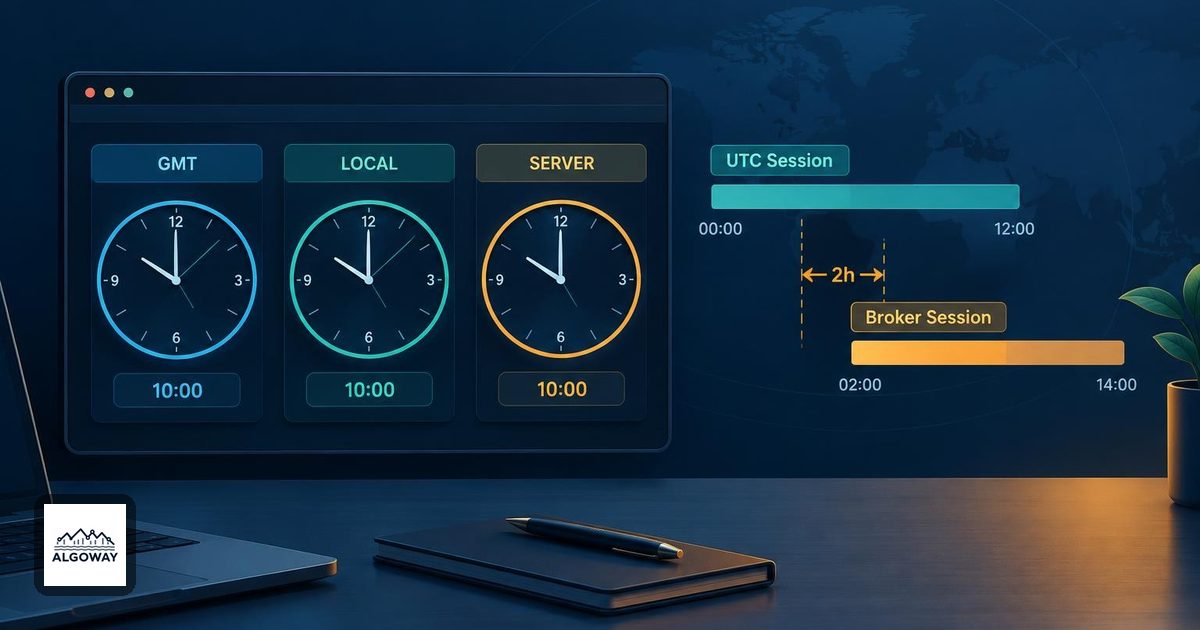
A session filter can pass a backtest while trading the wrong hours. In MT5, a particularly quiet source of trouble is a familiar function name: TimeGMT(). During a Strategy Tester run, it returns simulated server time, not an independently reconstructed historical GMT clock.
For automated trading, that distinction affects which signals are allowed to reach execution. If you are comparing a custom EA test with a TradingView-to-MT5 workflow through AlgoWay, document the clock used by each signal filter before comparing trades. The TradingView session-timezone guide covers the Pine side; this article concerns MT5's tester. A connection between platforms does not make their time assumptions identical.
The tester deliberately makes several clocks agree
The MQL5 TimeGMT reference distinguishes normal operation, where GMT is calculated using the terminal computer's local time and daylight-saving information, from testing, where it equals TimeTradeServer().
MetaQuotes also documents that TimeTradeServer in testing is simulated from historical data and equals TimeCurrent(). Its tester time-management chapter adds TimeLocal() to the equal clocks and explicitly identifies global-time strategies as a case needing timezone handling.
The practical consequence is simple: subtracting TimeGMT() from TimeTradeServer() inside the tester produces zero. That result is not evidence that the broker's historical quotes used UTC. Changing from one of these equal tester clocks to another does not supply the missing offset.
A two-hour mistake with a perfectly valid condition
Assume, solely for this example, that a broker's historical timestamps are UTC+2 throughout the test interval. Your intended entry window is 08:00 inclusive to 10:00 exclusive in UTC.
| Historical UTC | Broker timestamp | Intended UTC filter | Naive tester GMT-hour filter |
|---|---|---|---|
| 06:30 | 08:30 | Reject entry | Allow entry |
| 08:30 | 10:30 | Allow entry | Reject entry |
The naive condition accepts hours from 8 up to, but not including, 10 directly from the tester's TimeGMT() value. It therefore selects 08:00-10:00 in server timestamps, corresponding to 06:00-08:00 UTC under the example assumption. The intended UTC window corresponds to 10:00-12:00 server time.
For this fixed-offset example, the conversion is:
Historical UTC timestamp = Historical server timestamp - 2 hoursSubtract from the complete timestamp before extracting the hour. Subtracting two from an hour field alone leaves date rollover to chance. A server timestamp of 00:30 belongs to 22:30 on the preceding UTC date, which can also change a weekday filter.
Historical offsets belong to the test data
Do not turn the example's two hours into a universal MT5 setting. Establish the timezone convention for the broker or historical dataset used in the run. If its offset changes, use a date-specific offset schedule rather than applying today's difference to the entire history.
Also decide what the strategy actually means by “session.” A fixed 08:00 UTC rule and an 08:00 local-market-time rule are different specifications when that market observes daylight saving. The latter requires the relevant historical local-time rules as well as the conversion from broker timestamps. Two seasonal calendars should not be assumed to change on the same weekend.
A useful test record names the data source, server-time convention, offset schedule, target session timezone, boundary inclusivity and event used to evaluate the condition. Keep these choices fixed while comparing strategy parameters. Otherwise an optimization can quietly compare different parts of the trading day.
Check decisions at the boundary before profit
For a small diagnostic run, record the original simulated timestamp, converted session timestamp and entry-permission result. Choose observations just before, at and after the opening and closing boundaries, plus a date rollover. If the dataset includes an offset change, inspect both sides of that change.
For the example window, 07:59:59 UTC should fail, 08:00:00 should pass, and 10:00:00 should fail whenever the strategy evaluates at those times. If evaluation occurs only on ticks, a session boundary does not itself promise an evaluation exactly on the second. Check the first eligible event after the boundary too. These are proposed checks, not a claim that an EA was tested for this article.
Keep entry permission separate from position management. Blocking new entries after 10:00 does not, by itself, define a rule to close an existing position or cancel a pending order. State those actions explicitly if they are part of the strategy.
Only after the timestamp decisions agree should you compare fills and performance. The MT5 forward-testing guide explains why a historical holdout and a live demo check answer different questions. A tidy equity curve cannot tell you which timezone you meant.