AlgoWay Blog
Guides, manuals and platform references.
Core
- All articles
- FAQ
- PineConnector alternative
- TradersPost alternative
- Automate TradingView alerts
- Automate Telegram signals
- AlgoWay CopyTrader
- cTrader Copier
- TrendSpider with AlgoWay
- How to Automate a TradingView Indicator with Dynamic SL/TP and 1% Risk on MT5
JSON & Alerts
- JSON schema
- Manual alerts
- TradingView without paid subscription
- AlgoWay Strategy Integration in Pine Script
- Python Trading Bot Webhook Integration
- TRALADAL - TradingView Alert Adapter
- TradingView Order Action Alert
MT5 / Expert Advisors
Errors
Integrations
- MetaTrader 5
- TradeLocker
- Match-Trader
- DXtrade
- Capital.Com
- Binance
- Bybit
- MEXC
- OKX
- Bitget
- Hyperliquid
- BingX
- Alpaca
- Interactive Brokers
- Gate.io
- Coinbase
- WEEX
- ProjectX
- cTrader logic
Other Publications
- MT5 EA Webhook JSON Reference
- OANDA MT5 with AlgoWay
- Buy Webhook via Buy Me a Coffee
- AlgoWay vs PineConnector
- Compare AlgoWay with other trading automation tools
- AlgoWay Red News Filter
- Why Paid Trading Indicators Avoid Verifiable Backtests
- How Trade Automation Tools Mislead You
- utomating a Prop-Firm Eval End to End:
- ATP Premium Indicator Testing Bot
- Why TradingView Backtests Win but Live Trades Lose
- Best Prop Firms for Trading Automation and Telegram Signal Copy in 2026
- Four AIs, One Trader, and the Strange Case of TradingView to Alpaca
- TradingView Automation
AlgoWay Strategy Lab
MT5 Invalid Stops: Fix SL/TP Distance and Price Rules
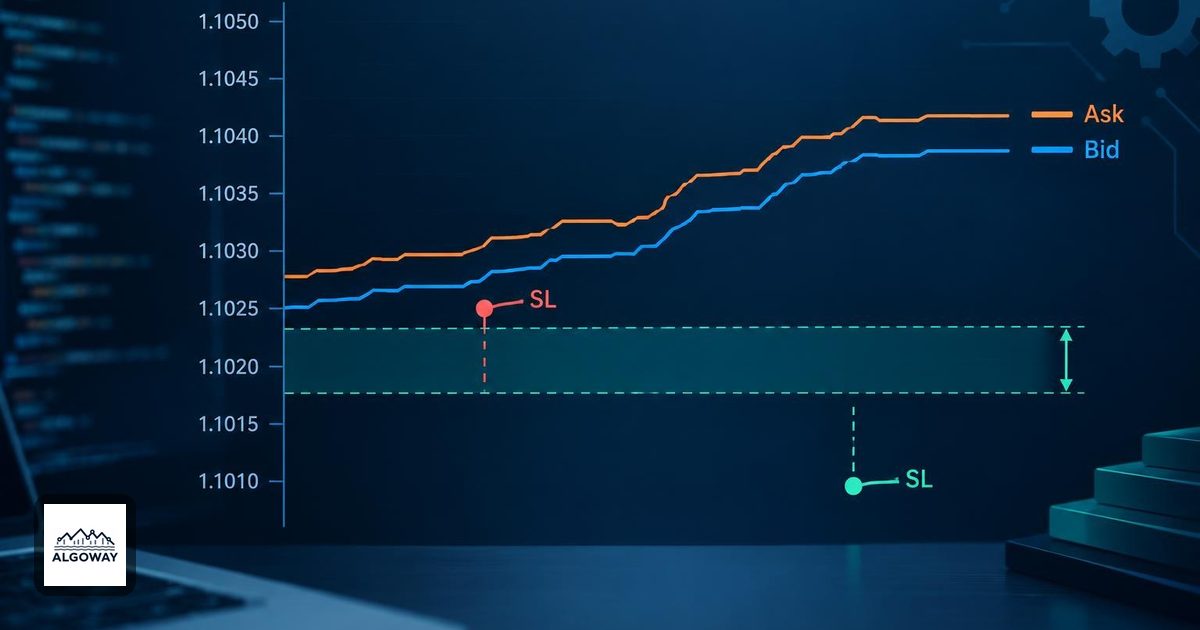
A stop can sit below your BUY entry and still be too close for MT5 to accept. The missing detail is often the spread: the broker checks a long position's protective levels against Bid, while you bought at Ask.
For an MT5 invalid-stops error, compare the actual SL/TP prices with the broker's current quote and symbol rules. Then check which stop settings AlgoWay actually used. A sensible line on a TradingView chart is not proof that the same price is valid on your broker's symbol.
Confirm that the rejection is about stops
MT5 trade-server return code 10016 means invalid stops. Code 10015 means invalid price, while 10029 means an order or position is frozen. Keep the exact return code and broker comment from the failed request; these are different diagnoses. See the official MT5 return-code reference.
If you have only the broader error 4756, start with the AlgoWay MT5 order-rejection guide. Invalid volume, filling mode and other causes need different corrections. This page focuses on protective SL/TP for market entries and existing positions, not pending-entry placement rules.
Measure from the closing quote, not the entry price
For ordinary Bid/Ask-based Forex and CFD execution, a BUY closes at Bid and a SELL closes at Ask. Let D = Stops level × Point size, using the broker's specification for the exact symbol. The minimum-distance checks are:
| Position | Stop Loss | Take Profit |
|---|---|---|
| BUY | SL ≤ Bid − D | TP ≥ Bid + D |
| SELL | SL ≥ Ask + D | TP ≤ Ask − D |
These compare the proposed levels with a current quote, not an old entry or candle close. MetaQuotes documents the Bid/Ask checks for protective stops. Exchange-traded instruments can have their own triggering rules; check the contract and broker rather than extending the Forex example to every market.
Consider a hypothetical five-digit Forex quote: Bid 1.10000, Ask 1.10020, point size 0.00001, Stops level 30. Then D is 0.00030. A BUY stop at 1.09980 is 40 points below Ask, but only 20 points below Bid. It fails the 30-point distance check. At that quote, the BUY SL boundary is 1.09970; the BUY TP boundary is 1.10030.
For a SELL at the same quote, the SL boundary is 1.10050 and the TP boundary is 1.09990. These are arithmetic examples, not suggested trade levels. A price exactly on a boundary can become too close before the broker processes the request.
Point size, tick size and freeze level answer different questions
In MT5, right-click the broker symbol in Market Watch and open Specification. Record its Stops level, price precision and tick size. The Market Watch documentation explains where to find these contract properties. Use the destination symbol, including its suffix, rather than assuming the TradingView feed has identical rules.
Point size converts the stop-distance rule into a price distance. Tick size controls the valid price increment. Decimal formatting alone does not establish a valid trading price. On a hypothetical instrument with two decimal places and a tick size of 0.25, 5000.13 has two decimals but is off the quarter-point price grid. A compatible level still needs to pass the distance check after rounding. The symbol-property reference defines these separately.
Freeze level concerns restrictions on trade operations near the market. A stop that was accepted at entry may later be impossible to modify at a particular quote. This matters when diagnosing breakeven or trailing-stop changes: record whether entry failed or a later modification failed. MetaQuotes explains stop-distance and freeze restrictions. Increasing the distance in an entry message will not, by itself, explain every later modification rejection.
Check which SL/TP AlgoWay actually submitted
AlgoWay accepts exact prices through sl_price and tp_price, and distance values through stop_loss and take_profit. For current MT5 entry handling, exact prices take precedence over the corresponding alert distance when internal fixed SL/TP is disabled. Use one model in a diagnostic message so its meaning is easy to trace.
There are two important EA-input exceptions:
- Use fixed SL/TP (pips) inside EA: when enabled, internal settings supply the stops instead of alert SL/TP values. Editing the alert's stop price will not test the level you think it does.
- Do not place SL in MT5 and Do not place TP in MT5: these controls can omit the corresponding protective level from the entry request. An accepted trade is not proof that both protections were placed.
With those overrides disabled, this illustrates an exact-price message for the hypothetical quote above:
{
  "platform_name": "metatrader5",
  "ticker": "EURUSD",
  "order_action": "buy",
  "order_contracts": "0.01",
  "sl_price": "1.09950",
  "tp_price": "1.10100"
}
Do not send these stale example prices to a live account. The broker symbol, valid volume and current quote must be checked first. Exact prices remove the question of whether a distance meant points, pips or percent; they do not bypass broker validation. The current entry path rounds alert prices to symbol precision, so supply levels on the valid tick grid yourself rather than relying on decimal rounding to do that job.
For the broader field choices, see the MT5 SL/TP message guide. In the MT5 Experts output, compare the current Bid/Ask and final SL/TP values with the alert in AlgoWay Webhook Logs. If the values differ, resolve the active EA settings before adjusting the strategy.
Retest one rejection with fresh evidence
- On a demo account, capture the failed action, broker symbol, current Bid/Ask, proposed SL/TP and exact return code. Separate entry failures from trailing or breakeven failures.
- Check distance, price increment and the active EA stop settings. Correct the identified cause, then recalculate against a fresh quote.
- Send one controlled test. Inspect the resulting position and its actual SL/TP, not just the webhook delivery status.
- If the error persists, provide the sanitized message, symbol specification and relevant request/result lines to support. Remove route identifiers, account details and other private data.
Do not solve a rejection by blindly widening a live stop or disabling protection. Both change the trade you intended. The useful result is a broker-accepted level whose distance, price increment and source you can explain.
