The best
TradingView automation tool
in 2026
AlgoWay turns TradingView alerts into verified broker and exchange execution through one complete automation platform. Connect MT5, prop-firm platforms, futures routes and crypto exchanges, control trade behavior, copy one signal to multiple accounts and inspect every result in full webhook logs.
Already using PineConnector, TradingView.to, TradersPost or PickMyTrade? Switch to AlgoWay without rewriting your TradingView alerts →
Prove the execution before registering. MT5 automation is $7/month billed monthly, or $72/year upfront ($6/month equivalent). 14-day free trial, no credit card required.
Prove It with a Live MT5 Test
No signupThis public route sends a small test order to the AlgoWay MT5 demo environment and returns the execution result. Use fixed test values here. TradingView placeholders belong in your real alert.
The demo forces a small test size. Your own route can use strategy quantity, fixed size, multipliers and platform-specific settings.
The best TradingView automation tool does more than forward a webhook
AlgoWay controls the full route from chart condition to platform response. Every stage is visible, every destination keeps its own settings, and every accepted order or rejection remains available for verification.
TradingView condition
A strategy fill, indicator condition, Pine Script alert or manual chart event becomes true.
Structured message
The alert carries the symbol, action, size and optional SL, TP, trailing or order ID fields.
AlgoWay validation
The route checks the message and converts supported formats into the execution structure.
Platform request
AlgoWay sends the supported action through the selected MT5, broker, futures or exchange connection.
Execution response
The accepted order or exact rejection is stored in logs so the next action is based on evidence.
Why AlgoWay is the best TradingView automation tool in 2026
TradingView does not know your broker credentials, account mode, minimum size, symbol suffix or API request format. AlgoWay stores those route-specific details and applies them after the alert arrives.
The message can be simple because the webhook identifies the configured destination. The same dashboard can maintain separate routes for MT5, TradeLocker, DXtrade, Match-Trader, cTrader, futures platforms and crypto exchanges.
From TradingView JSON to a readable result
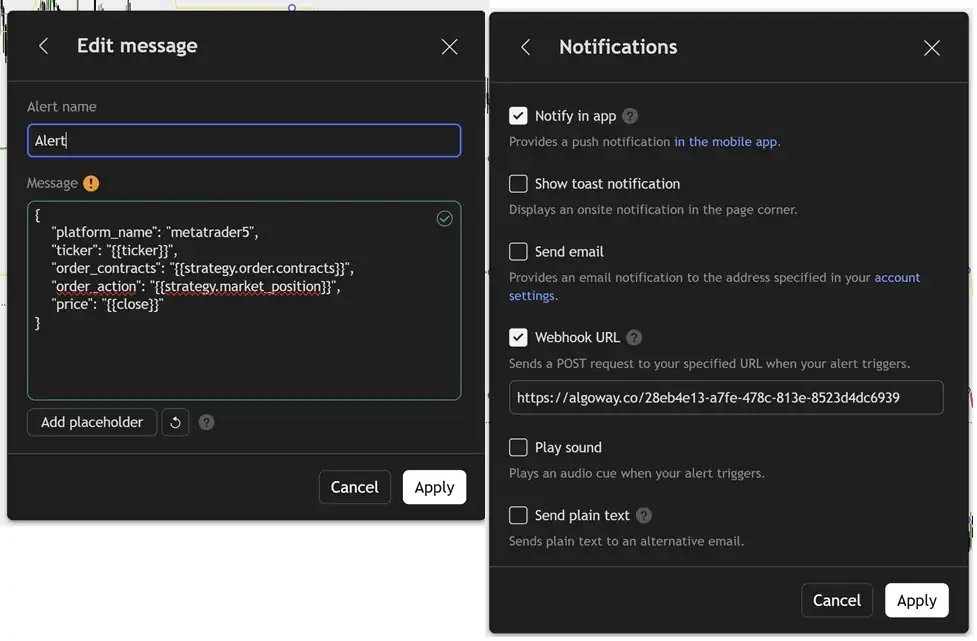
The alert remains explicit at every stage. The example below shows the three objects a trader needs to understand: the TradingView message, the normalized instruction and the execution response.
{
  "platform_name": "metatrader5",
  "ticker": "{{ticker}}",
  "order_contracts": "{{strategy.order.contracts}}",
  "order_action": "{{strategy.market_position}}",
  "price": {{close}}
}
{
  "platform": "metatrader5",
  "symbol": "EURUSD",
  "action": "buy",
  "quantity": "0.10",
  "trade_mode": "reverse",
  "route_status": "active"
}
{
  "status": "success",
  "symbol": "EURUSD",
  "action": "buy",
  "quantity": "0.10",
  "order_id": "destination ticket",
  "message": "order accepted"
}
Complete TradingView automation, not basic alert forwarding
A usable automation route must control how a new signal interacts with the current position, how size is interpreted and how exits are delivered.
Strategies, indicators and manual alerts
Use order-fill placeholders, Pine Script alert messages, indicator conditions or fixed chart alerts. The available automation follows the data exposed by the TradingView alert.
Entry, flat and reduction actions
Route supported buy, sell, flat, close and partial reduction instructions. Unique order IDs can connect strategy events with execution records where the destination supports them.
SL, TP and trailing fields
Send absolute prices or supported distance values for stop loss and take profit. Trailing behavior can be managed by the route, destination or MT5 workflow according to the platform.
Symbol mapping
Connect TradingView tickers with broker suffixes, exchange contract names and platform instrument identifiers. Test the exact symbol before live execution.
Quantity and multiplier rules
Use lots, contracts, units or exchange quantity as required by the destination. Route settings can apply supported multipliers while platform data protects minimum and step rules.
Visible errors
An arrived alert and an executed trade are not the same event. AlgoWay logs separate message validation, route processing and destination rejection so failures are diagnosable.
Strategy, indicator and manual alerts are not interchangeable
The quality of an automation route begins inside TradingView. AlgoWay can execute the information that reaches the webhook, but the alert source determines which values are available and when they are sent.
TradingView strategy
A strategy can expose order-fill events, current market position, contract quantity, order price and strategy-defined identifiers. This is the strongest source when the script already decides entry, exit and position size. Use strategy placeholders when the alert should change automatically with every order. Test whether the alert is created from order fills, alert calls or both, because duplicate event sources can produce repeated commands.
TradingView indicator
An indicator can be automated only through the conditions it exposes. A BUY arrow, SELL zone, stop line or target displayed on the chart is not automatically included in an alert. The indicator must provide the condition or value in the alert message. When only entry conditions are available, create separate exit logic or use destination-side protection instead of assuming AlgoWay can read visual objects from the chart.
Manual chart alert
A manual alert is useful for fixed commands, price-level execution and controlled testing. You can send a fixed symbol, action and size when price crosses a level or a drawing condition becomes true. Manual alerts are simple and transparent, but advanced position management normally requires separate entry, close and protection alerts. They are also the fastest way to prove that a new webhook route works before connecting a full strategy.
Use the route that matches the destination
AlgoWay does not force every platform through the same connection method. The route is selected according to how the destination accepts orders and how the account must remain connected.
| Architecture | Best use | Connection behavior | What remains online |
|---|---|---|---|
| Cloud platform route | TradeLocker, DXtrade, Match-Trader, cTrader, broker APIs and crypto exchanges | AlgoWay authenticates with the configured account or API credentials and sends the supported request directly to the destination. | Your browser and TradingView chart do not need to remain open after the alert has been created. |
| MetaTrader 5 EA route | MT5 brokers and prop accounts | The TradingView alert reaches AlgoWay, then the connected AlgoWayWS-MT5 EA receives the routed instruction inside the terminal. | The MT5 terminal and EA must remain connected. A Windows VPS is useful for continuous operation. |
| Clone Mode route | Several accounts or several platform types from one signal | The main webhook processes the alert and copies the instruction to additional configured webhooks. Every route handles its own platform requirements. | Each destination connection must remain valid, and every result should be reviewed independently. |
AlgoWay executes instructions. It does not invent missing trade logic.
A reliable route is explicit. If the alert does not contain a size, exit action or stop value, the result follows the route defaults and destination rules. AlgoWay cannot determine the trader's intended risk from a chart screenshot or guess which open position should be closed when the message does not identify it.
This boundary is useful because it keeps the strategy decision separate from the execution decision. TradingView decides when the event occurs. The alert states what should happen. AlgoWay applies the saved route rules. The final platform decides whether the request is accepted.
Values must reach the webhook
A plotted stop, target or zone is not executable unless its value is included in the alert or handled by the configured destination.
Symbols must exist at the destination
A ticker available on TradingView may use a different suffix, contract code or instrument identifier in the broker account.
Risk remains a trader decision
Automation removes manual delay, but it can also execute a wrong quantity immediately. Verify size, multiplier, leverage and exit behavior before live use.
Choose what the next signal means
The same SELL alert can open a short, close a long, reverse exposure or trade the opposite direction. Define the behavior in the route before live testing.
Reverse Mode
The latest signal becomes the intended position direction. An opposite signal closes current exposure and opens the new side where the platform supports that sequence.
LONG >> SELL signal >> close long >> open shortHedge Mode
Long and short exposure can be managed separately where the account and destination support dual-side positions. Order IDs can help address individual trades.
LONG remains open >> SELL signal >> separate shortOpposite Mode
MetaTrader workflows can intentionally invert the incoming direction. A long TradingView instruction becomes a sell operation and a short instruction becomes a buy.
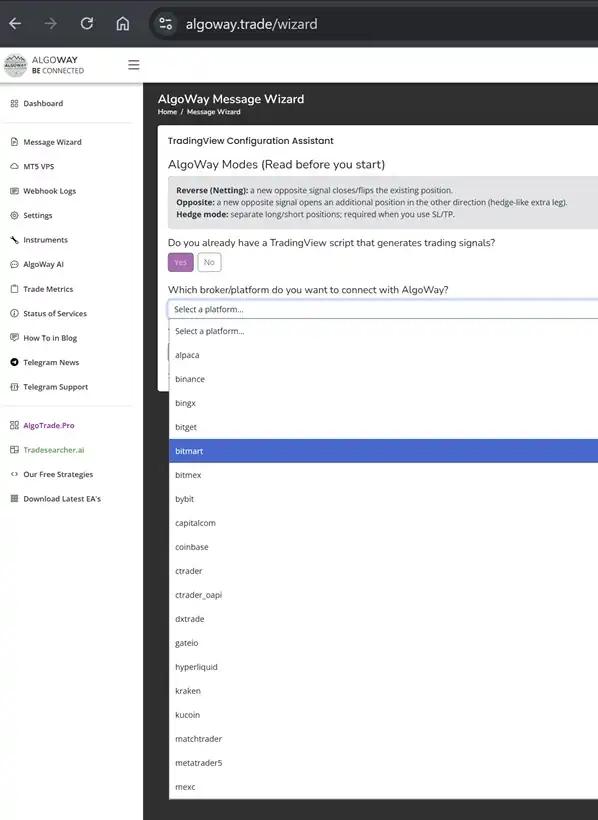
TradingView LONG >> AlgoWay opposite logic >> SELLOne TradingView automation platform for 20+ destinations
Create a separate AlgoWay webhook for each account or platform. Keep the TradingView logic in one place while every route stores its own credentials and execution settings.
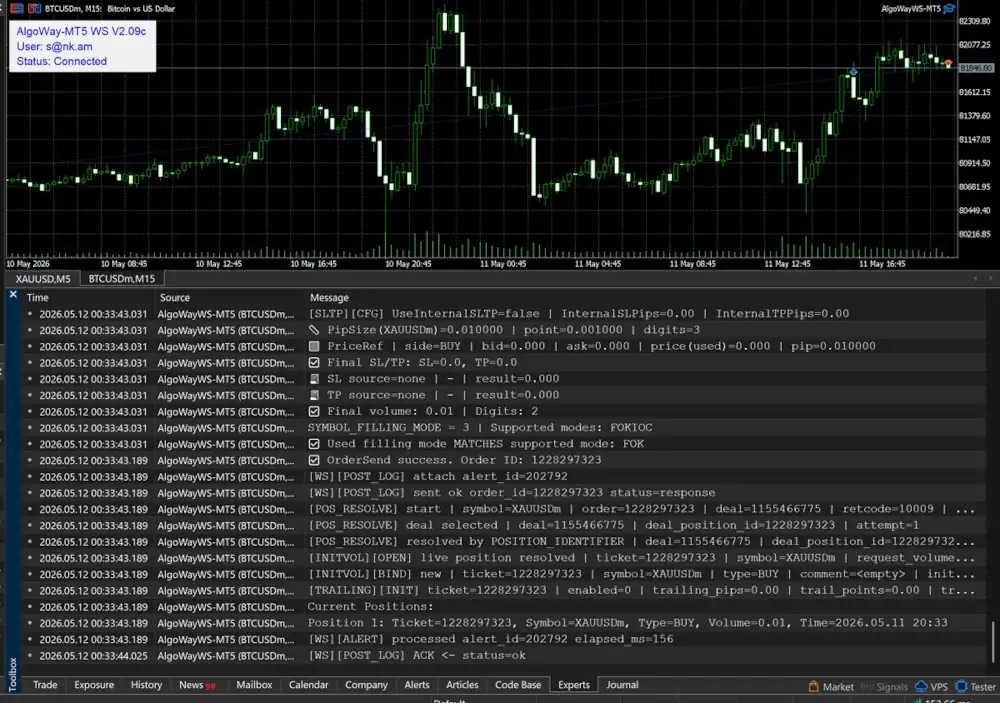
A webhook status is not enough
TradingView can show that an alert fired. That does not prove the destination accepted the trade. AlgoWay keeps the route result visible so you can separate delivery problems from broker-side rejection.
One TradingView alert can automate three independent accounts
Clone Mode copies the received instruction from a main webhook to additional configured webhooks. Each destination keeps its own credentials, symbols, quantity settings and execution result.
| Route | Example destination | Independent settings | Visible result |
|---|---|---|---|
| Main webhook | TradeLocker prop account | Broker URL, account, symbol and size | TradeLocker response in route logs |
| Clone webhook 1 | Bybit personal account | API key, market type, leverage and mode | Bybit response in route logs |
| Clone webhook 2 | MetaTrader 5 broker | Webhook UUID, EA settings and lot size | MT5 ticket and terminal result |
Set up the route in five practical steps
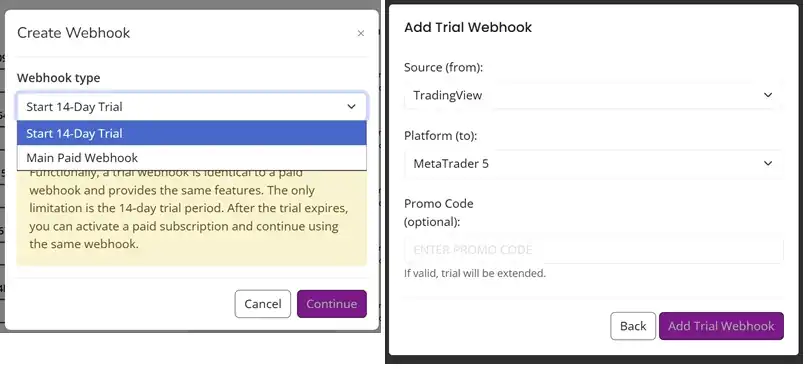
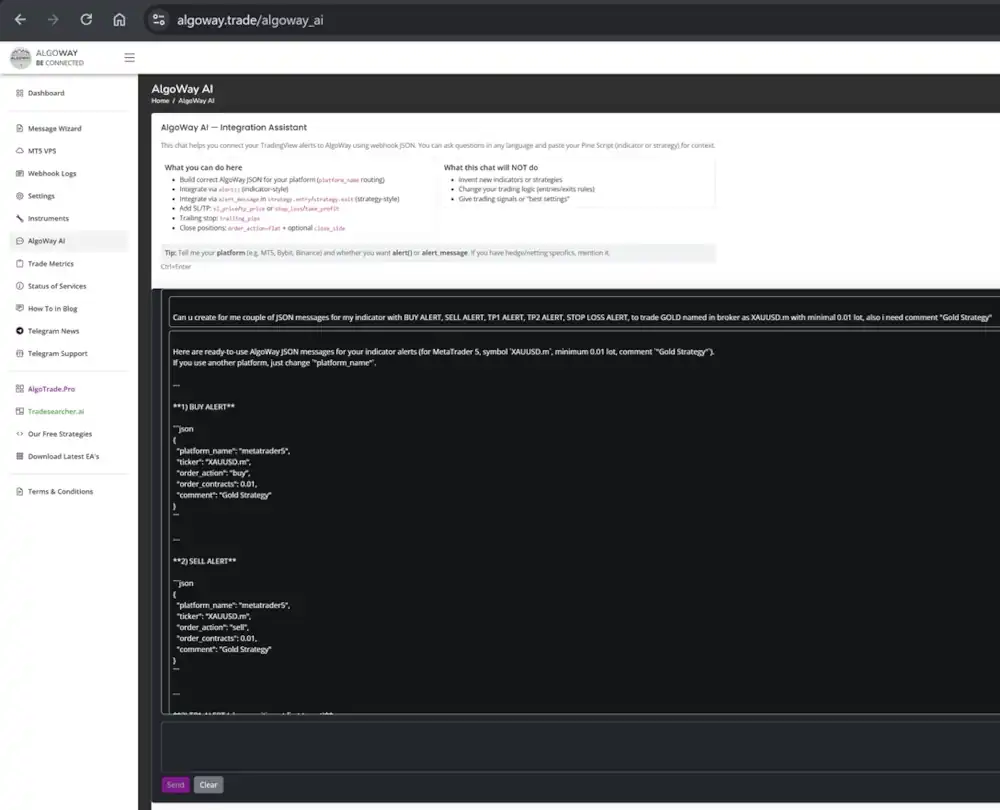
The screenshots below show the real workflow: create the route, choose the destination, prepare the message, configure the TradingView alert and verify execution.
Trigger a minimum-size test
Test the exact ticker, side and quantity on demo, paper or a controlled low-risk account. Do not add every advanced field before the basic entry and exit route works.
Read both sides of the result
Check TradingView alert history, AlgoWay webhook logs and the final platform order history. Each layer answers a different question about delivery and execution.
Then add protection and clones
After entry, close and reversal behavior are confirmed, add SL, TP, trailing, partial exits or Clone Mode one component at a time.
Test the failures, not only the successful entry
A reliable automation test proves what happens when data is wrong, an account is unavailable or the destination rejects an order. The logs should make every failure actionable.
| Test | What to confirm | Where to check |
|---|---|---|
| Valid entry | Correct symbol, direction and minimum size | AlgoWay logs and destination order history |
| Opposite signal | Hedge, reverse or opposite behavior matches the strategy | Current positions and route response |
| Flat or close | The intended position closes without opening an unwanted side | Destination positions and execution log |
| Invalid symbol | The route returns a clear instrument error | AlgoWay webhook error details |
| Invalid quantity | Minimum, maximum and step rejection are visible | Destination response in AlgoWay logs |
| Expired connection | The route reports authentication or authorization failure | Webhook log and platform connection status |
Continue with the exact route you use
This page shows the product and the complete execution model. The guides below contain platform-specific credentials, fields, screenshots and troubleshooting.
Choose your destination
Each route has its own setup guide with platform-specific fields, sizing rules and test steps.
TradingView automation FAQ
The practical limits are defined by the alert data, the AlgoWay route and the selected destination.
What is the best TradingView automation tool in 2026?
AlgoWay combines real TradingView webhook execution, a public MT5 demo, 20+ broker and exchange destinations, independent route settings, Clone Mode, advanced trade modes and full execution logs in one platform. The MT5 route costs $7 billed monthly or $72 upfront per year ($6/month equivalent).
Does TradingView place the broker order itself?
TradingView evaluates the chart condition and sends the alert. AlgoWay receives the alert and routes the supported instruction to the configured broker, exchange or MT5 environment.
Can I automate a TradingView indicator?
Yes, when the indicator exposes usable alert conditions. If it shows a visual value but does not include that value in an alert, AlgoWay cannot infer it from the chart image.
Can I use strategy placeholders?
Yes. TradingView can replace ticker, strategy position, contract quantity, close price and other supported placeholders when the alert fires.
Do I need a VPS?
Cloud API routes do not normally require your own VPS. A MetaTrader 5 EA route needs the MT5 terminal to stay online, so a VPS is useful for continuous operation.
Can one alert trade several accounts?
Yes. Clone Mode can distribute one received instruction from a main webhook to two additional configured webhooks, for up to three independent destinations.
Can each account use a different size?
Yes. Every route stores its own supported quantity logic, multiplier and platform settings. The same incoming signal can therefore be adapted to different account sizes.
What happens when one destination rejects the trade?
Each route is independent. A failure on one destination does not prove that another route failed. Read the response for every platform separately.
Can I send stop loss, take profit and trailing values?
Yes, where the selected route supports those fields. Use the exact field names and method required by that destination, then test the protection on a controlled account.
How do I know the order was executed?
Check TradingView alert history, the AlgoWay webhook result and the destination order history. A fired alert is not final proof of broker acceptance.
What is the safest way to start?
Create one route, send a minimum-size test, verify entry and close behavior, inspect the logs, and only then add advanced risk fields, larger size or clone destinations.
Start with the best TradingView automation tool in 2026
Run the public MT5 demo above or create a free AlgoWay account, connect your own supported route and verify the complete TradingView alert path for 14 days without a credit card.
